9
It is important to consider the fact that the machine will begin to cook when the light
button on the panel remain fixed. If it flashes more than three seconds and it happens
the same with the button ( ) means that the lid is not properly adjusted. ( )
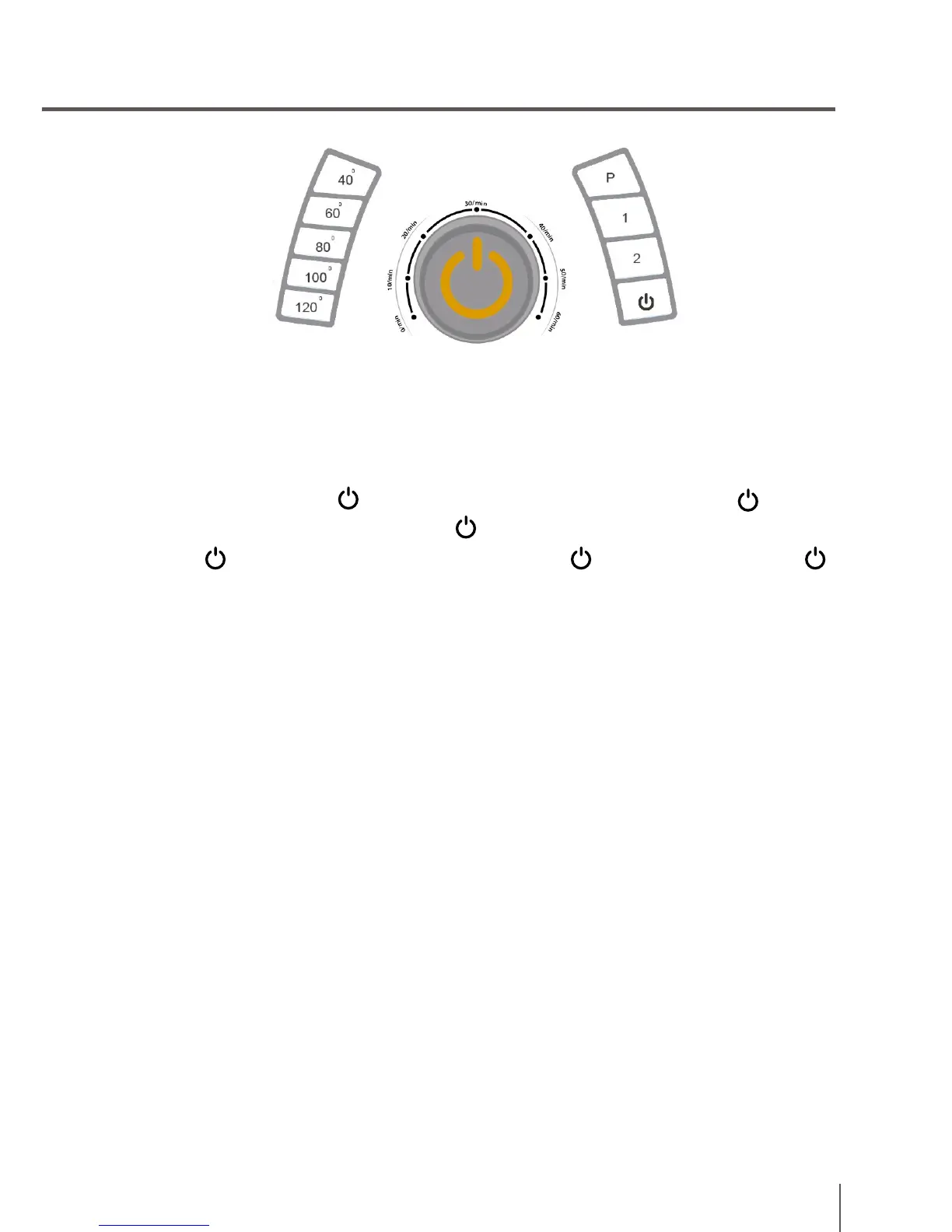
On top of the panel is the on/off button ( ) and speeds.
ON/OFF ( ): To begin, you must press the button ( ). Press again to stop it ( ).
Once the machine is on, select the combination of features you want. When the lights
remain fixed this mean that the program is working.
Pressing 1: Cooks at continuous speed.
Pressing 2: Cooks without interruption. Grind and stop.
Pressing Pulse (Turbo): Work at maximum speed. Only works if you hold down.
The robot can cook with or without temperature. If you want to cook with temperature,
you need to select it first. It is located on the bottom of the panel, between 40 and
120 ºC.
The switch time is the wheel located at the center of the panel. You need to select
the desired time. The time selection options are 0 to 30 minutes. If you do not select
anything, the cooking time will reach 60 minutes.
How to cook
Cooking with your new Cecomix Compact Plus Plus is very simple, it consists in
introducing the ingredients and use the robot according to the recipe book.
We will explain how to cook with your Cecomix Compact Plus robot.
All the ingredients should be introduced inside the jar.
Insert the jar with food in the main body of the Cecomix Compact Plus. Then install
the lid and turn in the opposite direction of the clockwise.


 To Next Page