ENGLISH
34
• Use the remote control to change the cleaning mode.
Note: before operating the robot, make sure the control panel’s outer ring is lit up steady red
or blue indicating it is turned ON.
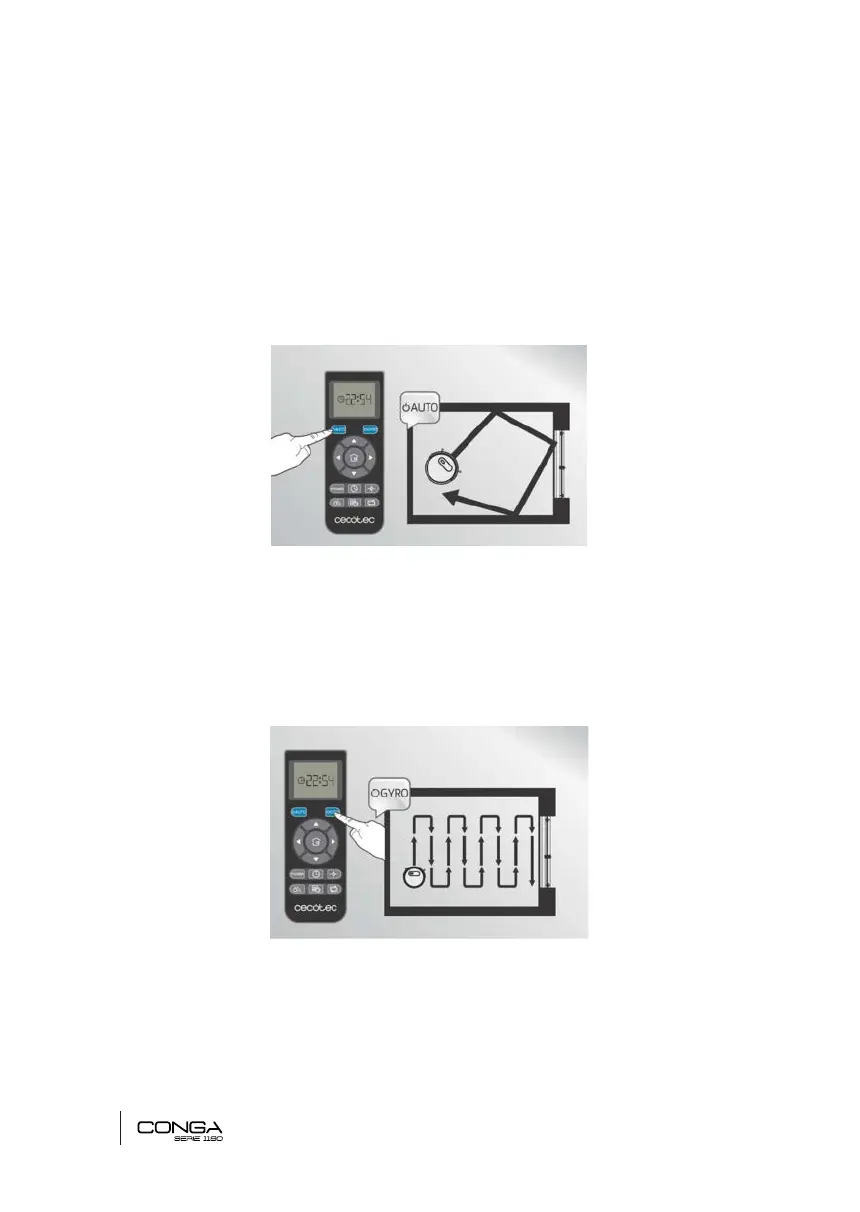
1) Auto/deep cleaning
Under this mode, the robot will clean the whole room randomly, then it will automatically
switch to edge mode (see Edge-mode section) and then will switch back to random cleaning in
order to ensure an efcient and complete cleaning.
2) Gyro
This is the most common cleaning mode. It includes map memorization and route planning.
Under this mode, the robot cleans 100 % of the room through smart navigation and the swit-
ches to edge mode, cleaning all edges. Once it has nished this cycle, it starts again and re-
peats the whole cycle, ensuring maximum and perfect cleaning by cleaning twice. It includes
smart back home, therefore it returns automatically to the charging base when it has nished.
3) Spot
Under this mode, the robot focuses on cleaning a specic area, moving in spiral movements
and resulting in a more intense cleaning.
05133_Conga 1190 Gyro_Manual_PE.indd 34 1/8/18 12:38











 To Next Page