ENGLISH
42
6. TROUBLESHOOTING
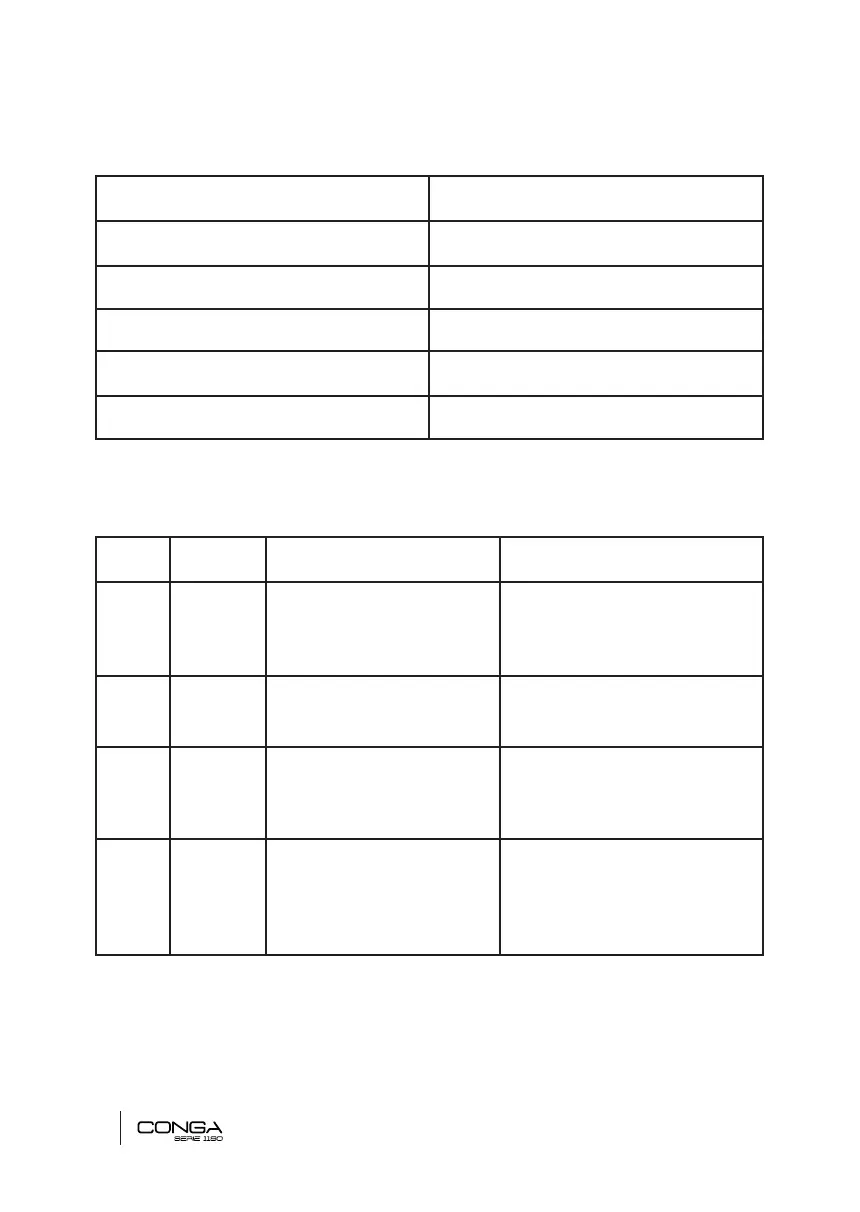
Robot status LED indicator
Charging Blue light blinking
Charging completed Steady blue light
Robot error Steady or blinking red light
Low battery Steady red light
Cleaning Steady blue light
The robot will notify through beeps and through the LED indicator its status and errors.
RED LIGHT BLINKING:
Error Beeps Error Solution
01 1 The robot’s wheels are off
the oor or are blocked
Change the robot to a new
position and restart it
02 2 Infrared bumper sensors
error
Check if the bumper is stuck and
clean it
03 3 Free-fall sensors error Check if the free-fall sensors
are dirty and clean them
04 4 Other errors The robot’s battery is too
low. Take it manually to the
charging base.
05133_Conga 1190 Gyro_Manual_PE.indd 42 1/8/18 12:38













 To Next Page