Assembling Your CM-1100 • 15
Once set up, you need to point your telescope at various portions of the sky to
observe different objects. To make rough adjustments, loosen the R.A. and
DEC clutch knobs slightly and move the telescope in the desired direction.
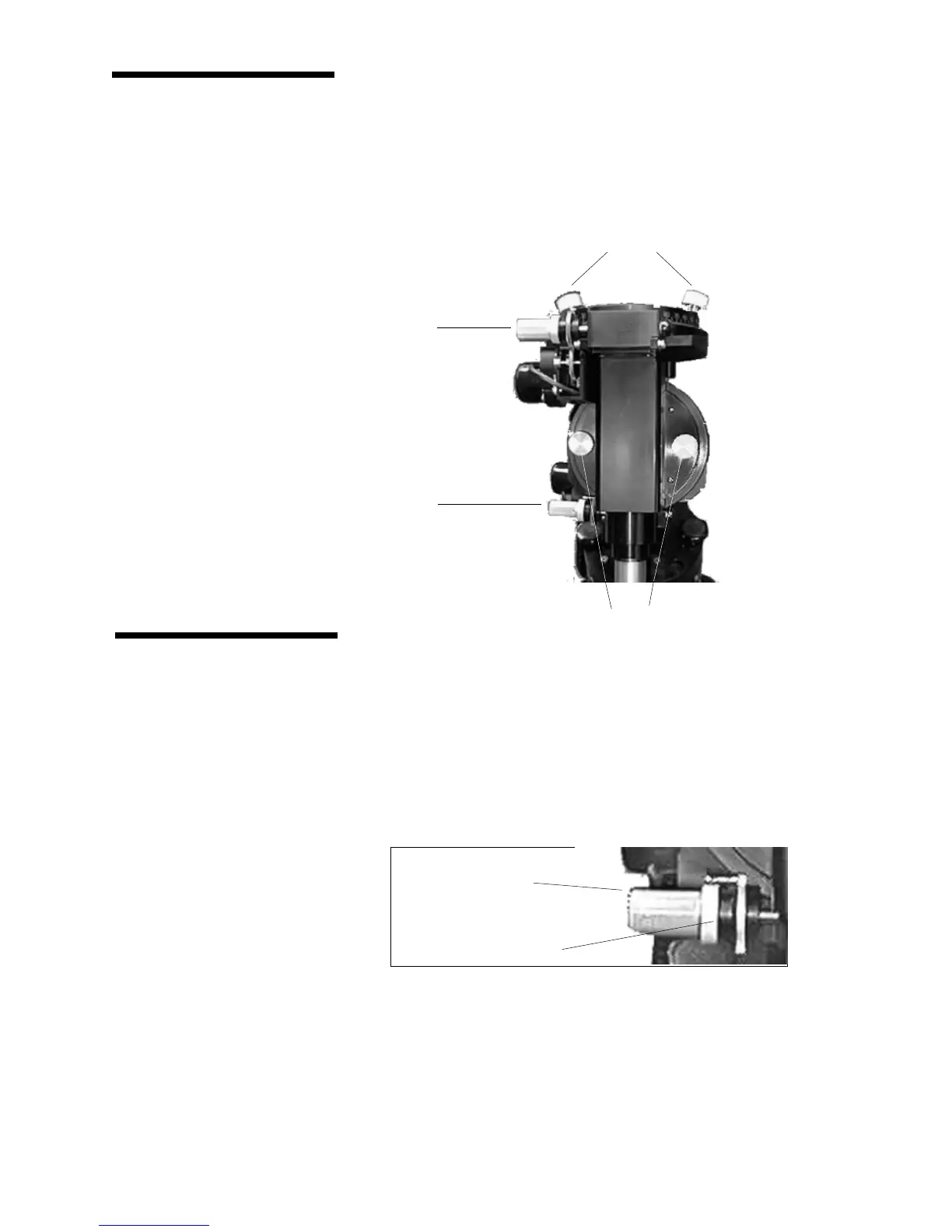
Both the R.A. and DEC axis have two knobs to clutch down each axis of the
telescope. To loosen the clutches on the telescope, rotate the clutch knobs
(see figure below) counterclockwise. Once your have found your desired object
in the finderscope, rotate the clutch knobs on each axis clockwise to lock the
telescope in place.
Moving the TelescopeMoving the Telescope
Moving the TelescopeMoving the Telescope
Moving the Telescope
in R.A. and DECin R.A. and DEC
in R.A. and DECin R.A. and DEC
in R.A. and DEC
Using the Slow MotionUsing the Slow Motion
Using the Slow MotionUsing the Slow Motion
Using the Slow Motion
ControlsControls
ControlsControls
Controls
The CI 700 mount is equipped with slow motion controls on both the R.A. and
Declination axis. Each slow motion control has a clutch mechanism that
allows you to override the tracking motor and adjust the amount of tension
when turning the knob. To adjust the clutch mechanism, hold the slow motion
knob with one hand, and rotate the clutch wheel with your other hand. Rotate
the clutch wheel clockwise (downward) to increase the tension on the slow
motion control and counterclockwise (upward) to decrease the tension.
DEC Clutch Knobs
R.A. Clutch Knobs
DEC Slow Motion Control
R.A. Slow Motion Control
Slow Motion Knob
Clutch Wheel
Figure 2-12
Figure 2-13






 To Next Page