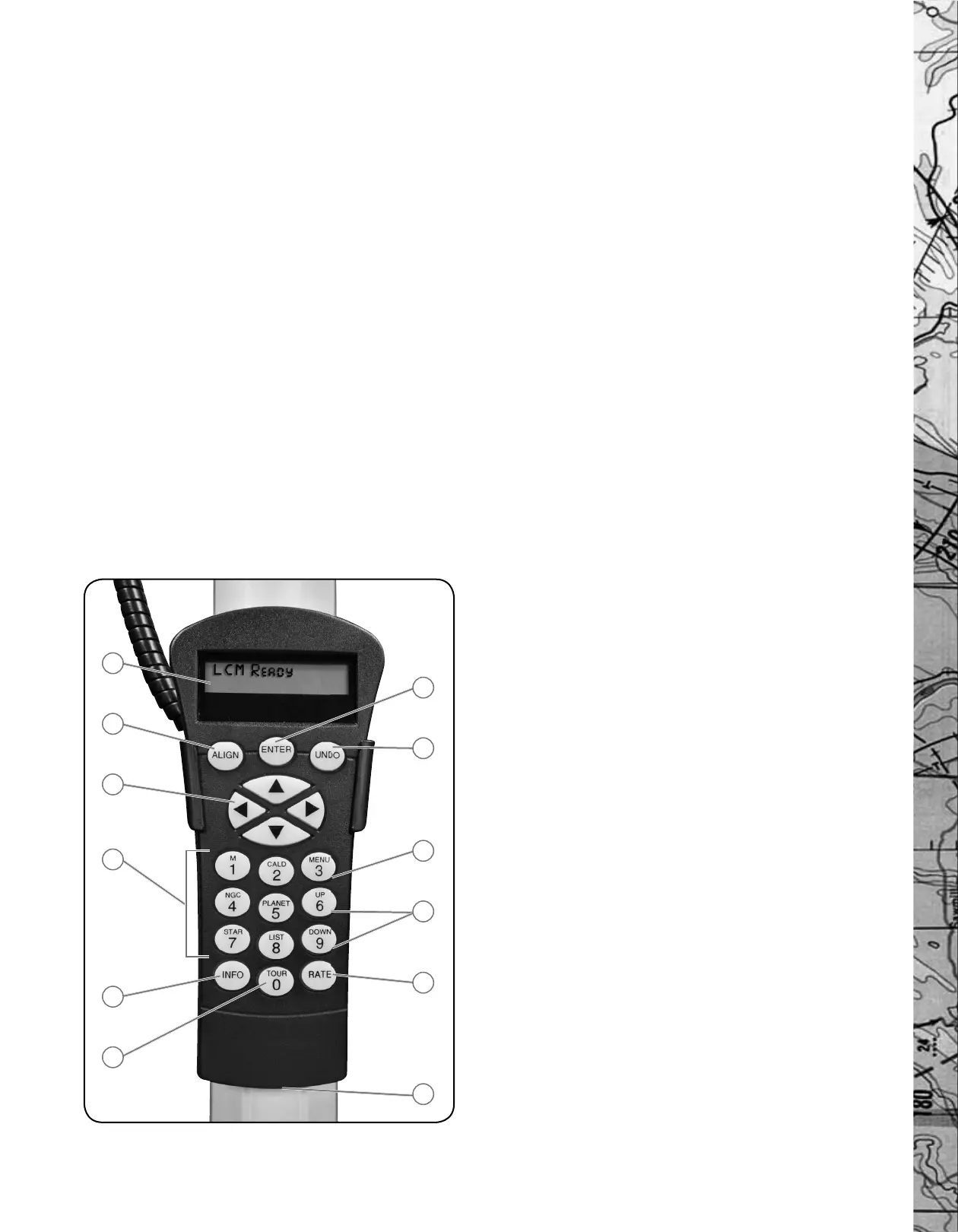
3. Direction Keys: Allows complete control of the telescope in any
direction. Use the direction keys to center objects in the StarPointer
fi nderscope and eyepiece.
4. Catalog Keys: The hand control has a key on the hand control to
allow direct access to each of the catalogs in its 4,000+ object database.
The hand control contains the following catalogs in its database:
Messier – Complete list of all Messier objects.
NGC – Many of the brightest deep sky objects from the Revised
New General Catalog.
Caldwell – A combination of the best NGC and IC objects.
Planets - All 8 planets in our Solar System plus the Moon and Sun.
Stars – A compiled list of the brightest stars from the SAO catalog.
List – For quick access, all of the best and most popular objects
in the database have been broken down into lists based on their
type and/or common name:
Named Stars Common name listing of the brightest
stars in the sky.
Named Objects Alphabetical listing of over 50 of the most
popular deep sky objects.
Double Stars Alphabetical listing of the most visually
stunning double, triple and quadruple stars
in the sky.
Variable Stars Select list of the brightest variable stars with
the shortest period of changing magnitude.
Asterisms A unique list of some of the most
recognizable star patterns in the sky.
5. Info: Displays coordinates and useful information about objects
selected from the database.
6.
Tour: Activates the tour mode, which seeks out all the best objects for
a given month and automatically slews the telescope to those objects.
7. Enter: Pressing Enter allows you to select any of the SkyExpedition
functions, accept entered parameters and slew the telescope to
displayed objects.
8. Undo: Undo will take you out of the current menu and display the
previous level of the menu path. Press Undo repeatedly to get back to a
main menu or use it to erase data entered by mistake.
9. Menu: Displays the many setup and utilities functions such as
tracking rate and user defi ned objects and many others.
10. Scroll Keys: Used to scroll up and down within any of the menu lists.
A double arrow symbol on the right side of the LCD indicates that the
scroll keys can be used to view additional information.
11. Rate: Instantly changes the rate of speed of the motors when the
direction buttons are pressed.
12. RS-232 Jack: Allows use with a computer and software programs
for point and click slewing capability.
HAND CONTROL OPERATION
This section describes the basic hand control procedures needed to operate
the SkyExpedition. These procedures are grouped into three categories:
Alignment, Setup and Utilities. The alignment section deals with the initial
telescope alignment as well as fi nding objects in the sky; the setup section
discusses changing parameters such as tracking mode and tracking rate;
fi nally, the last section reviews all of the utility functions such as adjusting
the telescopes slew limits and backlash compensation.
Alignment Procedure
In order for the SkyExpedition to accurately point to objects in the sky,
it must fi rst be aligned to known positions (stars) in the sky. With this
information, the telescope can create a model of the sky, which it uses to
locate any object with known coordinates. There are many ways to align
the SkyExpedition with the sky depending on what information the user is
able to provide: SkyAlign uses your current date, time and city to create
an accurate model of the sky. Then the user can simply point the telescope
to any three bright celestial objects to accurately align the telescope with
the sky. Auto Two-Star Align will ask the user to choose and center the
fi rst alignment star, then the SkyExpedition will automatically select and
slew to a second star for alignment. Two-Star Alignment requires the
user to identify and manually slew the telescope to the two alignment stars.
One-Star Align is the same as Two-Star Align however only requires you
to align to one known star. Although not as accurate as the other alignment
methods, One-Star Align is the quickest way to fi nd and track bright
planets and objects in Altazimuth mode. Finally, Solar System Align
will display a list of visible daytime objects (planets and the moon) available
to align the telescope. Each alignment method is discussed in detail below.
“Altazimuth” or “Alt-Az” refers to a type of mounting that allows a
telescope to move in both altitude (up and down) and azimuth (left
and right) with respect to the ground. This is the simplest form of
mounting in which the telescope is attached directly to a tripod.
Sky Align
Sky Align is the easiest way to get your telescope aligned and ready to
observe. Even if you do not know a single star in the sky, the SkyExpedition
will have you aligned in minutes by asking for basic information like the
date, time and location. Then you simply need to aim the telescope to
any three bright celestial objects in the sky. Since Sky Align requires no
knowledge of the night sky, it is not necessary to know the name of the
stars at which you are aiming. You may even select a planet or the Moon.
The SkyExpedition is then ready to start fi nding and tracking any of the
objects in its 4,000+ object database. Before the telescope is ready to be
aligned, it should be set up in an outside location with all accessories
(eyepiece, diagonal and fi nderscope) attached and lens cover removed as
described in the Assembly section of the manual. To begin Sky Align:
FIGURE 3-1
THE
SkyExpEdition HAND CONTROL
1
2
3
4
6
5
11
10
9
8
7
12
6







 To Next Page