ASSEMBLY
The SkyExpedition comes partially assembled and can be
operational in a matter of minutes. The SkyExpedition is
conveniently packaged in one reusable shipping carton that
contains the following accessories:
• 25 mm and 9 mm Eyepieces
• Erect Image Diagonal
• StarPointer Finderscope
• Accessory Tray
• The SkyX Student Edition Astronomy Software
• SkyExpedition Hand Control with 4,000 Object Database
ASSEMBLING THE TELESCOPE
Your SkyExpedition comes in three major sections: the optical
tube, the motorized mount and the tripod. These sections can
be attached in seconds using the quick release coupling screw
located under the tripod mounting platform and the dovetail
mounting clamp located on the outside of the motorized base.
To begin, remove all of the accessories from their individual
boxes. Remember to save all of the containers so that they can
be used to transport the telescope. Before attaching the visual
accessories, the telescope tube and mount should be attached to
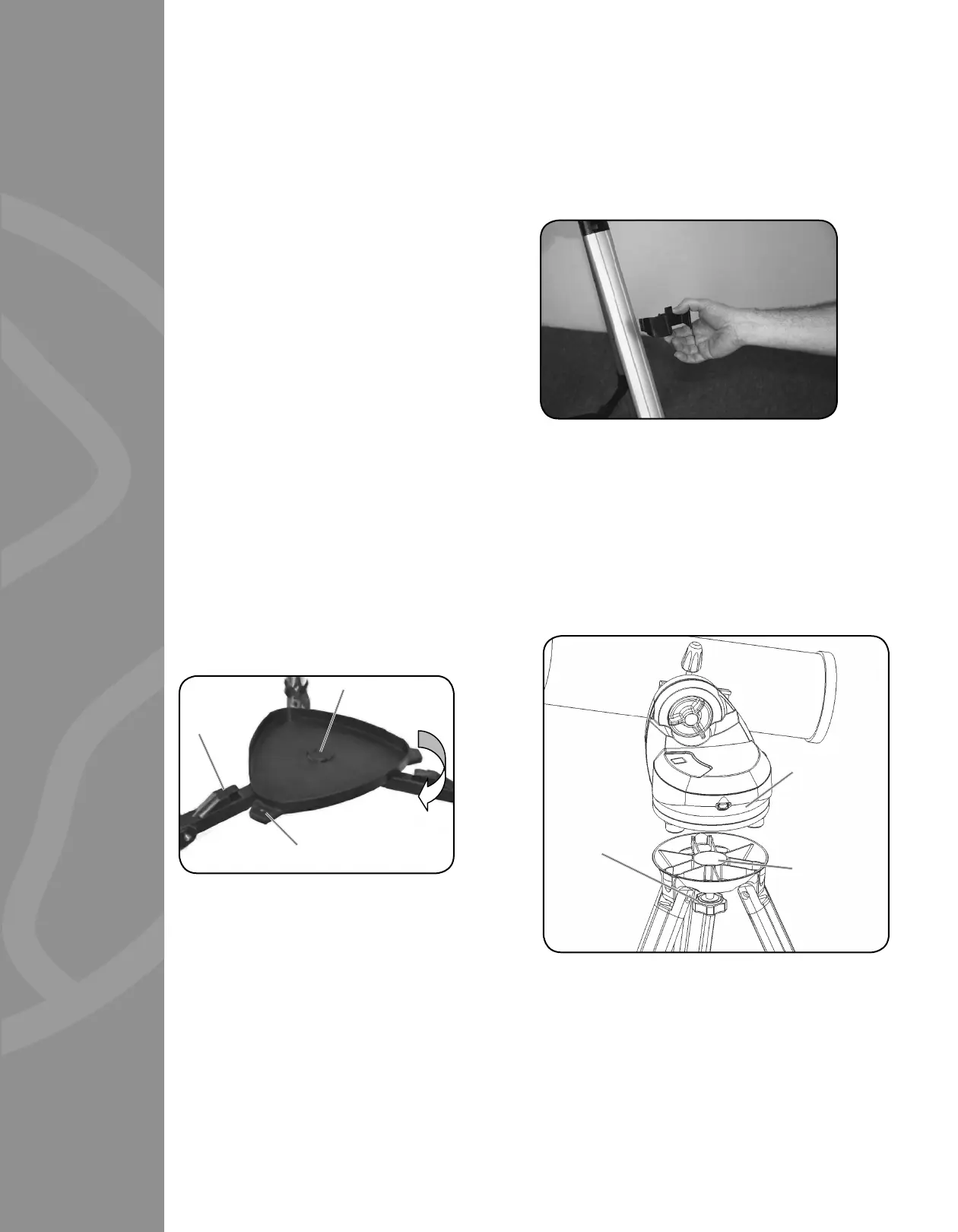
the tripod. First, install the accessory tray onto the tripod legs:
1. Remove the tripod from the box and spread the legs apart
until the center leg brace is fully extended.
2. Locate the accessory tray, and place it on top of the tripod
center support brace in between the tripod legs
(see fi gure 2-1).
3. Rotate the accessory tray so that the central hole in the
tray slides over the fl ange post in the center of the
support bracket.
4. Finally, rotate the tray so that the locking tabs slide under the
locking clips on center leg brace. You will feel the tray snap
into place.
It is a good idea to level the tripod by adjusting the height of the
tripod legs before attaching the motorized base and tube. Minor
adjustments can be made later. To adjust the height of the
tripod legs:
1. Lift the tripod leg locking lever located on the side of
each leg.
2. Slide the inner portion of each leg down 6” to 8” inches.
3. Adjust the tripod height until the base is visually level and
press down the locking levers to secure into place.
Attaching the Hand Control Holder
The SkyExpedition comes with a snap-on hand control holder that
conveniently attaches to any of the tripod legs. To attach the hand
control holder simply position the holder with the square plastic
tab facing up and push against the tripod leg until it snaps in
to place.
Attaching the Motorized Base to the Tripod
With the tripod properly assembled, the motorized base can
easily be attached using the quick release coupling screw located
underneath the tripod mounting platform:
1. Place the motorized base on top of the tripod making sure
that the three round feet rest on the round fl at pads on the
inside of the tripod head.
2. Thread the coupling screw into the hole at the bottom of the
motorized base and hand tighten.
FIGURE 2-1
Flange Post
Locking Tabs
Locking
Clips
FIGURE 2-4
Motorized
Base
Tripod
Mounting
Platform
Coupling
Screw
FIGURE 2-3
3







 To Next Page