ENGLISH I 3
PHOTOGRAPHY
35MM SLR AND DSLR CAMERAS
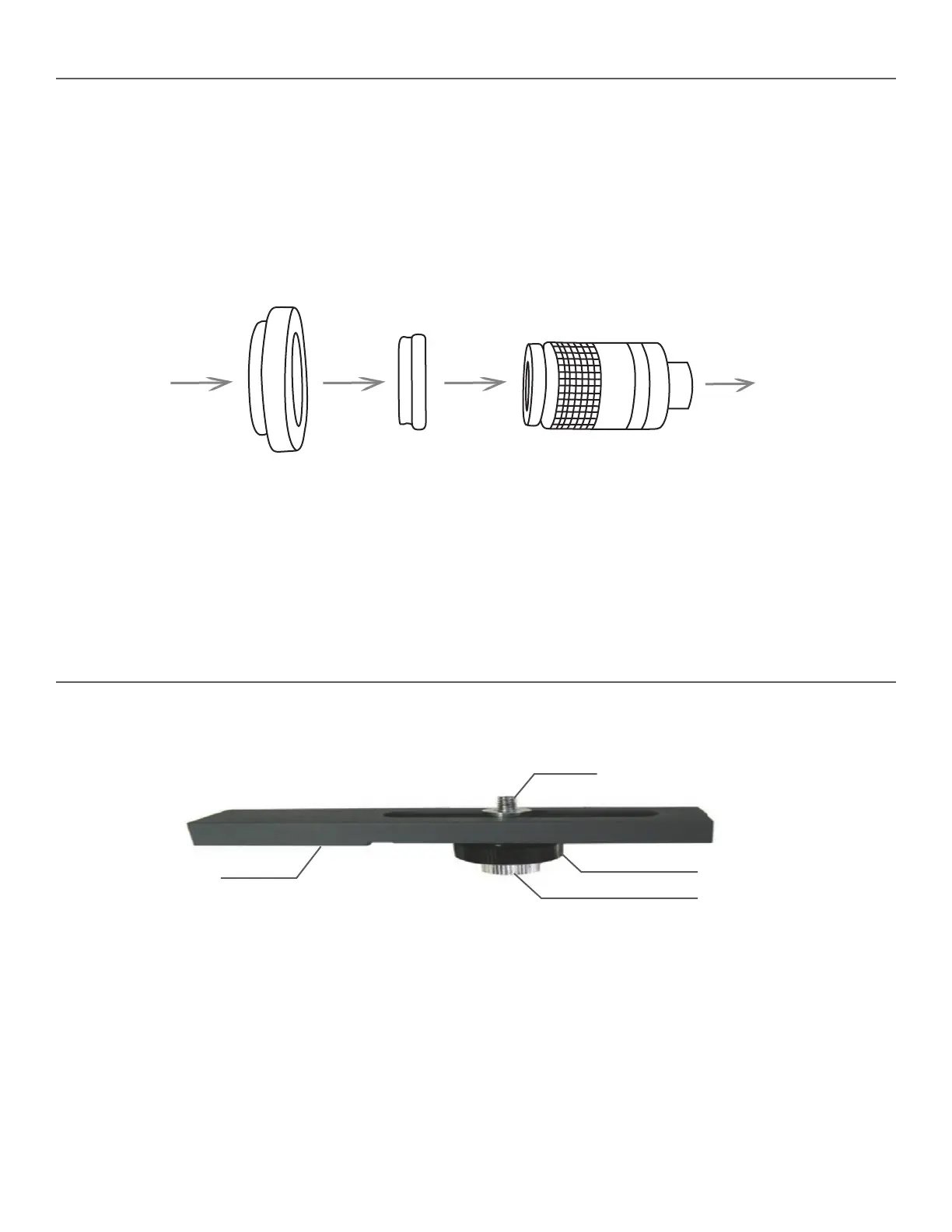
To use your spotting scope as a telephoto lens, remove the rubber eyecup from the top of the eyepiece. You will shoot through
the spotting scope with the eyepiece attached. Thread an optional T-Ring for your make and model of 35mm or DSLR camera
onto the T-threads located at the top of the eyepiece. For Ultima 65 models, thread the T-ring adapter (included with your model)
onto the eyepiece threads, then thread a T-Ring onto the eyepiece. Attach your 35mm camera body to the T-Ring. Ultima spotting
scopes have fixed apertures and, as a result, fixed f/ratios. To properly expose your subjects photographically, you need to set
your shutter speed accordingly. Most SLR cameras offer through-the-lens metering which lets you know if your picture is under
or overexposed. Adjustments for proper exposures are made by changing the shutter speed. Consult your camera manual for
specific information on metering and changing shutter speeds.
HINT: Most photos will be the sharpest and brightest when using the lowest power on the zoom eyepiece.
35mm Camera body
T-Ring
(Optional Item)
T-Ring adapter
(for Ultima 65 only)
Eyepiece with rubber eyecup removed
Spotting Scope
DIGITAL CAMERAS
Since digital cameras (not digital SLR cameras) do not use the T-system to mount cameras to lenses, spotting scopes, telescopes,
etc. you need a different way to be able to use them to take photos. Celestron offers a Universal Digital Camera Adapter (Model
# 93626), which makes it easy to attach a digital camera to your Ultima spotting scope.
This is used with Ultima 100 models to properly balance your spotting scope on top of a photo/video tripod.
To use the tripod balancing platform:
Mount the platform to the top of your photo tripod using the ¼”-20 threaded hole on the bottom side of the platform. Attach your
spotting scope to the platform using the ¼”-20 mounting screw located on the top side of the platform. Thread the mounting
screw in as far as it will go. Slide the attached spotting scope along the slotted cutout until your spotting scope is balanced on
the tripod. Tighten the locking ring to hold the spotting scope in place.
¼”-20 Mounting Screw
¼”-20 Threaded Hole
(not shown)
Mounting Screw
Locking Ring
TRIPOD BALANCING PLATFORM (FOR ULTIMA 100 MODELS)TRIPOD BALANCING PLATFORM (FOR ULTIMA 100 MODELS)











 To Next Page