13
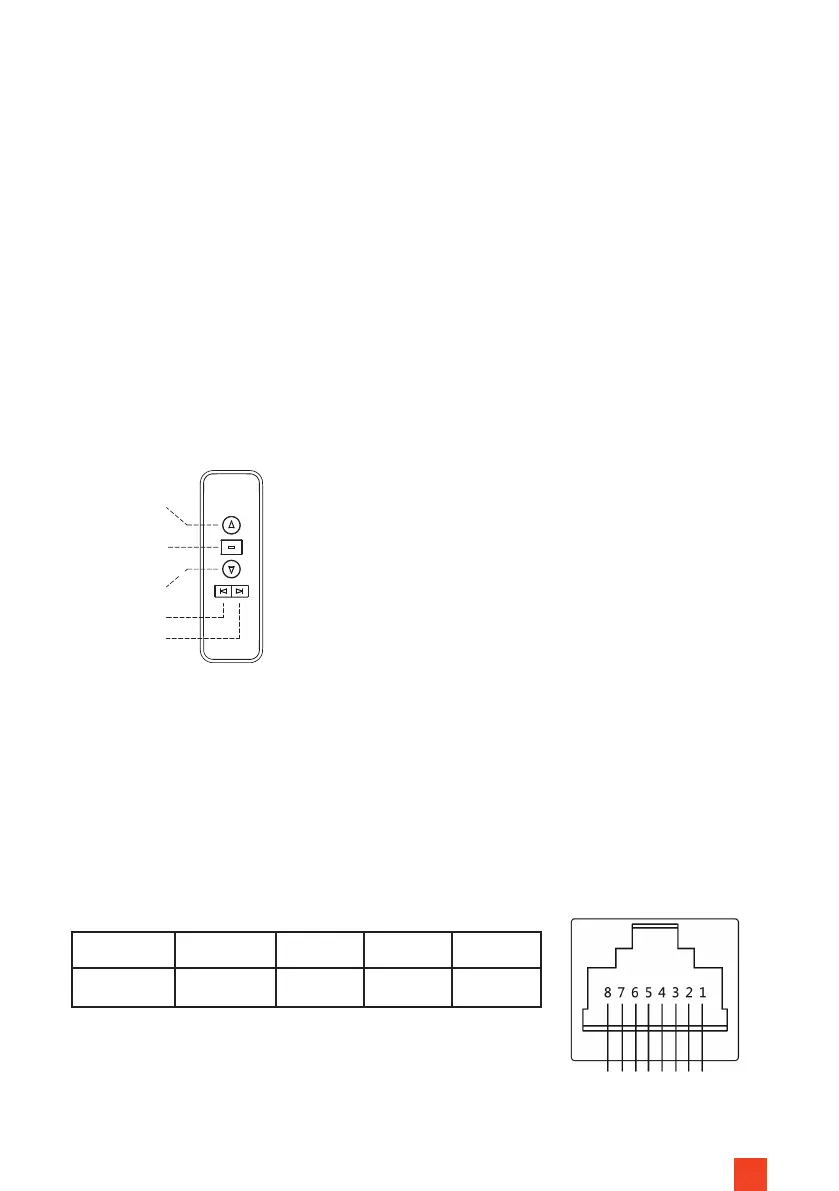
Up
Stop
Down
Up (Fine)
Down
(Fine)
Radio remote control
CODE PAIRING/DELETING OF THE RADIO REMOTE CONTROL
The radio remote control code has already been successfully paired at the
factory. (Note: The infrared remote control generally does not need to be
paired).
If pairing has been lost, to re-pair, disconnect the screen from the power sup-
ply for 10 seconds and then reconnect it to the mains again. Within the next 10
seconds, press the Up and Stop buttons on the wireless remote control simul-
taneously. If the process was successful, the motor moves forwards briey and
then back again. The code synchronisation is now complete. The cancelling
process is carried out in the same process as code synchronisation. One status
replaces the other with same procedure.
Fig. 8
Line 4 5 7 8
Function Common Up Stop Down
UTILISATION OF THE POTENTIAL-FREE CONTROL
The potential-free control is realised via the RJ45 connection with the lines 4,
5, 7 and 8. The assignment of the connection is shown in Figure 9.
The respective function of lines 5, 7 or 8 is triggered by pulse bridging with
line 4.
5
A
3
B
Down
Stop
Up
Common
Fig. 9


 To Next Page