10
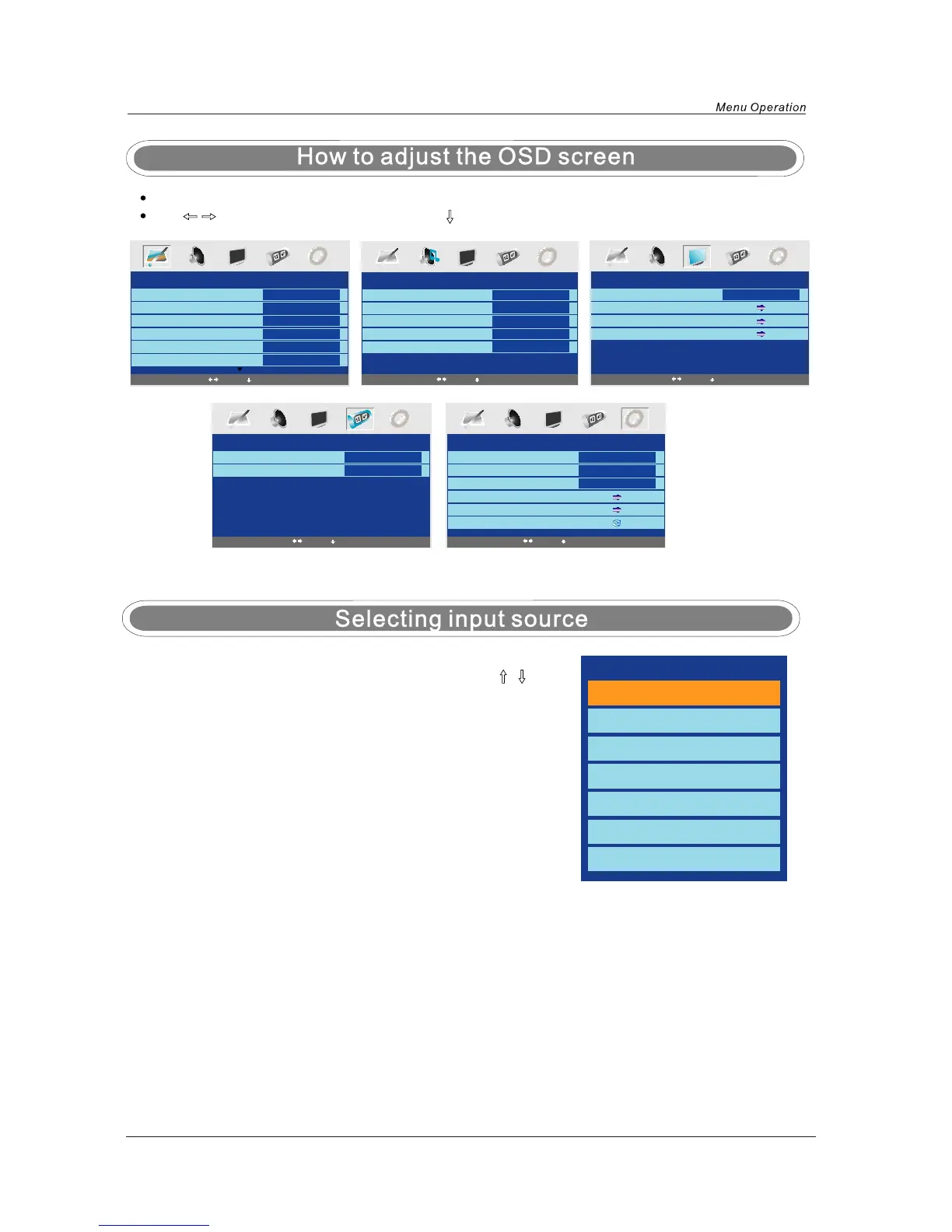
Press the MENU button to display the main menu.
Use
/ buttons to select menu, and press button to enter the menu.
PICTURE
Picture Mode
Contrast
Brightness
Color
Tint
Sharpness
Personal
50
50
50
0
Normal
Select
Enter
TIMER
Sleep Timer
OSD Timer
0 Min
30Sec
SOUND
Volume
Sound Mode
Bass
Treble
Balance
20
Music
60
52
50
SETUP
Country
Auto tuning
Manual tuning
Program Edit
UK
FUNCTION
Language
Video Size
Blue Screen
Child Lock
First Time Installation
Reset
English
Auto
On
You can dispaly the input source menu by pressing the FUNCTION
button on the remote control or on the the TV set, press
/ button
to select, and press OK button to confirm.
Select
Enter
Select
Enter
Select
Enter
Select
Enter
TV
SCART
CVBS
S-VIDEO
VGA
HDMI
DVD


 To Next Page