13
8. BLUETOOTH
®
INTERCOM
8.1 Intercom pairing
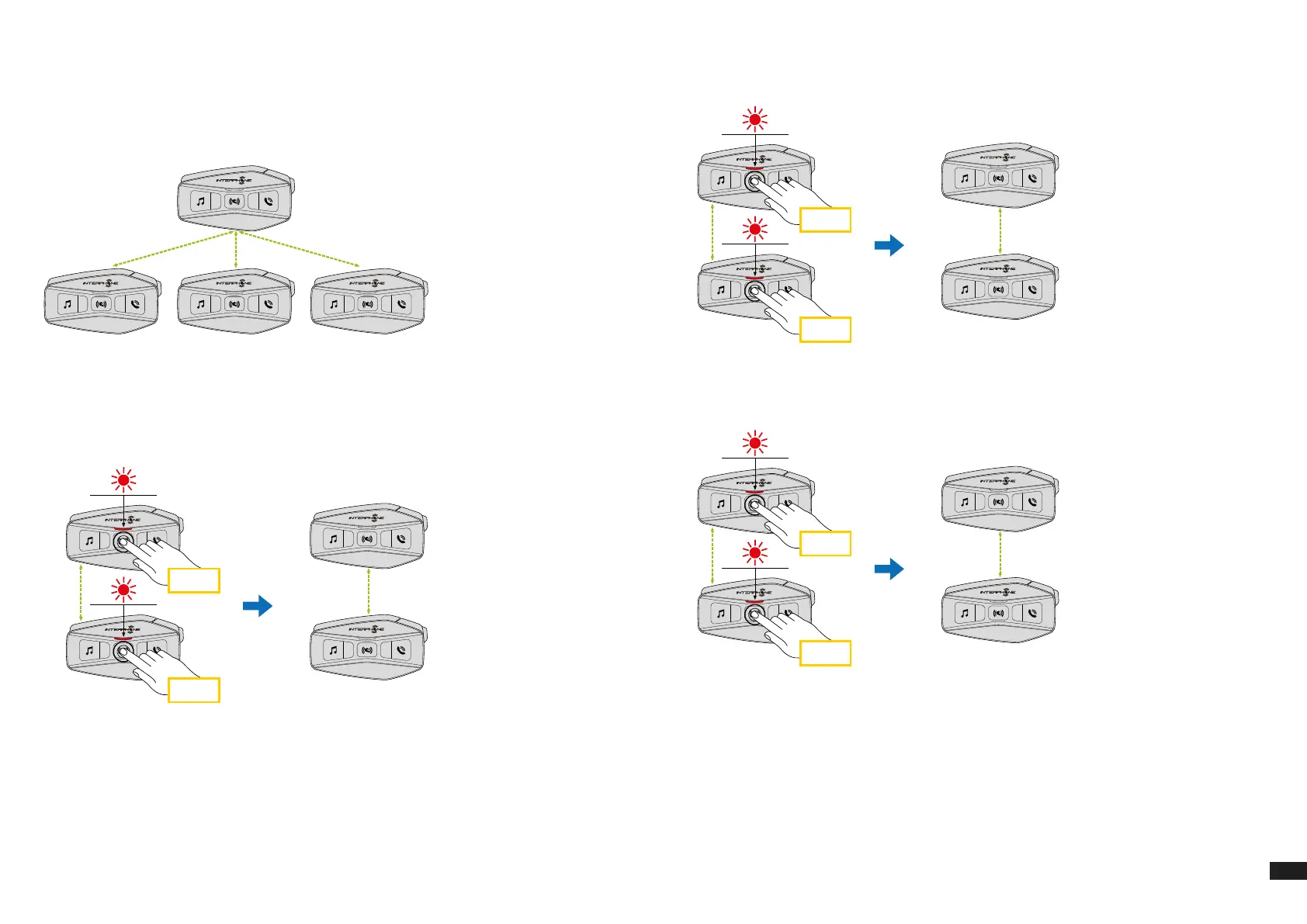
U-COM 16 can be paired with up to 3 other UCOM units (or Sena units), as
shown in the following picture.
A
B C D
The pairing is only necessary the rst time, then the control units will
automatically recognize each other.
1. Press and hold the center button (intercom) on boht units A and B for 5
seconds, until you hear the voice prompt “intercom pairing”. The light
ashing red indicates the device is now visible.
5 sec
5 sec
A
B
After few seconds the units will be paired and they will start the intercom
communication. The light on both units will ash blue twice.
2. Repeat the previous step again, pressing the center button (intercom)
on the two units A and C for 5 seconds until you hear the voice prompt
“Intercom pairing”.
5 sec
5 sec
A
C
3. Repeat the procedure again, pressing the centre button (intercom) of
the two units A and D for 5 seconds until you hear the voice prompt
“Intercom pairing”.
5 sec
5 sec
A
D


 To Next Page