emerald Quick Installation Guide
33
6.2.1 System Information menu
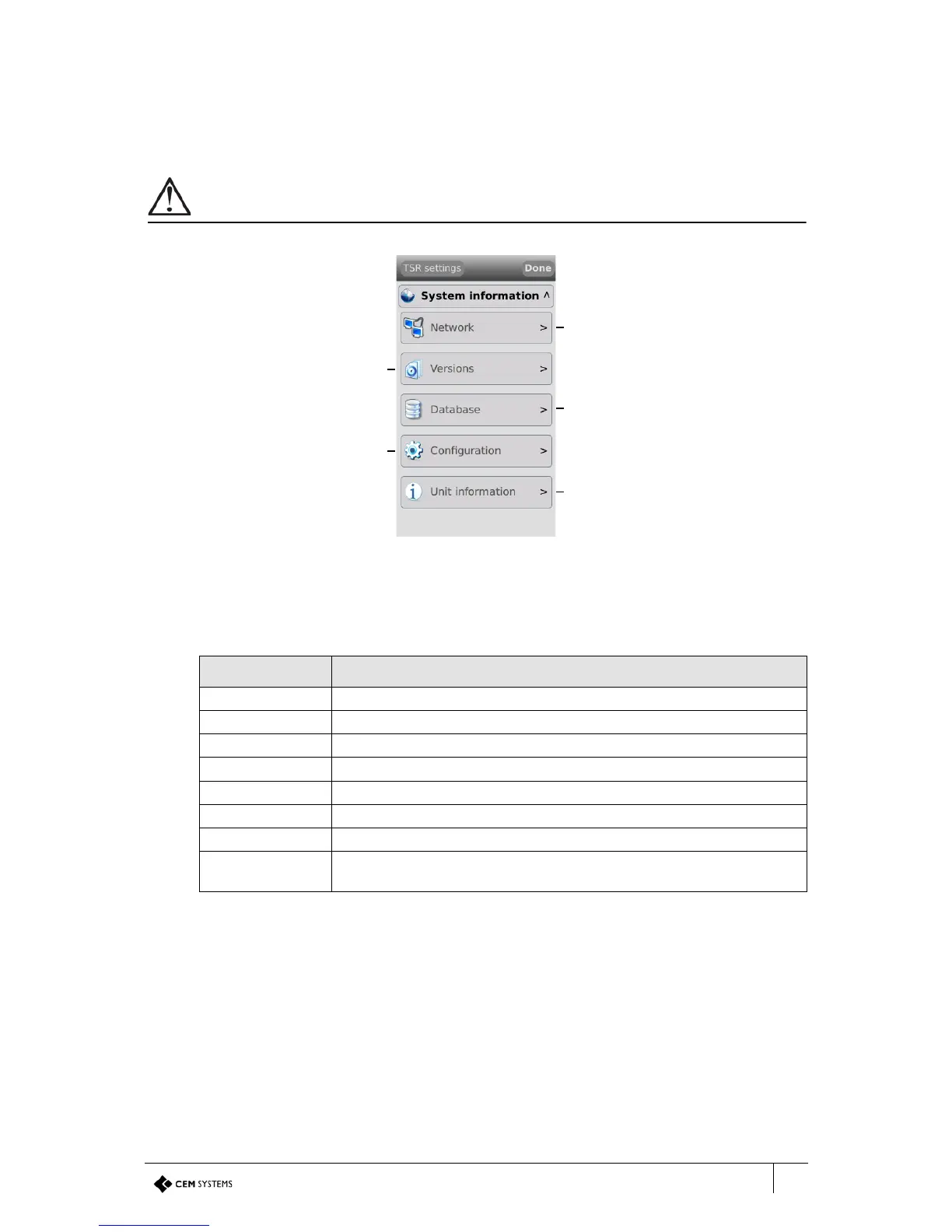
This menu provides access to five sub-menus which display useful device data about the
network, firmware, database, configuration and unit information.
When contacting CEM support with any issues, this information may be asked for.
Figure 26 The System information menu
Network
The Network information section details all of the terminal network settings.
View terminal network
information
View firmware, software and
UI versions
View information about the
onboard cardholder database
View information about the
terminal device configuration
View the status of terminal
connections, including
comms and tamper
Info Description
CEM address The CEM reader address of the terminal.
IP address The IP address of the terminal.
Subnet mask The subnet mask of the network hosting the terminal.
Default gateway The IP address of the gateway server.
MAC address The MAC address of the terminal.
RTC address The IP address of the RTC controlling the terminal.
VOIP server The IP address of the VOIP server for intercom functionality.
VOIP help station Intercom station number. This number is used to allow an intercom
workstation to communicate with the terminal.
Table 15: Terminal network information descriptions



 To Next Page