10
Use and maintenance manual Rev. 12-2010
ENGLISH
6. Use of the wheel balancer
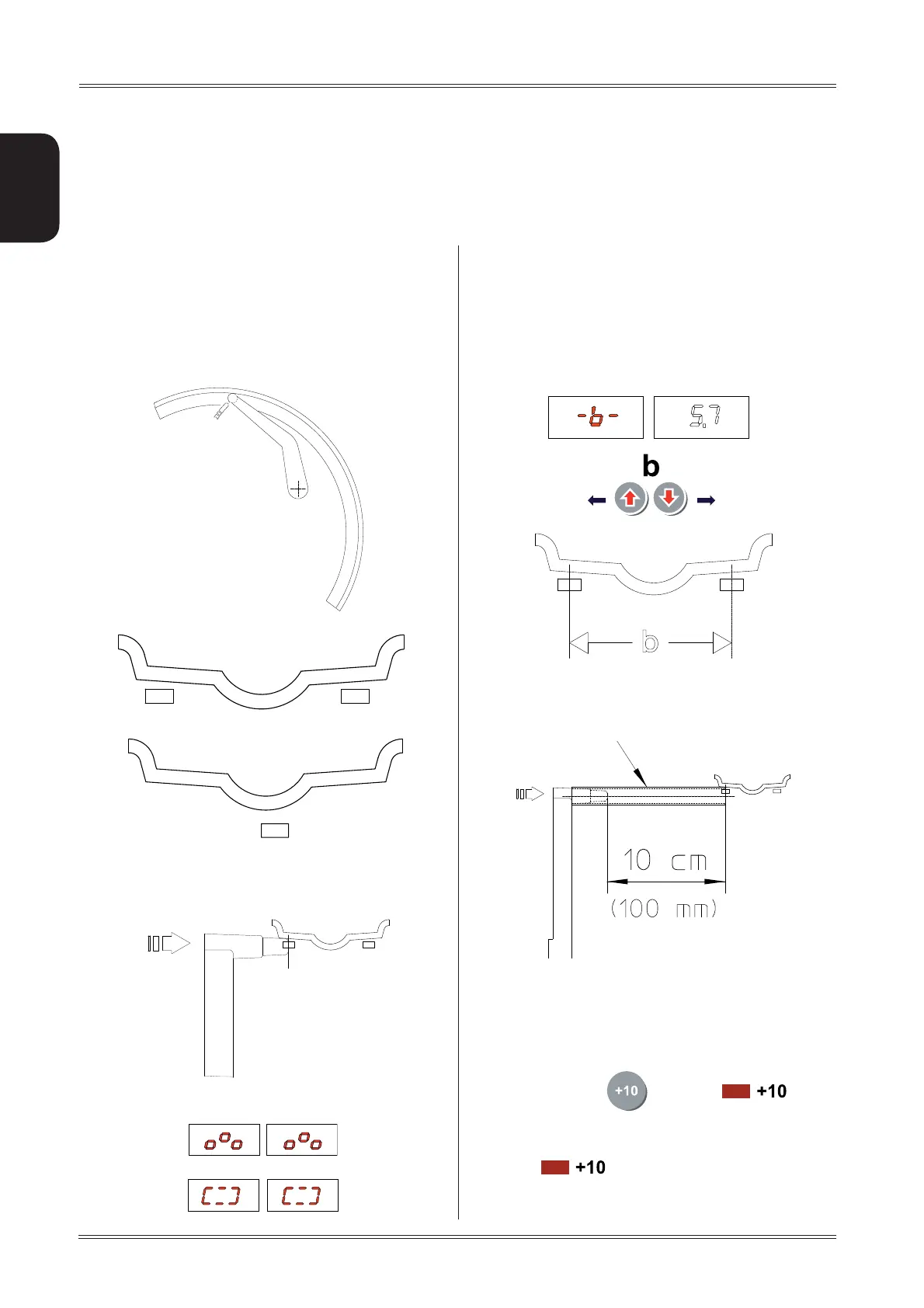
Return the gauge to rest position. The machine has b.
automatically detected DISTANCE + DIAMETER and
goes to
MANUAL WIDTH SETTING.
Setc. accurately the distance ‘b’ between the barycentres
of the weights where they will be applied
6.1.1 Using the extension for the distance
gauge
The extension increases the distance measuring range of
the gauge by 10 cm.
Proceed as indicated below:
Fit the extension into place on the distance gauge. ▪
Press the button ▪
(the LED comes
on)
Proceed with the distance measurement as already ▪
described.
The led ▪
goes off
Proceed with manually setting the width. ▪
6.1 DIMENSIONS SETTING
WHEEL
The balancing data is set by means of an “intelligent”
au-tomatic gauge; confi rmation of the measurement
and the position appear on the display. The round part
of the gauge must rest on the rim where the weight will
be positioned.
Extract the gauge up to the barycentre of the inside a.
correction weight. Use the relative gauge on the ma-
chine to measure this.
While the gauge is moving the following appears:when the
measurement has been stored:
Indication of dimensions acquired:
Use of the wheel balancer
Extension + 10


 To Next Page