33
ENGLISH
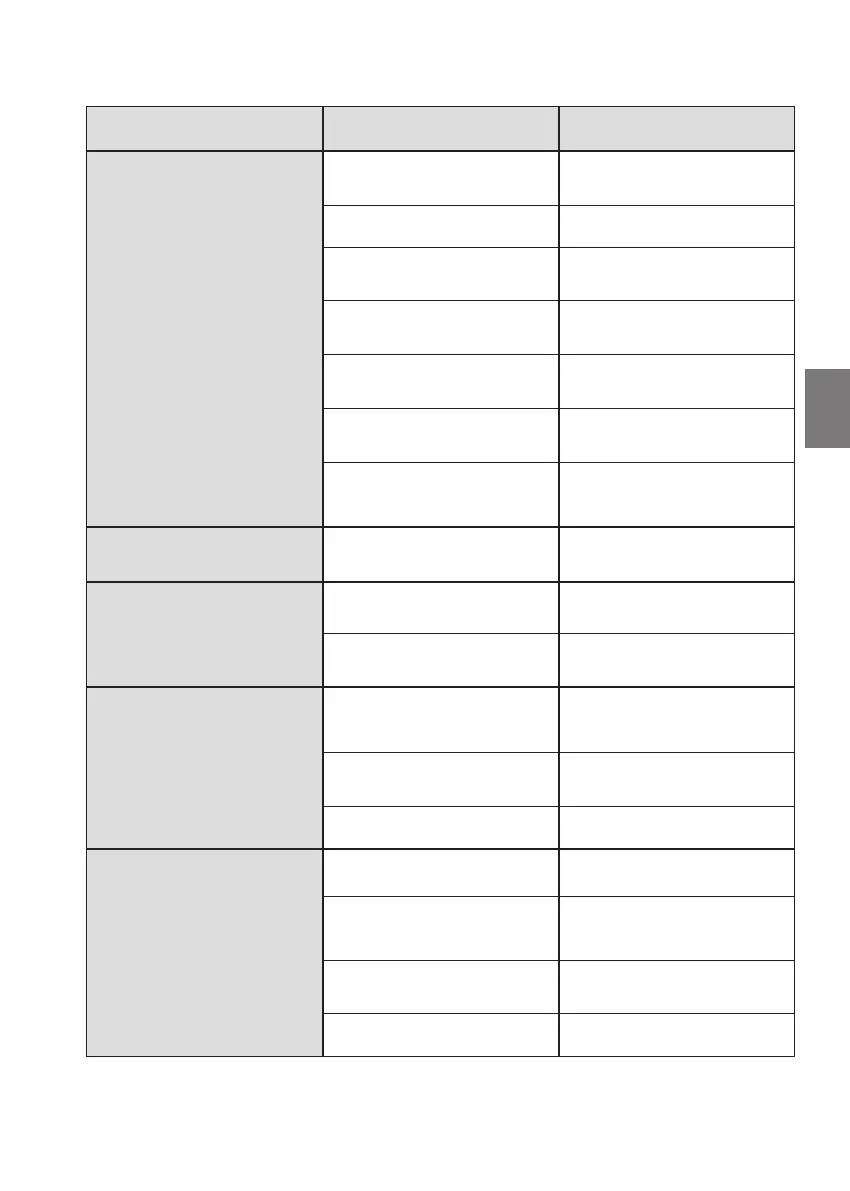
5. Troubleshooting
Fault Possible causes Solution
The brake does not release Air gap too big (wear) Check the air gap. Replace the
brake disc if necessary
No power to the brake Check electrical connection
Low power supply voltage for the
brake
Check power supply voltage
Brake disc stuck mechanically Remove mechanical blockage
Rectifier damaged (when fitted) Check rectifier and change if nec-
essary
Electro-magnet defective Check electro-magnet and change
if necessary
Brake overheated (if heat sensors
are fitted)
Cool brake, check braking torque,
and replace any worn parts (disc)
The brake has a delayed action Power supply voltage high Check power supply voltage
The brake releases after a delay Air gap too big (wear) Check air gap. Replace the brake
disc if necessary
Low power supply voltage for the
brake
Check power supply voltage
The brake does not stop
the motor
Residual activation voltage too
high (when a rectifier is fitted)
Check residual voltage
Brake disc stuck mechanically Remove mechanical blockage
Braking torque too low See below
Braking torque too low Springs incorrectly tensioned Adjust the springs according to
table 4A or point 4.6
Air gap too big Check the air gap against table
4B or point 4.7. Replace the brake
disc if necessary
Oil or grease on the brake disc
surface
Clean dirty parts
Springs broken Replace the springs or the brake


 To Next Page