helix
lock
2
3
4
helix
lock
5
long press
short press
Dx3 / DxH
5
long press
short press
Dx3 / DxH
Cleaning and Disinfection
It is recommended that you clean your CENS ProFlex digital after every use to
keep them in perfect working condition.
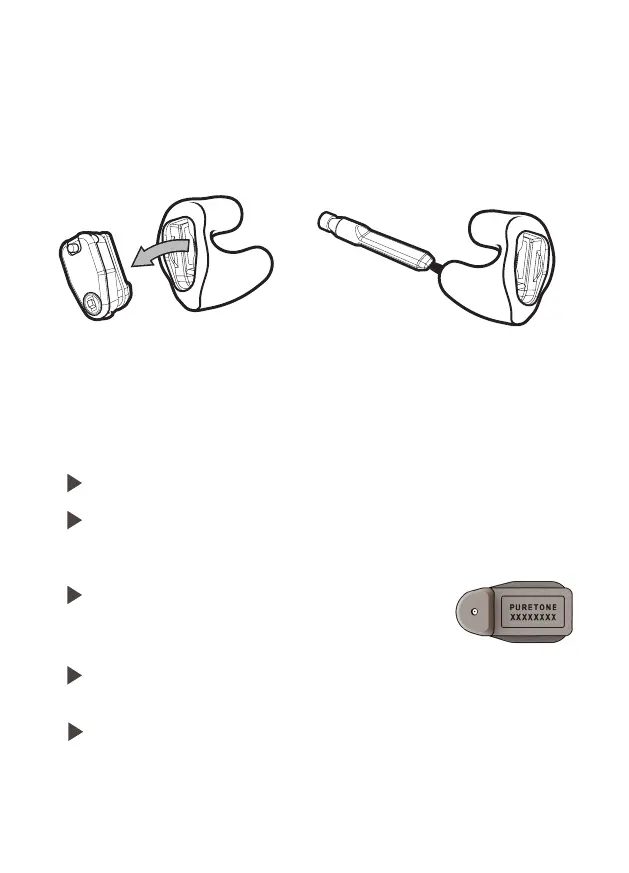
Remove the module from the earpiece
before cleaning.
Use the brush to clean the sound hole.
Your CENS ProFlex is a highly sensitive system. Proper care and handling will
ensure the best possible performance. Clean the instrument regularly to prevent
damage to the CENS ProFlex and to avoid health problems.
Do not put the CENS ProFlex in water.
(Remove module) use the supplied air puffer to blow debris out of
the sound tube on the earpiece then clean with the brush and wipe
with a damp cloth.
Use a dry soft cloth to wipe the module being
careful not to touch the rubber underneath
where sound is delivered.
Ask your supplier for special care packs and further information on
how to keep your CENS ProFlex in good condition.
This product may be adversely affected by certain chemical
substances, e.g insect repellents containing DEET.
Further information should be sought from the manufacturer.
NOTICE
11
NOTICE
Always transport and store your CENS ProFlex in the
protective case supplied.
helix
lock
2
3
4
helix
lock
5
long press
short press
helix
lock
2
3
4
helix
lock
5
long press
short press
Dx3 / DxH
5
long press
short press
Dx3 / DxH


 To Next Page