helix
lock
2
3
4
helix
lock
5
long press
short press
Dx3 / DxH
helix
lock
2
3
4
helix
lock
5
long press
short press
Dx3 / DxH
helix
lock
2
3
4
helix
lock
5
long press
short press
Dx3 / DxH
Inserting The Battery
Removing The Battery
Open the battery lid. Place the magnet stick on the
battery and remove directly out.
9
Setup
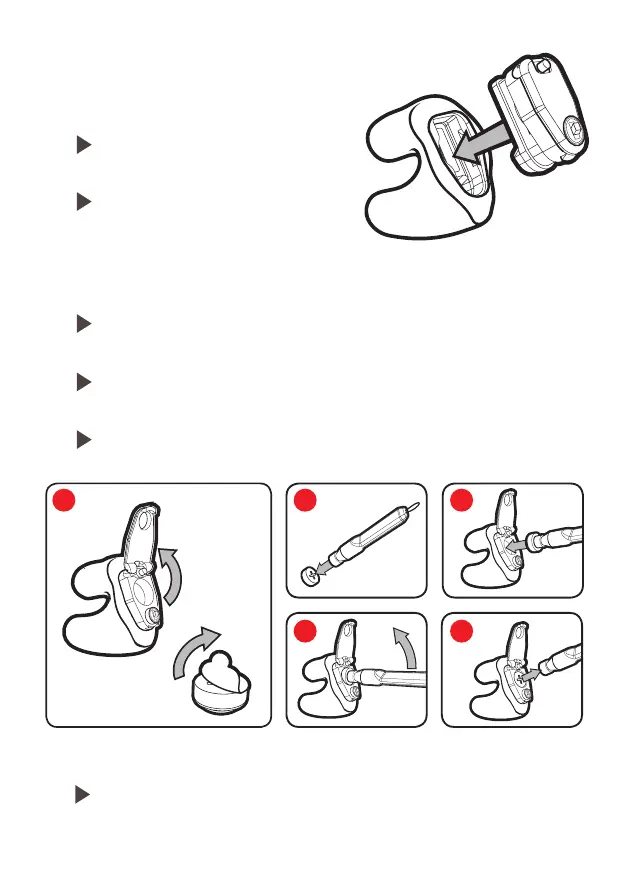
Module Insertion
Ensure battery tabs have been removed, open the battery lid.
Place the new battery on the magnet stick as shown.
Insert the battery into the module bottom first, as shown in the
diagram, and then tilt the stick up to insert the top of the battery.
Finally, remove the battery stick from the new battery, and close the
battery lid.
Press modules into earpieces until
they snap into place.
Modules can be used in either the
Left or Right earpiece.
1 2
4
3
5
helix
lock
2
3
4
helix
lock
5
long press
short press
Dx3 / DxH
helix
lock
2
3
4
helix
lock
5
long press
short press
Dx3 / DxH
helix
lock
2
3
4
helix
lock
5
long press
short press
Dx3 / DxH
helix
lock
2
3
4
helix
lock
5
long press
short press
Dx3 / DxH



 To Next Page