10
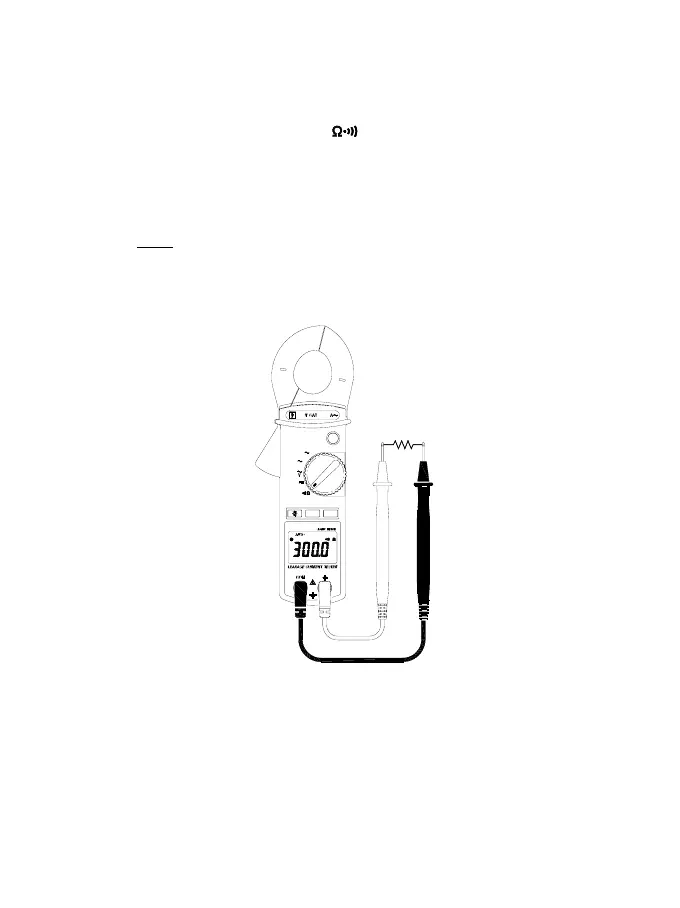
4.4 Resistance measurement:
Switch the function selector to
range.
Connect red test lead to “+” terminal and black one to the “ COM ”
terminal.
Connect tip of the test leads to the points where the value of the
resistance is needed.
Read the Ohm value from the LCD panel.
Note:
When measuring resistance value from a circuit, make sure the
power is cut off and all capacitors are discharged.
MAX ZERO
III
600 100
mA
600V
CAT III
V
Hz
HOLD
50 / 60Hz
Press 2 Sec
A
OFF



 To Next Page