TRMS Clamp Meter
9
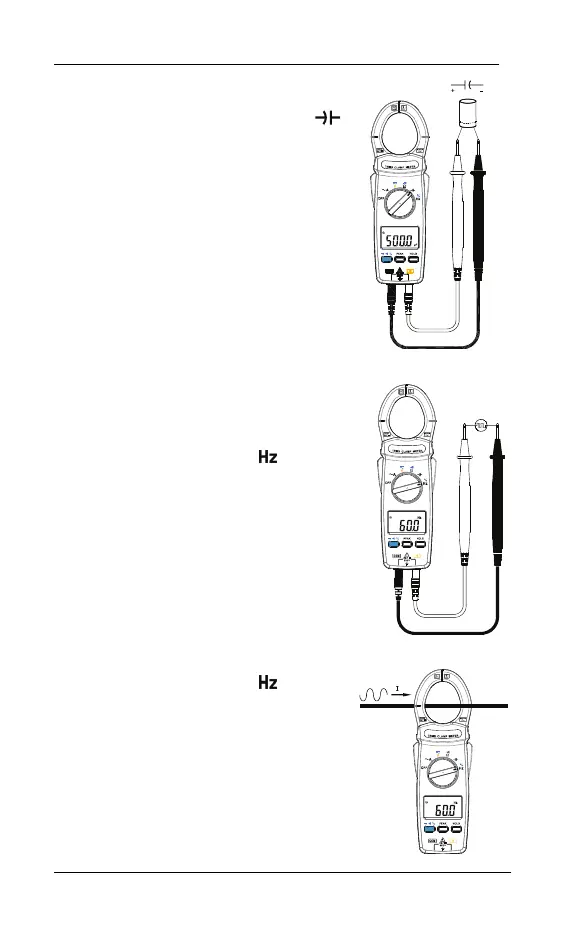
6-6 Capacitance Measurement
Switch the main function selector to
range. Connect red test lead to “+”
terminal and black one to the “COM”
terminal.
Connect tips of the test leads to the
capacitor being tested.
Read the capacitance value on LCD.
Note:
To avoid damage to the meter,
disconnect circuit power and discharge
all capacitors before measuring
capacitance. Use the DC voltage
function to confirm that the capacitor is
discharged.
6-7 Measurement Of The Voltage Frequency
Switch the main function to range.
Connect red test lead to“ +”terminal
and black one to the “COM”terminal.
Place the touch prods in contact with the
points whose frequency is to be
measured.
Read the result on the LCD panel.
6-8 Measurement Of The Current Frequency
Switch the main function to range.
Open the clamp by pressing the trigger.
Encircle the conductor and close the
jaws correctly by releasing the trigger.
Read the result on the LCD panel.



 To Next Page