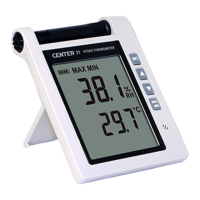
Hygro-Thermometer
4
FUNCTIONS:
○
1
Sensor probe
○
2
Display screen
○
3
Power / Backlight button
Power on/off:
Press the
button to turn on the unit. To turn the unit off, press and hold button down
until the screen shows “OFF 3, 2, 1, 0,” then the LCD screen goes off.
Note:
When the unit is on, the LCD will show the following initial information before entering the
main function: Available memory
t
Current date
t
Current time
t
Entering main function
LCD backlight on/off:
Press
button to turn on the LCD backlight, making it easier to read in dark environment.
Press
button again to turn off backlight. The backlight will turn itself off automatically after
30 seconds to save battery power.
Auto power off:
To save battery life, by default, every time the unit is powered on, it is under auto power off
mode. The unit will power itself off after 30 minutes if no key operation.
Auto power off will be automatically disabled under the following 2 circumstances:
When connecting to PC.
When data logger function is on process.
Disabled auto power off:
(1) Turn off the unit.
(2) Press and hold
button, and keep holding button.
(3) Press
button to turn on the unit.
(4) The LCD shows the initial information and then enters main function.
(5) Release
button.
(6) Make sure the auto power off
symbol disappears from display screen.
○
4
REC button
Press
button to start recording data. The REC symbol will display on the screen. To stop
recording, press
button again.
○
5
Relative Humidity/Dew Point Temperature switch
By default, the LCD displays Relative Humidity when the unit is powered on. To display dew
point (DP) temperature, press
button. Press
button again to switch back to Relative
Humidity.
○
6
MAX/MIN mode
Under this mode, the unit simultaneously monitors and stores the maximum and minimum value
(both humidity and temperature) in the memory. The unit will keep updating/refreshing the data.



 To Next Page