CLEAHMI21 External HMI Product Data
® U.S. Registered Trademark
Copyright © 2018 Honeywell Inc. • All Rights Reserved EN0Z-0988GE51 R1018
GENERAL
The CLEAHMI21 External HMI is a cost effective, versatile
mountable HMI for those EAGLE and EAGLEHAWK NX
controllers not equipped with a built-in HMI.
The CLEAHMI21 represents a network-independent,
comprehensive, and cost-effective operating option.
The CLEAHMI21 can be connected and used with the
following EAGLE / EAGLEHAWK NX controllers:
CLEA2000B31;
CLEA2014B31;
CLEA2014B32;
CLEA2026B31;
CLAXEHxxND100A;
CLAXEHSERIESxxND.
FEATURES
Local language operation: The CLEAHMI21 allows the
EAGLE controller to be operated in the following
languages: English, German, French, Italian, Spanish,
Greek, Norwegian, Finnish, Danish, Russian, Ukrainian,
and Czech. The default language can be pre-selected, and
also changed online.
In combination with the EAGLEHAWK NX, the languages
displayed on the CLEAHMI21 depend upon the languages
set up (using COACH NX) in the station which the
EAGLEHAWK NX is running.
Reduced cost for service, operation and maintenance
Maintenance or upgrade of Operator Interface Software is
superfluous because it resides in the EAGLE /
EAGLEHAWK NX controller, itself (single-source principle).
Application- or user-oriented operation: A configurable
start-screen allows for viewing custom fast access lists,
which can contain a random combination of data-point and
parameters. In combination with the EAGLEHAWK NX, the
start screen and the contents of its icons can be
customized (using COACH AX).
Intuitive push & turn wheel operation: Navigation,
selecting, and changing values is done using the push &
turn wheel, which conforms to industry standards.
Backlight with automatic time-out: The display backlight
will automatically turn ON upon pressing any key or
operating the push & turn wheel. It will automatically turn
OFF if none of the keys or the button are used for two
minutes. In combination with the EAGLEHAWK NX, the
Auto Logout Delay is adjustable.
Full display of long text information: Automatic left &
right scrolling enables lengthy texts to be viewed in their
entirety.
Versatile mounting options: The following mounting
options are available:
- Screw mounting into panel door cut-outs;
- Screw mounting onto panel doors or cabinets;
- Magnetic mounting onto metal surfaces;
- Screw mounting onto walls.
Standard Ethernet connection cable: A standard
Ethernet connection cable (max. length: 5 m) is used to
establish a connection between the RJ45 socket of the
CLEAHMI21 and the HMI port on the front of the EAGLE /
EAGLEHAWK NX controller. (NOTE: This is not a physical
Ethernet interface.)
Password protected access: Changing of values and
other data is restricted to registered users, by a multi-digit
password. In combination with the EAGLEHAWK NX, the
user access is fully embedded in the user management of
Niagara (COACH NX).
No extra power supply needed: Rather, the CLEAHMI21
derives needed energy from the controller via the standard
Ethernet connection cable.

 Need help?
 General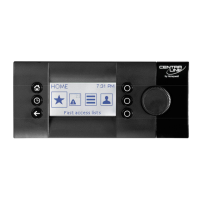

 To Next Page
