The RT2 is a wireless whole house fan (WHF)
control that can be placed on a bedroom table or
used anywhere in the home to control the Whole
House Fan using temperature for improved comfort
and energy efficiency or a built-in 1 to 12-hour
timer. The fan speed can be set from the remote.
The RT2 has a wireless range of 125 feet in a
home or building.
Pat. Pending
Made in USA
Model RM2
WHF Radio
Module
ODT
ODT
Link
Menu
ed
Set To
Cool
Indoors
Econo
Cooling
ON
o
F
Outdoors
QUICK START FOR HOMEOWNERS
The wireless control is factory set to control your WHF using Temperature.
Before operating your Whole House Fan (WHF), always OPEN windows. See the WHF Owners manual for
more information. Your A/C should be off during WHF operation.
i
Operating your WHF using Temperature Control (See pages 2 and 3 for more information).
In the morning and/or before operating your A/C, make sure the RT2 control is set to Econo Cooling OFF.
If operating your A/C, make sure windows are closed.
In Timer Control, touch the OFF key below Econo Cooling to
time displayed on the RT2. The factory default is 3 hours but can be adjusted (see page 4).
display ON. The WHF will now operate for the length of
Operating your WHF using Timer Control (See pages 2 and 4 for selecting Timer Operation)
Outdoors
Link
Menu
ed
Set To
Cool
Indoors
Econo
Cooling
ON
o
F
Displays the indoor temperature.
Displays the outdoor
temperature when an outdoor
temperature sensor is installed.
Displays the WHF speed.
Indicates the RT2 is linked to
the RM2 receiving module.
MENU Key accesses
user options such as
Temperature or Timer Control.
Use this key to turn WHF cooling
On or Off.
Displays the Set To Temperature
setting for WHF cooling.
Use the Up/Down keys to change
Set To Temperature setting or timer
setting in WHF cooling.
User & Installer Manual
Model RT2
Wireless Whole House Fan Control
Rev Jul 2019
Slide battery cover off to replace
the two AA batteries.
RSM, CA
i
The touchscreen responds best to a
deliberate touch not a tap.
1. Touch the OFF key to display ON, then set the Set To temperature to your desired Indoor temperature. The WHF will
o
turn ON if the Indoor temperature is more than 1 above the Set To temperature and turn OFF when the Indoor
o
temperature drops more than 1 below the Set To temperature.
The following morning or when WHF operation is no longer desired, touch the ON key to display OFF. As a
precaution, the RT2 control includes a built-in Safety Timer that will turn the WHF OFF after 12 hours of operation.
2.

 Need help?
 General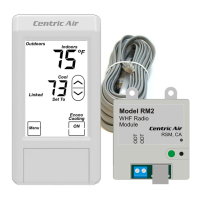

 To Next Page