INSTALLATION
Power the WHF and Set Installer Options3)
Use the wireless remote to set the Number of Fan
Speeds. See Installer Options below.
After setting the Number of Fan Speeds, turn the WHF
on by pressing the OFF key to display ON. Lower the
Set To temperature several degrees below the indoor
temperature. If an optional outdoor temperature sensor
is installed, you may have to temporarily adjust the limit
to activate the WHF.
Check the fan speeds by pressing HI and using the
DOWN key to display LO then press ENTER. Verify that
that the fan changed to LO speed. Press LO to display
HI then press ENTER. Verify that the fan changed to HI
speed.
Turn the WHF off by pressing the ON key to display
OFF. Verify that the fan turned off.
7
INSTALLER OPTIONS
Linked
Set To
Cool
Indoors
o
F
Access the Installer Options by
pressing and holding the
MENU key for about 7 seconds
until Option 01 is displayed.
ACCESS INSTALLER OPTIONS
Outdoors
Homeowner - The following options have been
set by the installer. Changing options without
contacting your installer could result in the fan
not operating correctly or damage to the control.
!
Installer - Ensure the fan type and fan speeds
are set correctly before operating the WHF.
Failure to do so could damage the control board.
Econo
Cooling
Menu
OFF
3 3
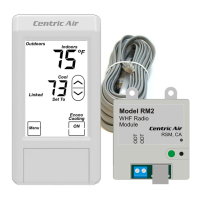
Power the whole house fan. The LED on the radio
module blinks amber while trying to link to the wireless
remote control.
Install batteries into the wireless remote control. The
remote will indicate nC until the unit links to the radio
module. Once the link is established, the LED will be
solid green and Linked will be displayed on the remote
control.
If the LED is not lit, this could indicate
that power is not getting to the radio module. TURN OFF
POWER to the fan and check the plug&play connections
as well as the wiring connections to the fan.
Option Tag Factory
01
02
SPd
HSS
2
Off
Description Selections
Set WHF Speeds
High Speed Start
1, 2 or 3
Off or On
01 Set the Fan Speeds
Default is 2 Speeds.
Select 1, 2 or 3 Speed
Option
Next
Enter
Use the DOWN
key to select 1-
speed.
Option
Next
Enter
Use the UP key
to select 2-speed.
Option
Next
Enter
Use the UP key
to select 3-speed.
Press the NEXT key to go to the next option or press
ENTER to save the selection.


 To Next Page
 Loading...