Installing Dusting Paper
NOTE:
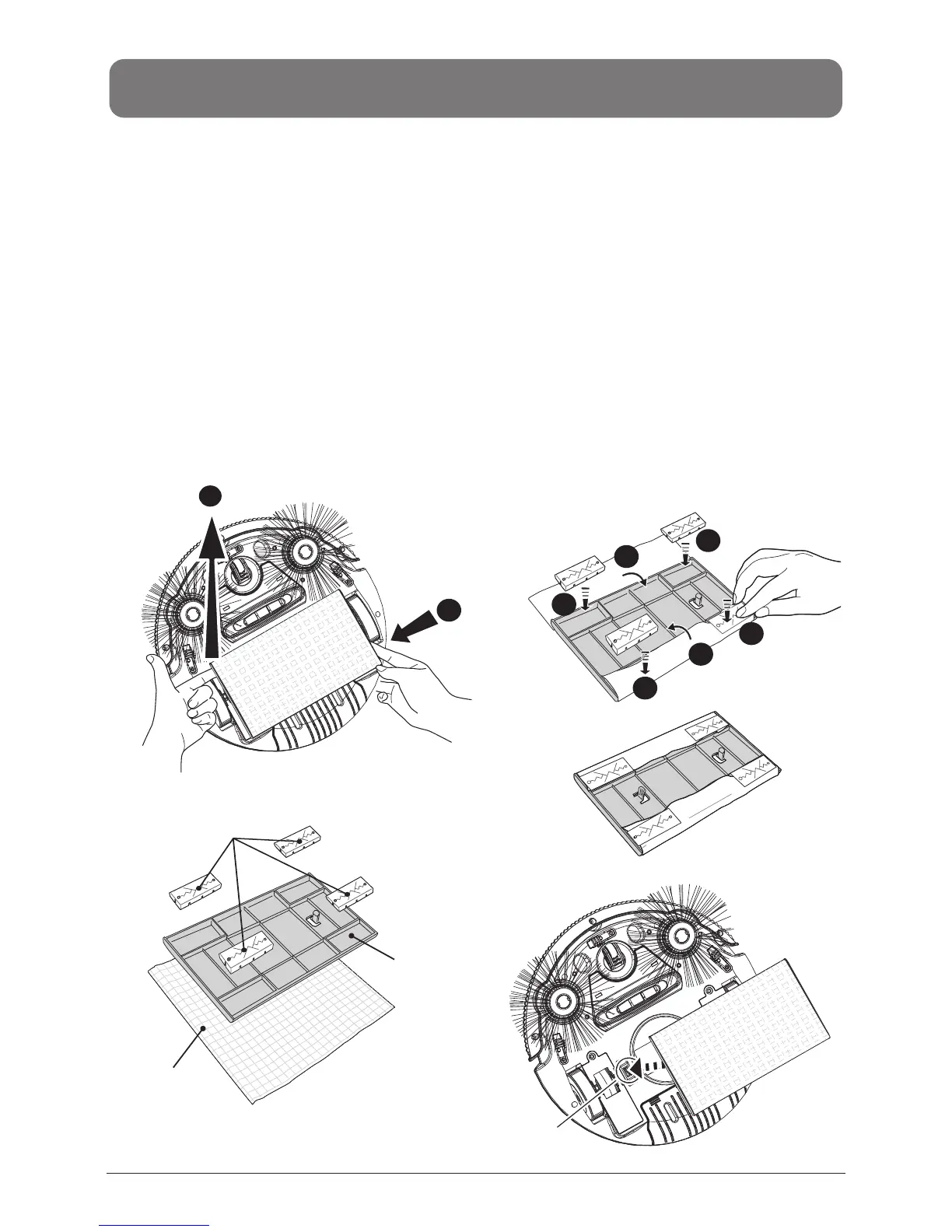
1. Remove the dusting paper holder following the instruction shown in Fig. 7.
2. Flat the dusting paper and put it one floor or table. Then place the holder (the side with
4 stoppers face up) on the paper at the midpoint as shown in Fig. 8.
3. Remove 4 stoppers from the holder, fold the hem of dusting paper on two sides back to
the holder, and place back 4 stoppers on top of the paper then press firmly to fix the
paper onto holder (Fig. 9).
4. Then place the dusting paper holder to the bottom of unit by aiming one bolt of holder at
the hole (near the big wheel) on cleaner, click the holder on the cleaner, and then do it
again for the other side. (Fig. 10)
1. Do not use mopping function on the carpet. At the same time you should remove the
side brushes to prevent it from damaging the brushes.
2. If you don’t need to use mopping function, please remove the dusting paper holder from
the cleaner (follow the instructions shown in Fig. 7) before you turn it on for cleaning.
INSTALLATION GUIDE
1
2
Lift up
Stoppers
Hole for the
stopper
Dust Paper
Fold back
Fold back
Finished !
Press the two bolts on
the dusting paper holder
into the two holes on the
bottom of the cleaner.
Press
Press
Press
Press
1
2
3
6
4
5
Fig 9
Fig 10
Fig 8
Fig 7
Push to
the left
EN-8


 To Next Page