DS Multi-8
WWW.CERTINA.COM
328_EN / 11.14
6/7
SET
SET
SET
SET
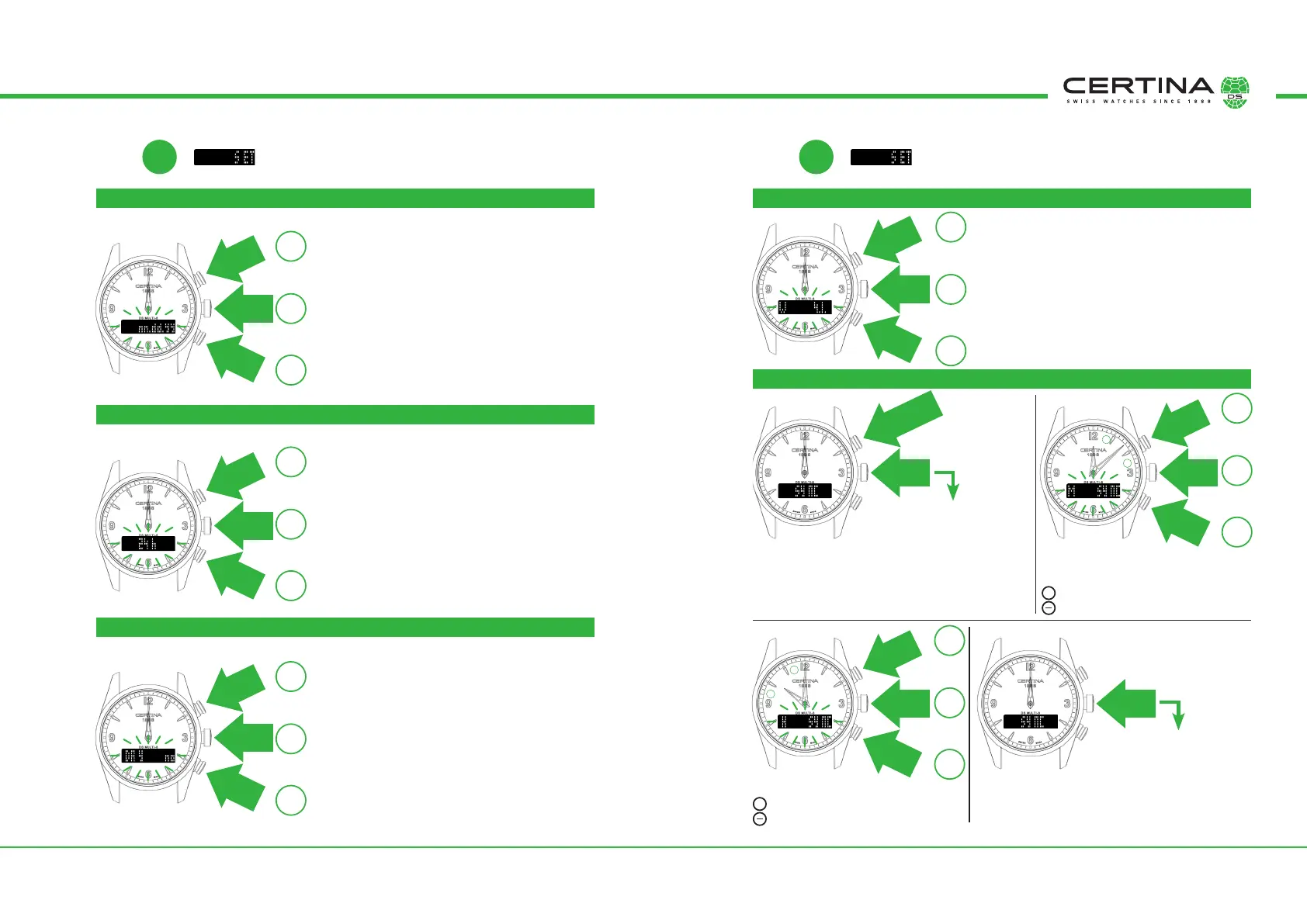
DATE HAND FORMAT FIRST CALENDAR WEEK OF THE YEAR
TIME HAND FORMAT
HAND SYNCHRONISATION
START OF WEEK (rst weekday)
Date hand format:
dd.mm.yy = day.month.year
mm·dd·yy = month·day·year
First calendar week of the year:
FULL = First full week of the year
1.1. = The week from 1.1.
4.1. = rst week with the majority of its days
in the year (DIN 1355/ISO 8601:
week with the rst Thursday, i.e 4.1.)
Time hand format
24 hr = 24 hour format
12 hr = 12 hour format
Synchronisation is necessary if the hands are not set
to midday (12.00) during the setting operation, or if
the same time is not shown by the hands and the
digital display when the same time zone (e.g T1) is
displayed simultaneously.
Minute hand to be moved towards
12:00:
➞
Clockwise direction
➞
Anticlockwise direction
Hour hand to be moved towards 12:00:
➞
Clockwise direction
➞
Anticlockwise direction
If the hand is still not at 12.00, repeat the proce-
dure from
➇
➊
.
First weekday:
no = Monday
SA = Saturday
SU = Sunday
Press
once
Press
once
Press
once
Press
once
Press
once
Press
once
Press
once
Press
once
Press
once
Press
once
Press
once
Press
once
Press
once
Press
once
Press
once
Press
once
Press
once
Press
once
Press
once
Press
once
+
–
+
–
OK
+
–
OK
+
–
OK
+
–
OK
+
–
OK
+
–
OK
➃
➆
➄
➅
Press and hold
for 2 secs
Go to
➈
, no
synchronisation required
Go to
➈
,
Synchronisation ok
➞
➞
➞
➞
+
+
➇
➇ ➇
➇
➊
➋
➌ ➍
+
–



 To Next Page