EasyManua.ls Logo

Cessna 172P - Page 240

Cessna 172P
358 pages
Print Icon
To Next Page IconTo Next Page
To Previous Page IconTo Previous Page
Loading...
II ER
RST
sr/
SEI
iIODC
Dt/A
ctocK
5
DIGITAL
CLOCK
MODEL
172P
PILOT'S
OPER,ATING
HANDBOOK
ST'PPLEMENT
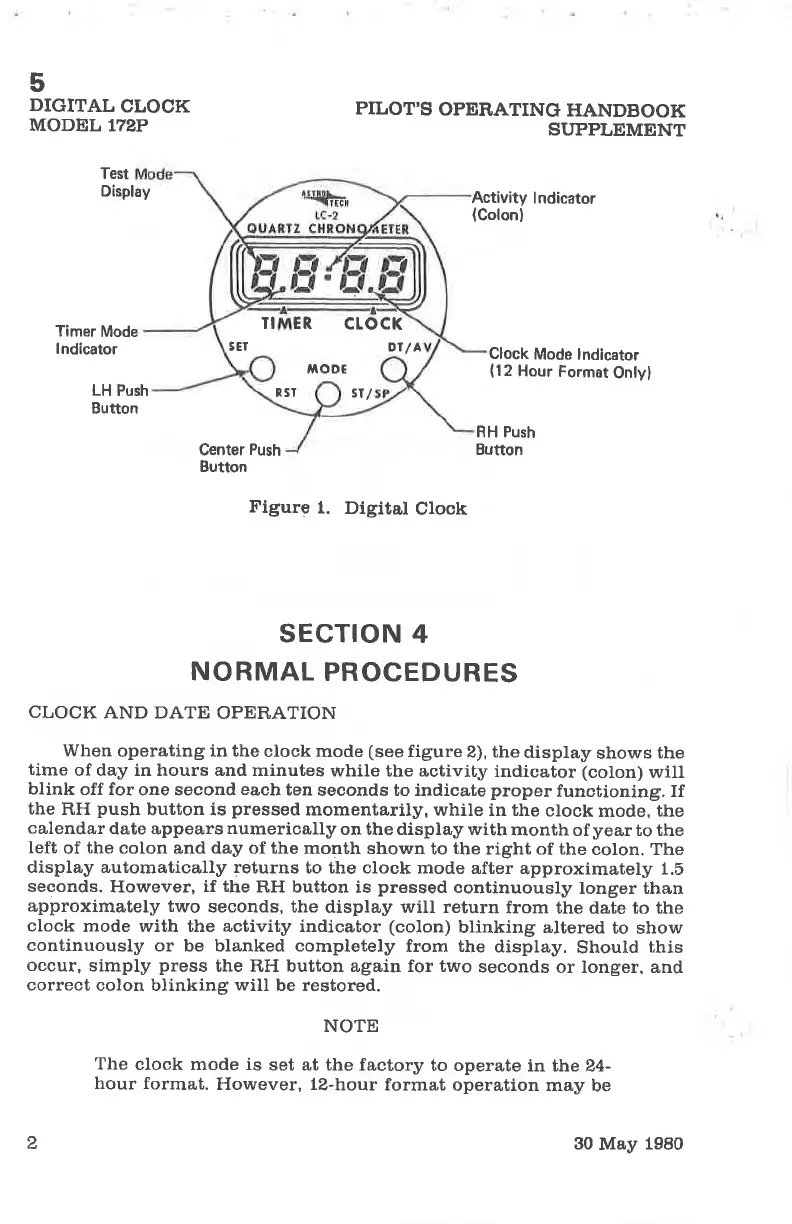
Test
Display
Act¡v¡ty
lndicator
{Colon}
Timer
Mode
lndlcator
Clock
Mode lndicator
(12
Hour
Format
Onlyl
LH Push
Button
Center
Push
Button
RH Push
Button
Figure
1.
Digital
Clock
sEcTroN
4
NORMAL
PROCEDURES
CLOCK
AND DATE
OPERATION
When operating in the
clock mode
(see
figure
2), the
display
shows
the
time
of day in hours and minutes
while the activity
indicator (colon)
will
blink
off for
one second
each
ten
seconds to indicate
proper
functioning. If
the
RH
push
button is
pressed
momentarily,
while in the
clock
mode,
the
calendar
dato appears
numerically
on the display with
month
of
year
to the
left
of
the
colon and day of the
month shown
to
the
right of the
colon, The
display automatically returns
to the clock mode
after
approximately 1.5
seconds.
However,
if the
RH button
is
pressed
continuously
longer than
approximately two
seconds, the
display will return
from
the date to the
clock
mode with the activity indicator
(colon)
blinking altered
to
show
continuously
or be blanked completely
from the
display.
Should
this
occur,
simply
press
the RH button again for two
seconds
or longer, and
correct
colon blinking
will
be restored.
NOTE
The
clock mode is
set at the factory
to operate
in the 24-
hour format.
However, l2-hour
format
operation may
be
2
30
May
1980

Table of Contents

Other manuals for Cessna 172P

Related product manuals