EasyManua.ls Logo

Cessna 172P - Page 241

Cessna 172P
358 pages
Print Icon
To Next Page IconTo Next Page
To Previous Page IconTo Previous Page
Loading...
PILOT'S OPER,ATING
HANDBOOK
SUPPLEMENT
5
DIGITAL
CLOCK
MODEL
172P
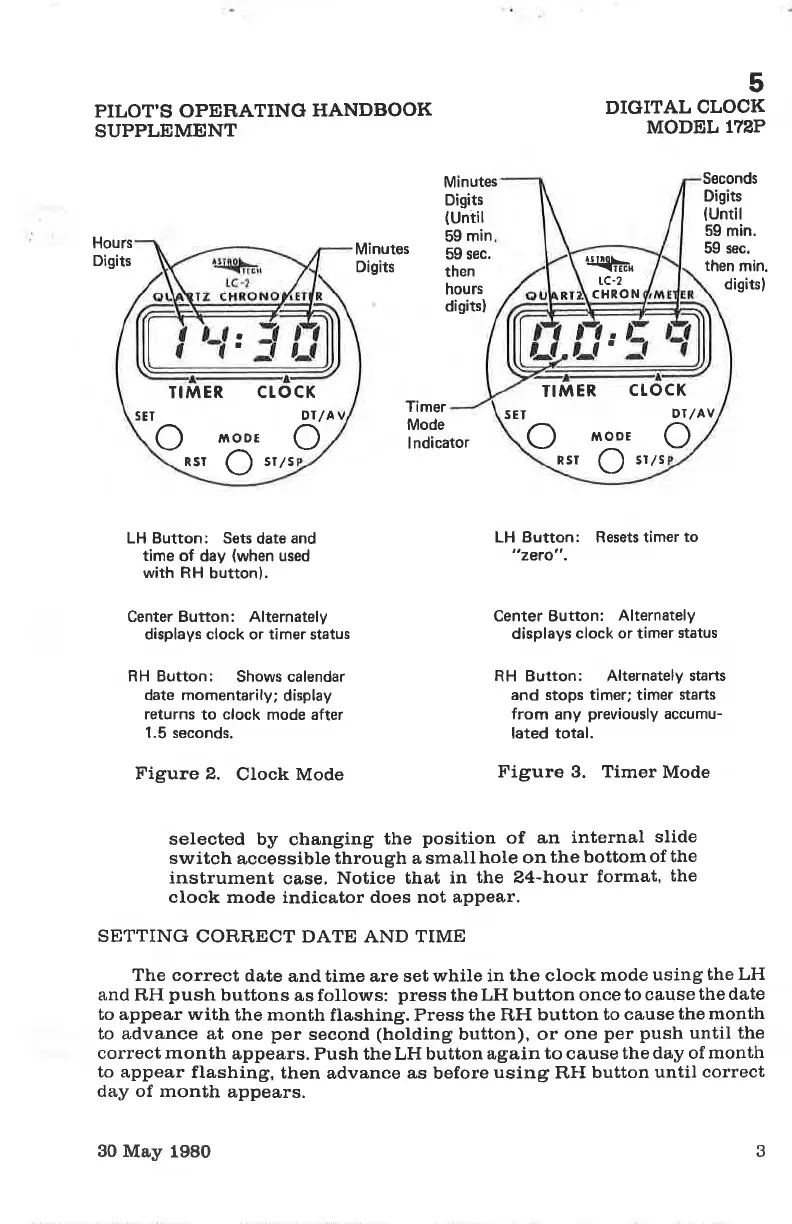
Seconds
Digits
(Until
59
min.
59 sec.
then
min.
digitsl
Hours
Digits
Minutes
Digits
Minutes
Digits
(Until
59
min
59 sec.
then
hours
digits)
Timer
Mode
I
ndicator
LH Button: Sets
date and
time
of day
(when
used
with RH
button).
Center Button: Alternately
displays clock or t¡mer status
RH Button:
Shows calendar
date momentarily;
display
returns
to
clock
mode after
1.5 seconds.
LH Button: Resets t¡mer
to
"zero" .
Center Button:
Alternately
displays
clock or timer
status
RH Button: Alternately
starts
and stops timer; timer
starts
from any
previously
accumu-
lated total.
Figure 2.
Clock Mode
Figure 3. Timer
Mode
selected by
changing
the
position
of
an
inte¡nal
slide
switch
accessible
through a small
hole on
the
bottom
of the
instrument
ca,se.
Notice that
in
the
Z4-hour
format'
the
clock mode indicator does not appear.
SETTING
CORRECT DATE AND TIME
The correct
date
and time are set while
in
the
clock
mode
using
the LH
and RH
push
buttons
as follows:
press
the
LH button once
to cause
the date
to appear with
the month
flashing. Press
the
RFI
button
to cause
the month
to advance at one
per
second
(holding
button), or
one
per
push
until the
correct month
appears.
Push the LH button
again
to
cause
the day of
month
to
appear flashing,
then
advance
as
before
using
RH
button until
correct
day of month
appears.
3
a
a
TIMER
MODE
s¡ls
SET
o
o
RSr
o
ctocK
Dt/A
rr{ts*
tc-2
CHRON
a
TIMER
SET
Àì ooE
srls
RST
o
o
o
ct ocK
DT/AV
30
May 1980

Table of Contents

Other manuals for Cessna 172P

Related product manuals