11
9.PlaceTheQuick-20rOnTheSubject’sHead
1. Grasp each handle and gently pull them apart to open
the headset.
2. Slide the headset over the subject’s head.
3. Adjust the position of the headset so the earpads t
around the subject’s ears.
4. Brush aside excess hair near and underneath the
earpads.
5. Position Fp1 and Fp2 to sit 1cm above the eyebrows.
6. Reorient misaligned legs and pods.
7. Grasp and rotate each pod so the sensor is
perpendicular to the subject’s head.
8. Push the headset downward so the sensor at the crown
(Cz) makes rm contact with the subject’s head.
9. Ensure pods lie at on the subject’s head.
10. Brush aside excess hair on the forehead and any other
positions where Drypad sensors are installed.
11. Lift the earpad to access the ear lobe and clean with
alcohol.
12. Clip the A1 earclip to the left earlobe.
13. Option: Attach the A2 earclip to the right earlobe.
14. Option: Attach ExG passive lead wire on the A2 handle
for additional biometric measurements.
15. Verify headset is properly positioned on the subject’s
head.
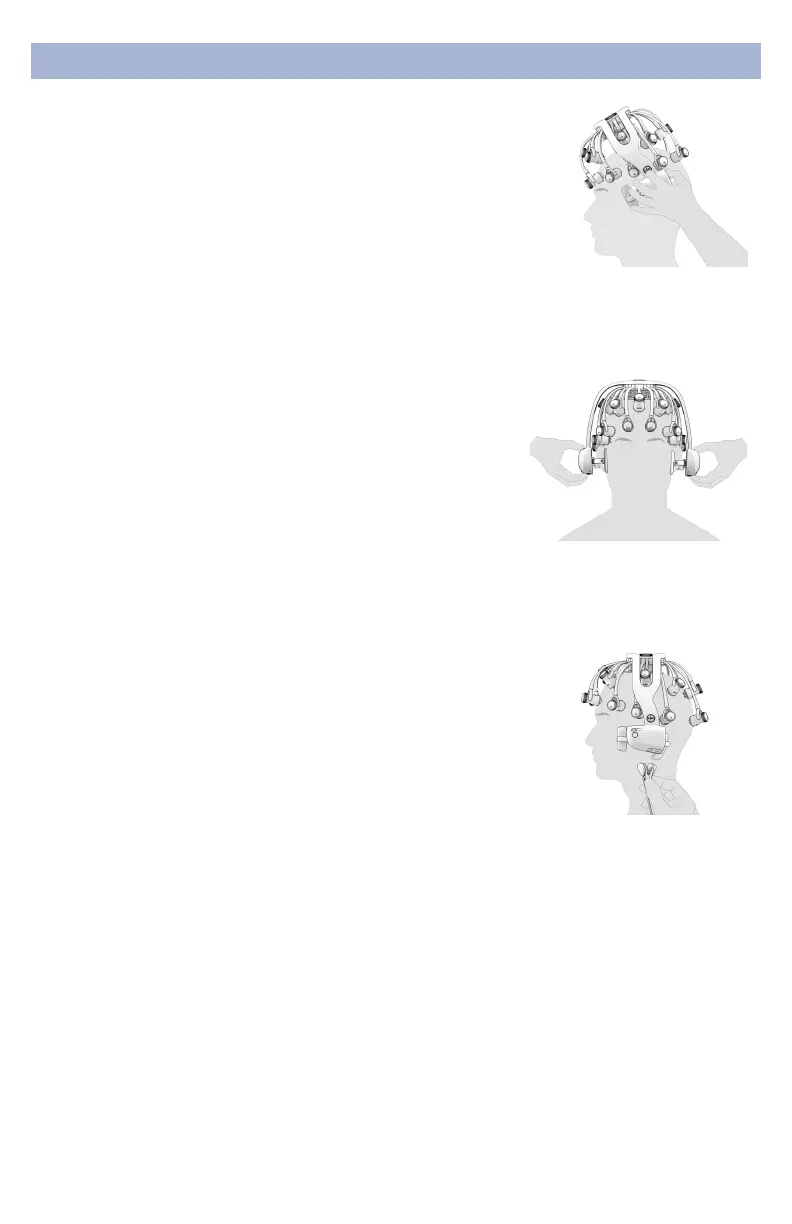
Don headset front-to-
back, positioning Fp1
and Fp2 1cm above the
eyebrows
Pull down on handles
until Cz makes rm
contact with the top
of the head
Apply A1 earclip to
left earlobe
DonningInstructions


 To Next Page
 Loading...