41
Funcionamiento
1
2
3
O
PIN
? ? ? ?
4
Presione para continuar. Presione para continuar.
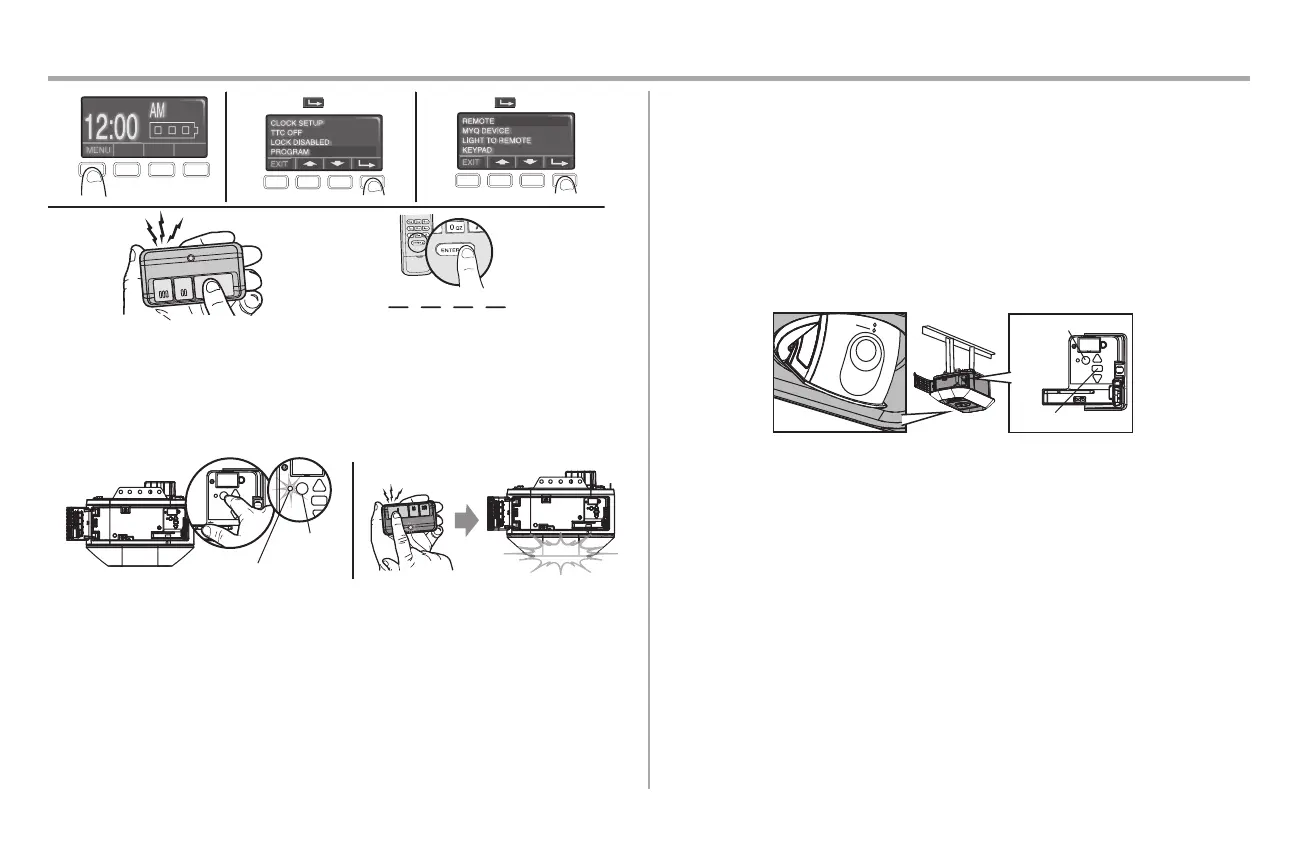
PARA AÑADIR, REPROGRAMAR O CAMBIAR UN CONTROL REMOTO UTILIZANDO
EL BOTÓN LEARN
1. Mantenga presionado el botón LEARN (APRENDER) en el abrepuertas de garaje.
2. Mantenga presionado el botón del control remoto con el que desee operar usar. Suelte el botón cuando las
luces del abrepuertas de garaje parpadeen o escuche dos clic.
“clic”
“clic”
1
2
LED LEARN (APRENDER)
APRENDER
Botón
Borrar la memoria
BORRE TODOS LOS CONTROLES REMOTOS Y ENTRADAS SIN LLAVE
1. Mantenga presionado el botón LEARN (APRENDER) en el abrepuertas de garaje hasta que se apague el LED
de aprender (aproximadamente 6 segundos).
2. Inmediatamente mantenga presionado el botón LEARN (APRENDER) nuevamente hasta que se apague el
LED de aprender. Todos los códigos ahora están borrados. Vuelva a programar cualquier accesorio compatible
que desee utilizar.
BORRARLA CONFIGURACIÓN DELA CÁMARA
1. Mantenga presionado el botón negro de ajuste del abrepuertas de garaje hasta que oiga 3 pitidos
(aproximadamente 6 segundos).
Tendrá que volver a configurar el abrepuertas de garaje y la cámara después de realizar el restablecimiento.
LED
Botón LEARN
(APRENDER)
Botón de ajuste


 To Next Page
 Loading...