14
Installation
STEP 2Installthe Header Bracket
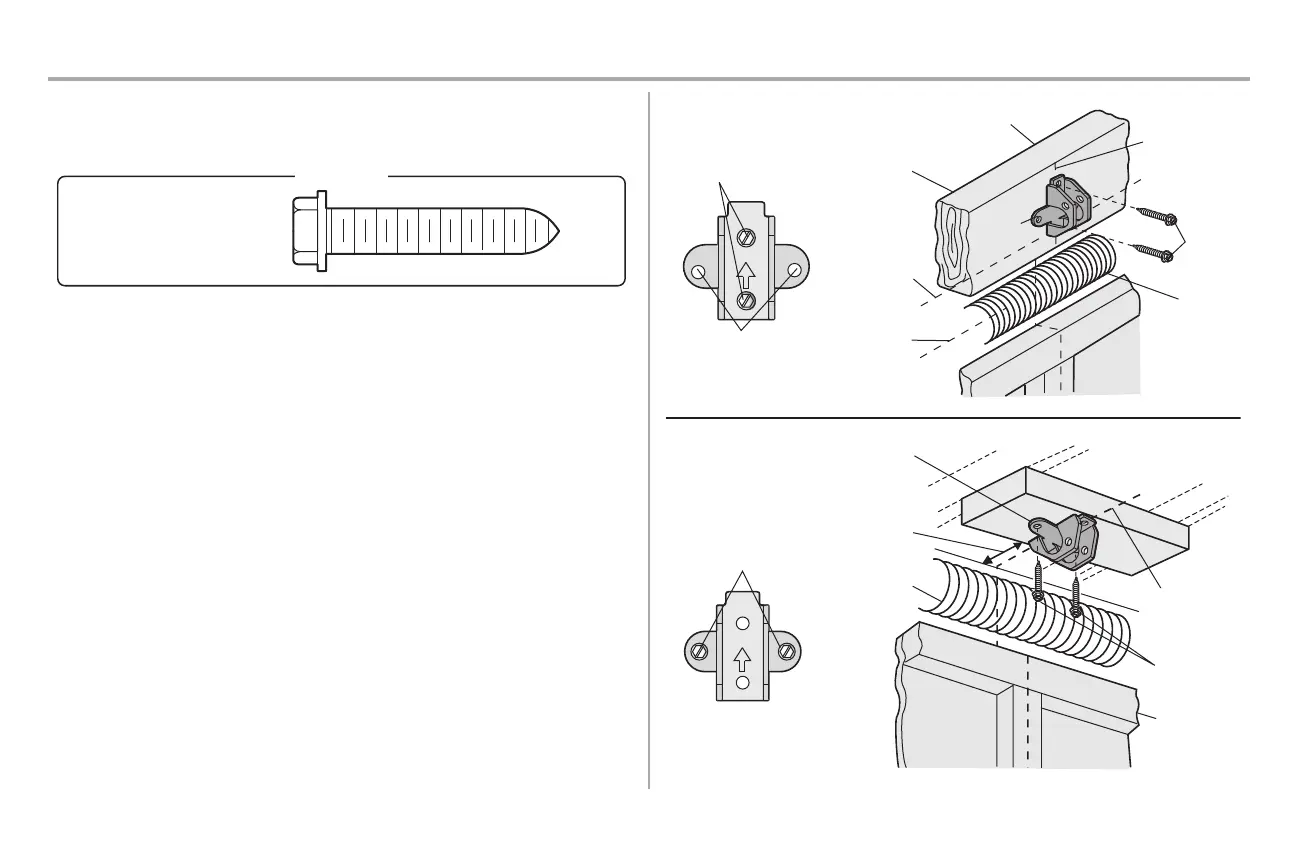
You can attach the header bracket either to the wall above the garage door, or to the ceiling. Follow the
instructions which will work best for your particular requirements. Do not install the header bracket over
drywall. If installing into masonry, use concrete anchors (not provided).
Lag Screw 5/16"-9x1-5/8"
HARDWARE
OPTIONA- WALL INSTALLATION
1. Center the bracket on the vertical centerline with the bottom edge of the bracket on the horizontal line
as shown (with the arrow pointing toward the ceiling).
2. Mark the vertical set of bracket holes. Drill 3/16" pilot holes and fasten the bracket securely to a
structural support with the hardware provided.
OPTIONB- CEILINGINSTALLATION
1. Extend the vertical centerline onto the ceiling as shown.
2. Center the bracket on the vertical mark, no more than 6" (15 cm) from the wall. Make sure the arrow is
pointing away from the wall. The bracket can be mounted flush against the ceiling when clearance is
minimal.
3. Mark the side holes. Drill 3/16" pilot holes and fasten bracket securely to a structural support with the
hardware provided.
UP
Wall Mounting
Holes
WALL INSTALLATION
CEILING INSTALLATION
Optional Mounting
Holes
Vertical
Centerline of
Garage Door
Header Wall
Header
Bracket
2x4
Structural
Support
Door
Spring
Garage Door
Highest Point
of Garage
Door Travel
Horizontal
Line
Lag
Screw
UP
Header Wall
Ceiling Mounting
Holes
Finished Ceiling
Vertical
Centerline of
Garage Door
Header
Bracket
6" (15 cm)
Maximum
Door Spring
Garage Door
Lag Screw





 To Next Page