TROUBLESHOOTING
REPAIR PARTS
LiftMaster warrants to the first consumer purchaser of this product that it is free from defect in materials and/
or workmanship for a period of 1 year from the date of purchase.
NOTICE: To comply with FCC and or Industry Canada rules (IC), adjustment or modifications of this receiver and/or transmitter are
prohibited, except for changing the code setting or replacing the battery. THERE ARE NO OTHER USER SERVICEABLE PARTS.
Tested to Comply with FCC Standards FOR HOME OR OFFICE USE. Operation is subject to the following two conditions: (1) this
device may not cause harmful interference, and (2) this device must accept any interference received, including interference that
may cause undesired operation.
LiftMaster.com
1-800-528-2806
SYMPTOM CAUSE SOLUTION
The keypad will not
program to the operator.
The keypad is programmed to the
wrong frequency and encryption.
Program the keypad to match the operator's
frequency and encryption (see page 3).
The backlight and tone on
the keypad no longer work.
Battery may be dead. Replace battery with 9V Lithium battery.
Key press turns on
backlight but no beep.
Stuck button. Check that all buttons are not stuck.
PIN won’t learn. PIN already learned. Learn a new PIN. Exit Learn.
PIN won’t learn. Memory full. Erase a PIN to add a new pin. Perform
Factory Reset to erase all PINs.
PART NUMBER DESCRIPTION
K093A0763 Mounting Plate
K107A0031 Keys
ONE YEAR LIMITED WARRANTY
BATTERY
To prevent possible SERIOUS INJURY or DEATH:
• NEVER allow small children near batteries.
• If battery is swallowed, immediately notify doctor.
To reduce risk of fire, explosion or chemical burn:
• Replace ONLY with 9V Lithium battery.
• DO NOT recharge, disassemble, heat above 212° F (100° C) or incinerate.
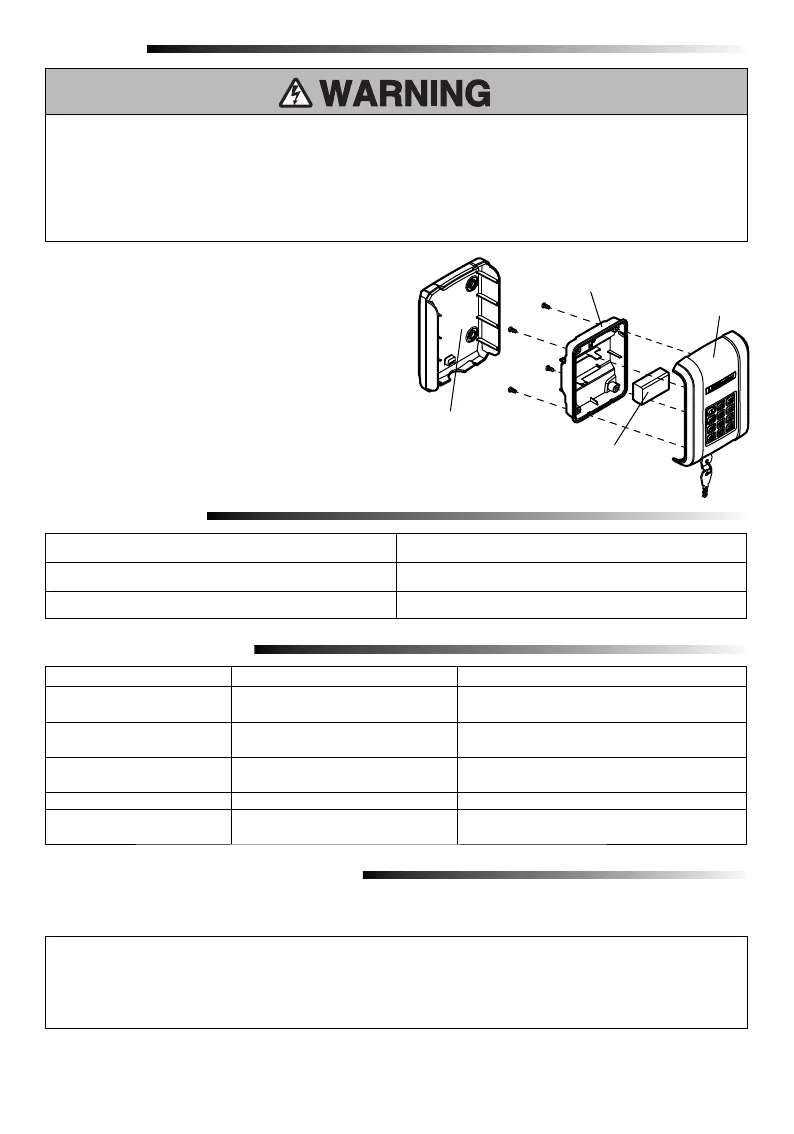
Battery
Mounting plate
Faceplate
Battery Cover
The 9V Lithium battery should produce power for up to
5 years. To replace the battery:
1. Unlock and remove the faceplate from the mounting
plate.
2. Remove the battery cover using a Phillips screw
driver.
3. Remove the old battery and install new 9V Lithium
battery. Re-install inner cover.
4. Reattach the faceplate to the mounting plate and
lock with the key.
5. Dispose of old battery properly.


 To Next Page