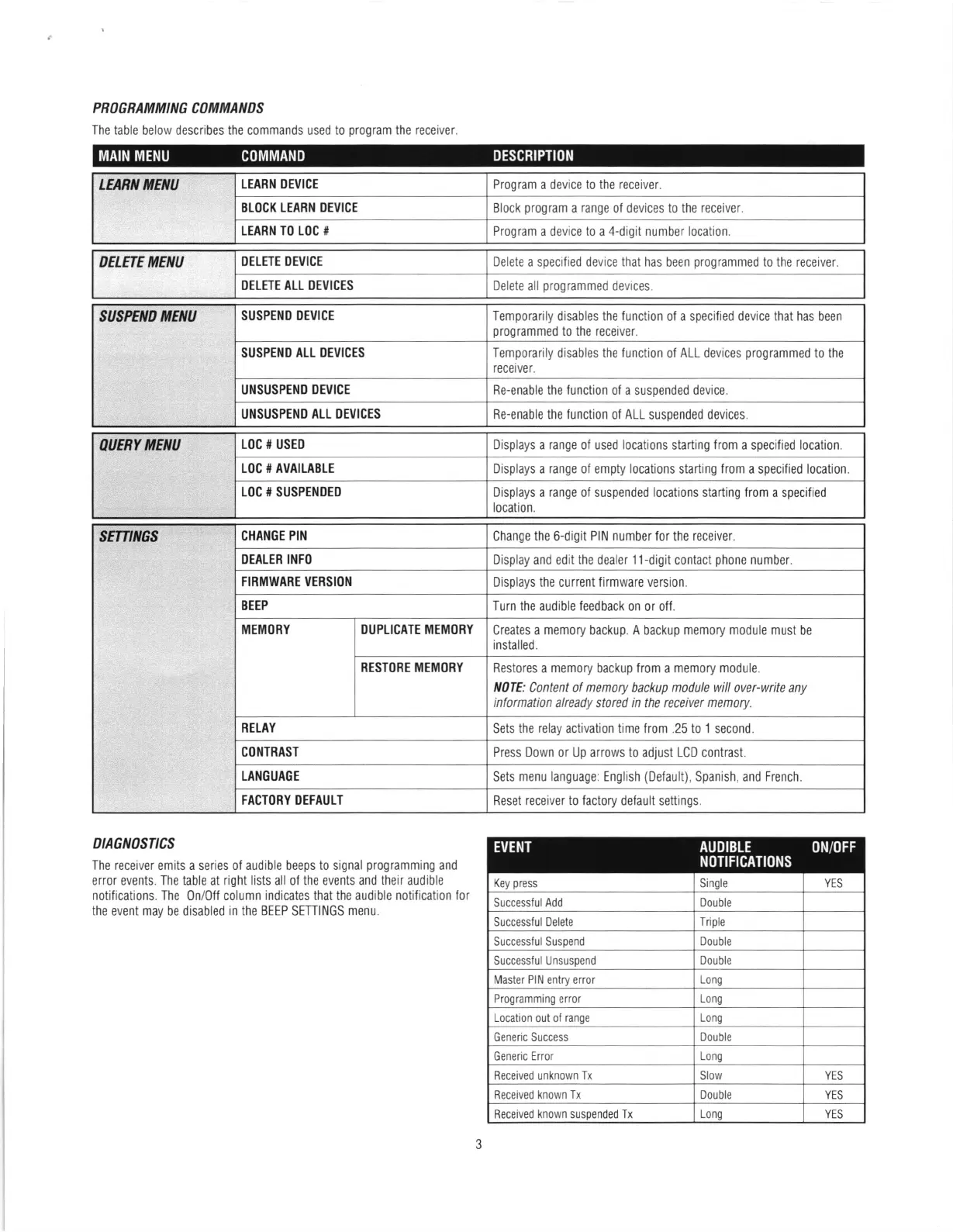
PROGRAMMING COMMATIDS
The table
below describes
the
commands
used to
program
the receiver
LEABN MENU
LEABN DEVICE
Program
a device
to the receiver.
BLOCK LEARN OEVICE
Block
program
a
range
ol devices to
the receiver
LEARN TO LOC #
Program
a device
to
a
4-digit number location
DELETE
MENU
DELETE DEVICE
Delete
a
specified
device
that has
been
programmed
to
the receiver.
DELETE ALL OEVICES
Delete all
programmed
devices.
SUSPEND
MENU
SUSPEND DEVICE
Temporarily
disables
the function
of a
specified device that has
been
programmed
to the receiver.
SUSPEND
ALL DEVICES
Temporarily disables the function
of
ALL devices
programmed
to the
receiver.
UNSUSPEND DEVICE
Re-enable the lunction ol a suspended device.
UNSUSPEND ALL DEVICES
Re-enable the lunction ol ALL
suspended
devices
AUERY
MENU
LOC # USED
Displays a range of used locations
starting
from
a specified location.
LOC # AVAILABLE
Displays a range of empty locations
starting
from
a specified
location.
LOC # SUSPENDED Displays
a
range
of suspended locations starting from a specified
location.
sEr7rrtlcs
CHANGE PIN
Change
the
6-digit
PIN number for
the
receiver.
DEALER INFO
Display and edit
the
dealer 11-digit
contact
phone
number.
FIRMWARE VERSION
Displays the
current firmware version.
BEEP
Turn the audible feedback
on or off.
MEMORY DUPLICATE MEMOBY
Creates a memory
backup.
A
backup
memory module must
be
installed.
RESTORE MEMORY
Restores a memory backup from a memory module.
N0fE: Content of memory backup module will over-write
any
information
already stored
in
the receiver
memory.
RELAY
Sets
the relay
activation time from .25 to 1 second.
CONTRAST Press Down
or
Up
arrows
to
adjust
LCD
contrast
LANGUAGE
Sets
menu
language:
English
(Default),
Spanish,
and
French.
FACTORY DEFAULT
Reset
receiver to factory
default settings
DtACNaSTtCS
The
receiver emits a series of audible beeps to signal
programming
and
error events. The table
at
right lists all of the events and
their
audible
notifications. The
0n/0ff column
indicates that the audible
notification for
the
event
may
be disabled
in the BEEP
SETTINGS
menu.
Key
press
Single
YES
Successlul Add
Dou
ble
Successlul Delete
Triple
Successlul Suspend Double
Successlul Unsuspend
Double
Master PIN entry error
Long
Programming error
Long
Location
out ol
range Long
Generic Success
Dou
ble
Generic Error Long
Received unknown Tx Slow YES
Received known
Tx
Double YES
Received
known
suspended Tx
Lono
YES
MAIN MENU
COMMAND
DESCRIPTION
EVENT
AUDIBLE
ON/OFF
NOTIFICATIONS
J


 To Next Page
 Loading...