
 Need help?
Do you have a question about the CHAMELEON IHD3-PPMID and is the answer not in the manual?
Introduces the smart meter's In-Home Display and its purpose.
Guide to accessing and using the interactive tutorial.
Explains what information the IHD shows (usage, cost) and update frequency.
Importance of signal strength and how to check/improve it.
Details the internal battery, its duration, and recharging procedures.
Explains automatic meter readings and their impact on billing.
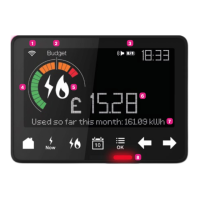
Explains icons for signal strength and budget status.
Describes battery status and energy usage dials.
Details cost, kWh, fuel type, and feedback/prompt indicators.
Describes the instant electricity usage indicators.
Explains the Home, Now, and Fuel buttons for navigation and data display.
Describes buttons for time periods, menu access, and scrolling.
Explains the meaning of coloured lights indicating energy usage levels.
How to view energy usage by day, week, month, or year.
Guide to measuring individual appliance energy consumption.
Explains the purpose and guidance nature of setting energy budgets.
Step-by-step guide to setting budgets for electricity and gas.
How to enable or disable budget limit alarms.
Tips on saving energy by switching appliances off standby.
Advice on saving energy related to heating water in the kitchen.
Suggests turning off lights when not in use to save energy.
Tips for reducing energy consumption from washing machines.
This document describes the Bulb In-Home Display (IHD3-PPMID), a smart meter companion device designed to help users monitor and understand their energy consumption. The IHD provides real-time and historical data on electricity and gas usage, empowering users to make informed decisions about their energy habits and potentially save money.
The Bulb In-Home Display (IHD) is an electronic device that wirelessly communicates with your smart meters to provide a clear overview of your energy usage. It updates every 30 minutes, displaying your energy consumption in kilowatt-hours (kWh) and the corresponding cost in pounds and pence. This information helps you understand how much energy different appliances use, allowing you to identify areas for potential savings.
The IHD features a main screen that shows current energy usage, a budget indicator, battery level and charge status, and instant electricity usage indicators. It also displays the time and provides feedback, messages, and prompts to guide the user. The device can show energy usage for electricity, gas, or a combined total, giving a comprehensive view of household energy consumption.
A key function of the IHD is its ability to help users set and monitor daily, weekly, or monthly budgets for their energy spend. While these budgets are for guidance only and do not cut off power if exceeded, they serve as a useful prompt to manage energy usage. The budgets for gas and electricity are set individually, but the homescreen displays a combined budget. The device can also be configured to sound an alarm when a budget limit is reached, which can be turned off in the settings.
The IHD also includes a built-in tutorial that uses sample data to demonstrate the functions of each button and what happens when they are pressed. This allows users to explore the device's features without affecting their actual energy usage or tariff settings.
The In-Home Display is designed for ease of use, with intuitive buttons at the bottom of the screen to navigate through information.
To make the most of the display, it's recommended to keep it plugged in somewhere easily visible. The signal strength to your smart meter is indicated by a symbol on the top left of the screen; more stripes mean a stronger signal. If the signal is weak, moving the IHD closer to your electricity smart meter can improve the connection.
The IHD has an internal battery that lasts for about an hour and a half, allowing you to carry it around the house to observe the energy impact of different appliances. If the screen goes blank when unplugged, pressing the round, flat button on the back will wake it up. If it doesn't wake up, plugging it back in will recharge it, and no data will be lost.
Understanding your energy use is facilitated by the IHD's ability to show usage over different time periods. You can press "Home" to see today's usage, "Calendar" to cycle through weekly, monthly, and yearly views, and the "Back Arrow" to scroll back in time for a chosen period. The "Fuel" button allows you to see usage for individual fuels.
To determine how much energy a single appliance uses, you can unplug your IHD, take it to the appliance, press "Now" to note the baseline energy usage (including always-on appliances like fridges), then switch on the appliance and press "Now" again to see the change in cost and kWh. This method helps identify the most expensive appliances to run, guiding decisions on where to make changes and save energy.
The Bulb In-Home Display is designed to be largely maintenance-free. Once installed, your smart meters automatically send readings to your Bulb Account, eliminating the need for manual meter readings. This ensures that your statements are based on actual usage rather than estimates.
The device's internal battery recharges when plugged in. If the battery runs out, simply plug the IHD back into power, and it will resume operation without any loss of data.
For ongoing support and information, help is available online at www.bulb.co.uk/help. Additionally, users can join the Bulb Community at www.bulb.co.uk/community to share tips and discuss energy-saving strategies. The manual itself is printed on 100% recycled paper, encouraging users to recycle it once they no longer need it for reference.
 General
| Device Type | In-Home Display (IHD) |
|---|---|
| Operating Temperature | 0°C to 40°C |
| Operating Humidity | 85% non-condensing |
| Power Supply | 230V AC, 50Hz |
| Communication Protocol | Zigbee Smart Energy Profile (SEP) |

 To Next Page
