Need help?
Do you have a question about the CHAMELEON IHD6-CAD-PPMID and is the answer not in the manual?
Explains how to use the display's tutorial feature for interactive learning.
Details the IHD's wireless connection to smart meters and its data update frequency.
Explains that smart meters send readings automatically, eliminating manual input.
Guidance on maintaining a connection to the smart meter for optimal display performance.
Highlights the advantages of connecting to Wi-Fi for automatic updates and enhanced features.
Information on the internal battery, charging, and the display's power features.
Clarifies that the display provides information only and does not control energy supply.
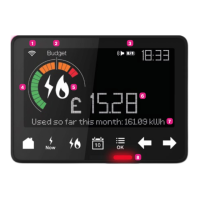
Detailed explanation of all numbered indicators and icons shown on the In-Home Display screen.
Explains the function of key buttons like Home, So Far Today, and Menu.
Guidance on setting daily, weekly, or monthly budgets for managing energy spend.
Step-by-step instructions for setting up daily, weekly, or monthly energy budgets.
How to view energy usage by day, week, month, and identify appliance consumption.
Explains how Wi-Fi keeps the display updated and provides extra features.
Step-by-step guide for connecting the In-Home Display to a Wi-Fi network.
Instructions on how to disconnect the In-Home Display from the current Wi-Fi network.
Tips on reducing energy by lowering thermostat settings and washing at lower temperatures.
Advice on saving energy by switching to LED bulbs and turning off standby appliances.
Tips for saving energy by heating less water and insulating windows.
How to read electricity meter readings, including 2-rate meters, in kWh.
How to read gas meter readings using the In-Home Display, shown in m³.
Instructions on accessing meter information for both electricity and gas via the IHD.
Steps to take if the In-Home Display screen goes blank, including recharging.
Guidance on resolving issues where the display shows no data, often related to proximity.
What to do if the In-Home Display isn't showing data after 48 hours.
Information on where to find online help and community support.
 General
| Brand | CHAMELEON |
|---|---|
| Model | IHD6-CAD-PPMID |
| Category | Measuring Instruments |
| Language | English |


 To Next Page