6. The Receiver tab should show CHAPRO in the
antenna selection window, the abs. value should be 77.8mm
and the Vertical radio button should be selected. The
elevation mask should be at least 10, if not higher,
depending on site conditions. Check the IMU (Inertial
Measurement Unit) check box if you intend to use
automatic level checking (additional configuration and
settings required).
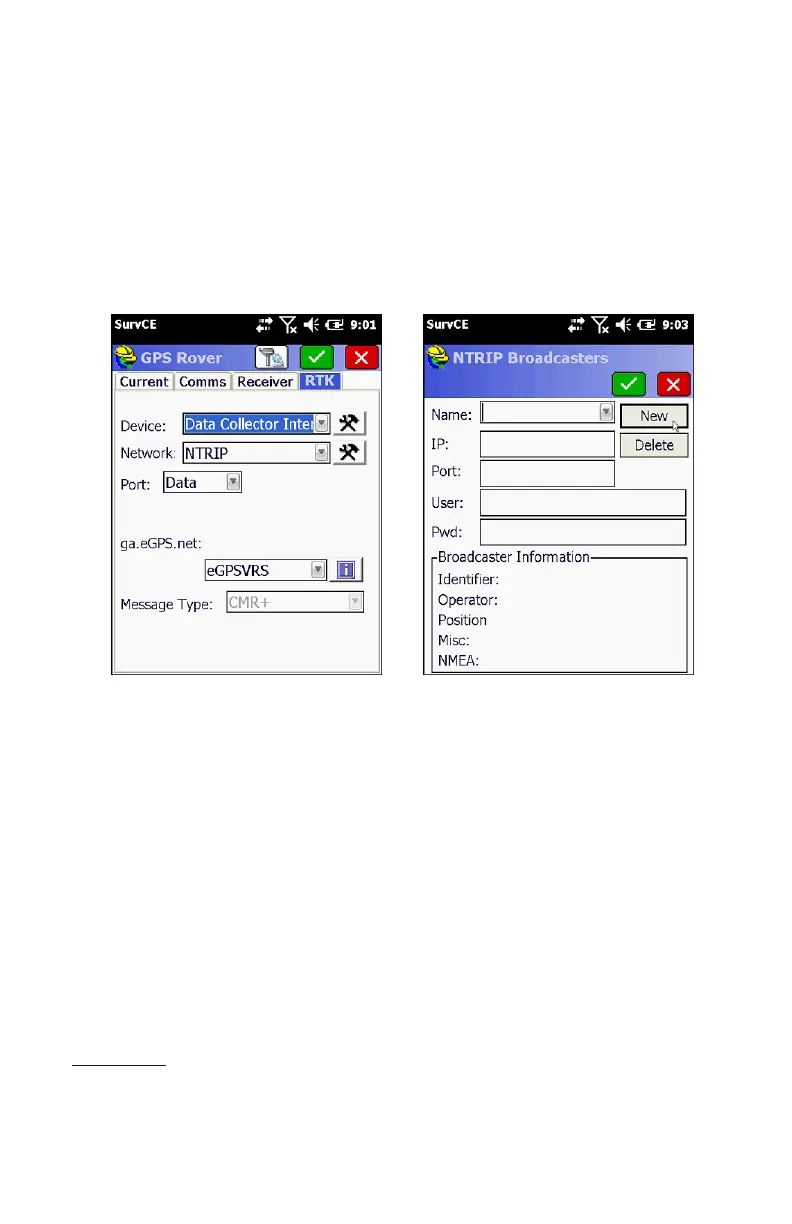
7. To configure the Pro as a network rover, select Data
Collector Internet for the Device field and NTRIP for the
Network field. Press the hammer and wrench icon to add
NTRIP broadcasters to the list of selectable broadcasters.
8. On the NTRIP Broadcasters screen, enter an arbitrary
name to identify the broadcaster account in the Name field
(eGPS Solutions, for example). Next enter the IP address for
the broadcaster in the IP field (for example, 107.7.166.152).
Next enter the Port number in the Port field (for example,
8080). Next, enter your broadcaster account username and
password. You should be connected to the internet
BEFORE starting SurvCE so the collector can connect to the
broadcaster and download the base station mount points
when you press the green check mark to save the new
broadcaster account.
20


 To Next Page