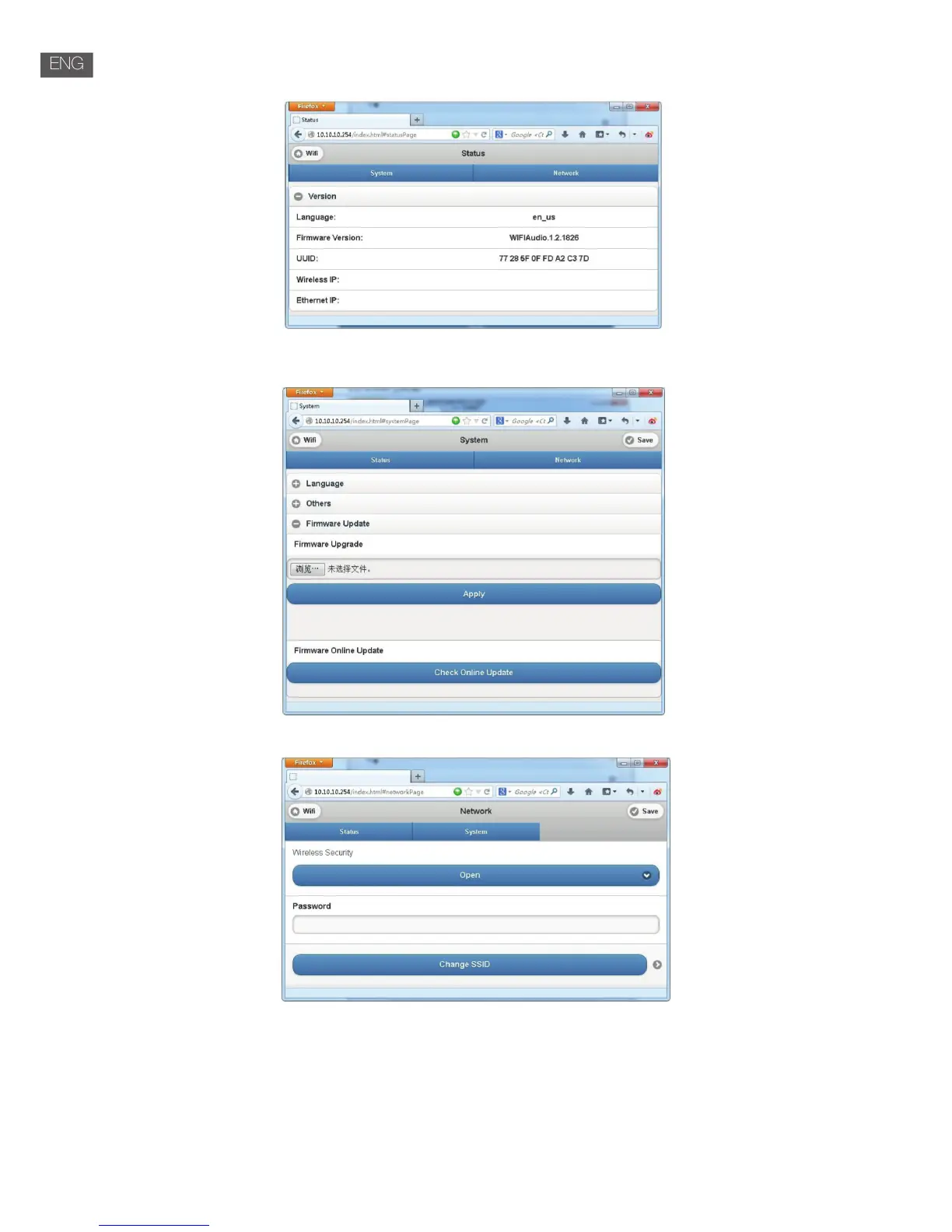
4. Setting tab: There are 3 sub tabs in setting tab: Status, System and Network.
( 1 )Status tab: View the rmware version, UUID of Wi-Fi speaker.
( 2 )System tab: Reset the Wi-Fi speaker and local upgrade rmware in “Other” option and online upgrade rmware
in “Firmware Online Upgrade”.
( 3 )Network tab: Setting the SSID, password and encryption type of Wi-Fi speaker.
Music Playing
• Wi-Fi mode:
Customer could use APP to search and add it to the management list, then play the music of choice.
If two speakers play the same music in the same time( Multi room mode ), Please carry out the
corresponding operation according to the APP. Customer could automatically install the APP by Android Market or
App Store. In the Android Market or App Store search ”Champion”, download and complete the installation.


 To Next Page