35
INSTALLER Section (en)
7698967.01 (1-01/18)
11.2 ACCESSORIES NOT INCLUDED IN THE SUPPLY
11.2.1 REMOTE CONTROL
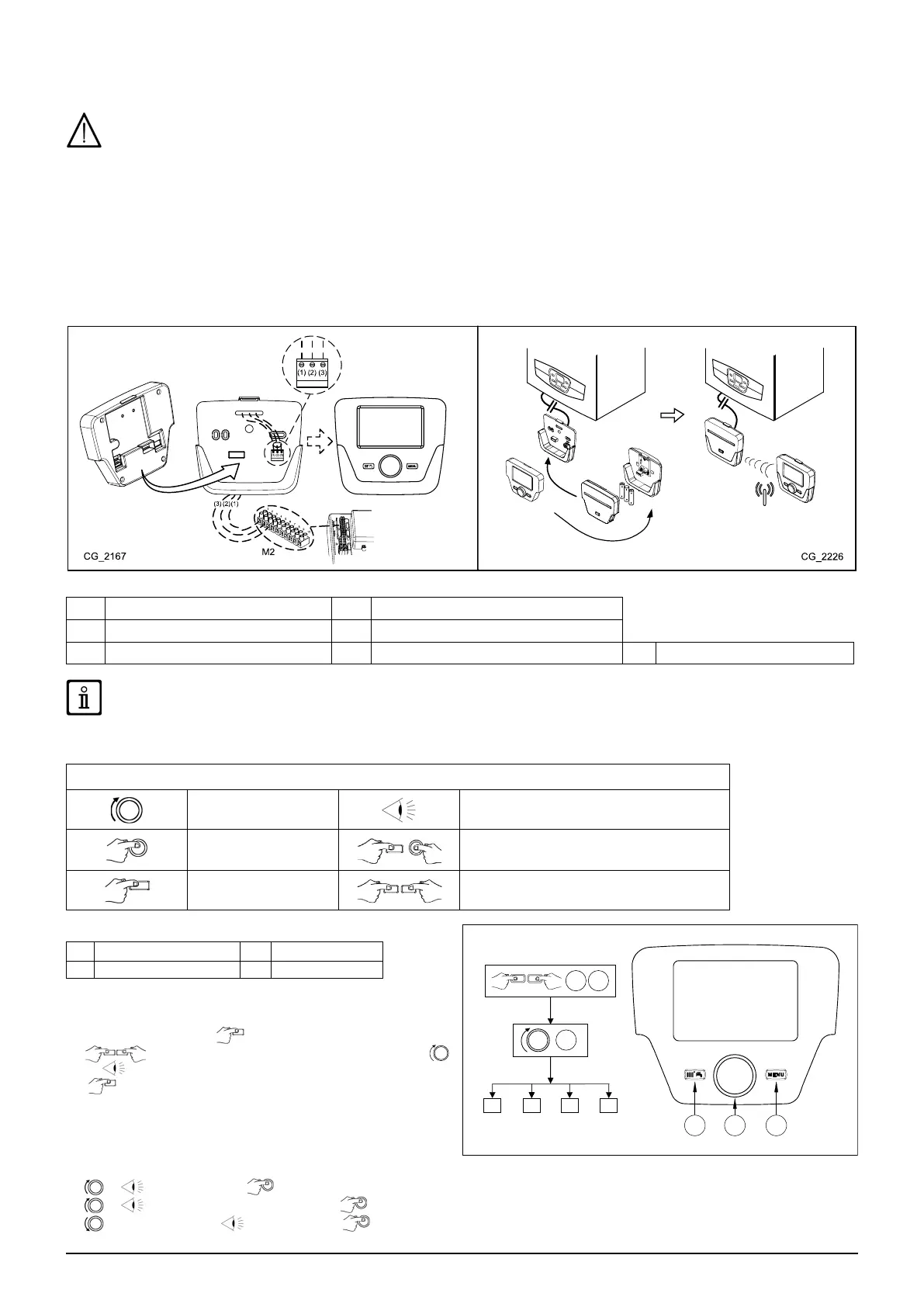
The wire (1) from the boiler terminal block M2 powers the display backlighting (12 V). It is not necessary to connect this wire to
make the Remote Control work.
To operate the boiler with the Remote Control mounted on the wall, purchase accessory A supplied with the base A1. Also see
the mounting and operation instructions supplied with the kit A. Proceed as follows:
• Switch off the boiler.
• Pass the three wires from the boiler terminal block M2 through the hole in the base A1 to apply to the wall.
• Connect wires 1-2-3 of the boiler terminal block M2 to terminals (1)-(2)-(3) of the base terminal block A1 respectively.
• Fix the base A1 to the wall using the expansion grips and screws supplied with the accessory.
• Apply the Control Panel A to the base xed to the wall, taking care not to apply excessive force.
• Power the boiler making sure that the Remote Control lights up.
A1
A
A - A1
A
A1
A1
A
B
B1
B
B1
A
Control Panel
A1 Base for wall-mounted Control Panel
B Led interface accessory B1 Base for Led interface accessory
(1) Display backlighting +12V (2) Earth connection (3) Power input/Signal +12V
Use the Remote Control to set the programmable timer for heating and DHW. See the instructions supplied with the accessory.
SETTING PARAMETERS USING THE REMOTE CONTROL
SYMBOLS FOR REMOTE CONTROL
Turn knob B Display shows
Press knob B Press button A and knob B together
Press button A or C Press buttons A and C together
KEY TO FIGURE MENU
1
Enduser
3
Engineer
2
Commissioning
4
OEM
The following procedure is used to access the four boiler
programming menus:
• from the main menu C.
•
A and C (hold down for approx. 6 seconds)
B menu 1-2-3-4 (see gure to side and key).
•
C to go back one menu at a time to the main menu.
When the Control Panel is wall-mounted enable the room
sensor and ow temperature modulation as follows:
A) ROOM SENSOR
• Access menu 2.
•
B Operator unit B to conrm.
•
B programme row 40 (Used as) B.
•
B (anti-clockwise) Room unit 1 B to conrm (the room sensor is now active).



 To Next Page