Voice Command : After stopping Music or FM Radio, press and hold the PLUS (+)
button at the same time for more than 1 second to use the voice recognition feature
(Siri, S-voice, etc.) within your mobile-phone. The voice recognition feature on your
mobile-phone must be enabled.
5. MOBILE-PHONE CONNECTION
Mobile-phone Pairing
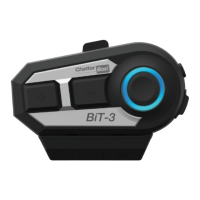
① Make sure your BiT-3 unit is powered off.
② Press and hold POWER button for 8 seconds until the LED turns and flashes in red
and blue alternately.
③ Turn on the Bluetooth function in your mobile-phone and search and select the
name of the unit (ChatterBox BiT-3 Vxx)
④ Certain mobile-phones may require a password <Password: 0000>
⑤ After pairing is completed, the blue LED slowly flashes twice.
⑥ After pairing is nished, turn the power of the unit o and turn on the unit again
to prevent a sudden volume increase.
※NOTE for iPhone users: After the pairing is done, please set the unit at the
minimum volume level to prevent sudden volume increase.
Second mobile-phone pairing
Pairing sequence is exactly the same as the first mobile-phone pairing.
※CAUTION: Please make sure that you turn off the Bluetooth function of the first
paired-mobile phone before starting the second mobile-phone pairing.
New mobile-phone (the third phone) replacement
① Turn off one of the previously paired mobile-phone's Bluetooth function or delete
one the paired unit's name (ChatterBox BiT-3 Vxx) from the connected Bluetooth
device list on the mobile-phone settings.
② Pairing sequence is exactly the same as the first mobile-phone pairing.
6. MODE CHANGE
Music Mode : Short press the MAIN FUNCTION button twice.
9


 To Next Page