18. SIMPLE MANUAL
21
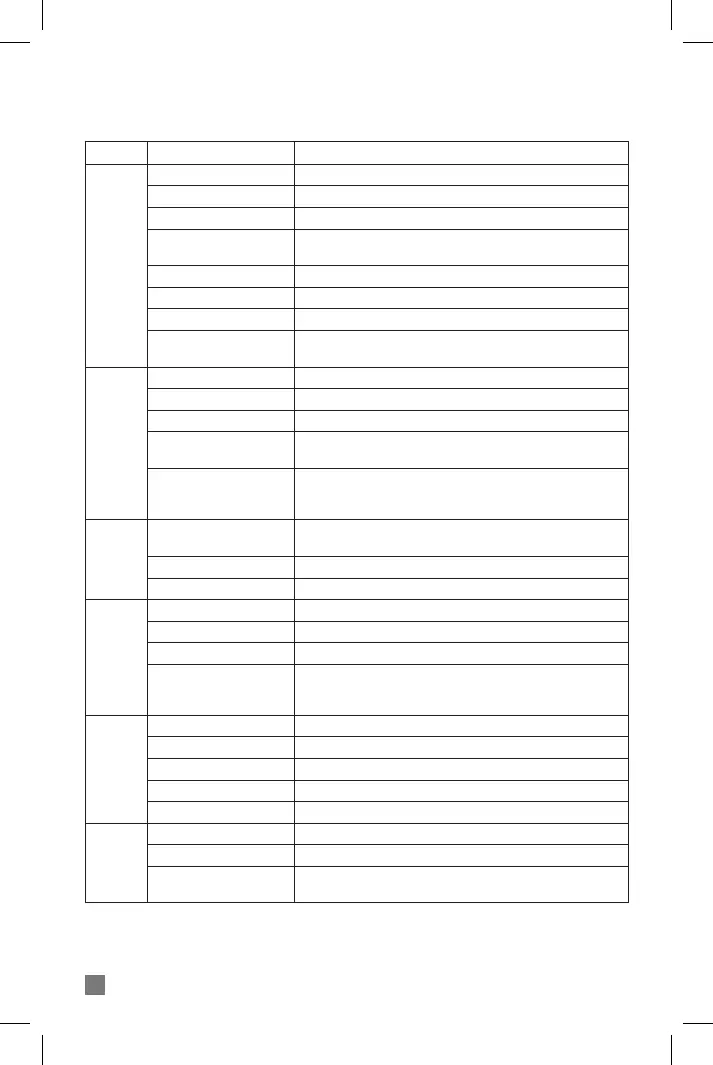
MODE FUNCTION OPERATION
Power on
Long press POWER button for 3 seconds
Long press POWER button for 6 seconds
Short press PLUS (+) or MINUS (-) button
In the Smartphone pairing mode, simultaneously long press PLUS
(+) and MINUS (-) button
Simultaneously press PLUS (+) and MINUS (-) button for 5 seconds
Simultaneously press FUNCTION and MINUS (-) button for 8 seconds
While pressing MINUS (-) button, insert USB cable
While simultaneously pressing POWER and PLUS (+) buttons,
insert USB cable (on power o state)
Short press MAIN FUNCTION button
Long press MAIN FUNCTION button
Power o
Volume control
Change language
Change VOX level
Factory reset
Reboot
Software download
Answer call
Hang up / Reject call
Dial the last number call
Voice Command (Smart-
phone’s Siri function)
While being on the phone,
switching device between
BiT-3 and mobile-phone
Smartphone pairing
Intercom pairing
Universal Intercom pairing
Entering music mode
Stop / Play
Next song / Previous song
Switching music play be-
tween two paired mobile-
phones
Entering FM Radio mode
Searching channel
Play / FM Radio mute
Saving channel
Change saved channel
Intercom connection
Intercom disconnection
Universal Intercom discon-
nection
Long press PLUS (+) button after stopping Music or FM Radio
While being on the phone, simultaneously press PLUS (+) and
MINUS (-) buttons for 1.5 seconds
After pressing POWER button for 8 seconds, search for BiT-3 in
the Bluetooth function of the Smartphone
In Smartphone pairing mode, short press POWER button
In Smartphone pairing mode, double-short press POWER button
Short press the MAIN FUNCTION button twice at FM Radio mode
Short press MAIN FUNCTION button
Double-Short press Plus (+) or Minus (-) button
Long press MAIN FUNCTION button
Double-Short press MAIN FUNCION button at MUSIC mode
Double-Short press Plus (+) or Minus (-) button
Short press MAIN FUNCTION button
Press MAIN FUNCTION button more than 2 seconds
Long press PLUS (+) or MINUS (-) button
Short press POWER button or Shout out to Microphone
Short press POWER button
Double-Short press POWER button
Long press MINUS (-) button after stopping Music or FM Radio
GENERAL
PHONE
PAIRING
MUSIC
FM RADIO
INTERCOM


 To Next Page