④ Now tighten the screws on the bracket to fit the cradle to the helmet firmly using
the L wrench.
⑤ Connect the microphone and speakers to the cradle. Be careful to match the
arrow on the connecting plug and jack.
⑥ Insert the guide n on the back of the product along the slide of the cradle and
push it down until you hear the ‘click’ sound.
※CAUTION : Over-tightening the screws may cause the slide to bend and make it
difficult to fit the product.
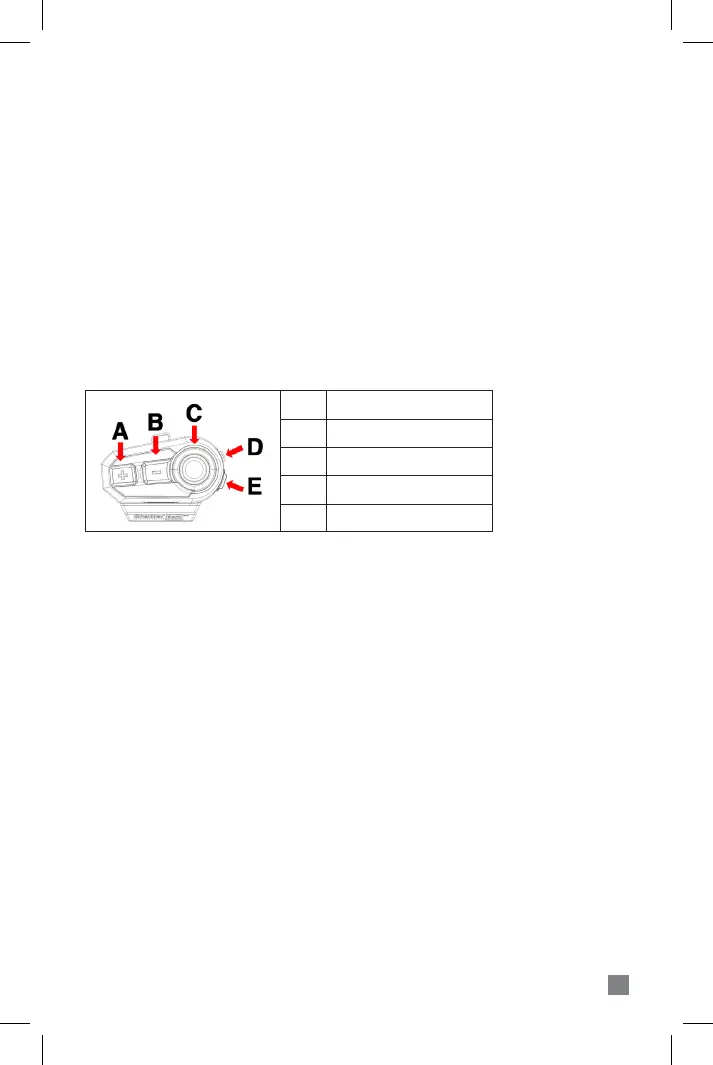
3. BUTTONS AND INPUTS
4. BASIC FUNCTIONS
Power On : Long press POWER button for 3 seconds.
Power O : Long press POWER button for 6 seconds.
※CAUTION : The power operation cannot be resumed for 8 seconds after the
power is turned on or off. Please try again after 8 seconds.
Volume Up : Press the PLUS (+) button at intervals of longer than 0.5 seconds.
Volume Down : Press the MINUS (-) button at intervals of longer than 0.5 seconds.
※CAUTION : Fast pressing twice in less than 0.5 seconds will result in the next /
previous song selection in Music mode or channel search on FM radio
mode.
Automatic Power-O : If you do not operate the unit for longer than 60 minutes,
the unit will automatically turn o to save the battery.
8
A
PLUS (+) button
B
C
D
E
MINUS (-) button
FUNCTION button
POWER button
USB port


 To Next Page