EasyManua.ls Logo

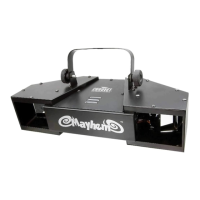
Chauvet Mayhem - User Manual

Chauvet Mayhem
17 pages
Print Icon
To Next Page IconTo Next Page
Loading...
3000 N 29
th
Ct, Hollywood, FL 33020 U.S.A.
(800) 762-1084 (954) 929-1115
FAX (954) 929-5560
www.chauvetlighting.com
User Manual
Snapshot
Use on Dimmer
Outdoor Use
Sound Activated
DMX
Master/Slave
Autoswitching
Power Supply
Replaceable Fuse
User Serviceable
Duty Cycle

Questions and Answers

  • O
    okempJul 31, 2025
    What to do if my Chauvet DJ Equipment does not power up?
    • M
      mark34Jul 31, 2025
      If your Chauvet DJ Equipment isn't powering on, first, ensure that the power mains are active. Next, check the power cord to confirm it's properly connected.
  • R
    randersonAug 8, 2025
    Why does the breaker/fuse keep blowing in my Chauvet DJ Equipment?
    • M
      Mark WareAug 8, 2025
      If the breaker or fuse keeps blowing in your Chauvet DJ Equipment setup, it could be due to an excessive circuit load. Check the total load placed on the electrical circuit. Alternatively, there might be a short circuit along the power wires. Inspect the electrical wiring, both internal and external, for any shorts.
  • S
    Samantha CastroAug 15, 2025
    How to troubleshoot a Chauvet DJ Equipment fixture not responding to DMX?
    • M
      Matthew GreeneAug 15, 2025
      If your Chauvet DJ Equipment fixture isn't responding to DMX, there are several potential causes. First, check the control panel and unit addressing to ensure the DMX addressing is correct. Next, inspect the DMX cables for any damage. Also, verify the polarity switch settings on the controller. Check the cable connections to make sure the DMX cables aren't loose. If everything else checks out, the DMX input or the Main PCB may be faulty and need to be replaced.
  • C
    Catherine WilliamsAug 22, 2025
    What to do if I have a loss of signal in my Chauvet DJ Equipment?
    • C
      Chelsea NicholsAug 22, 2025
      If you're experiencing signal loss with your Chauvet DJ Equipment, ensure you are using only DMX compatible cables. If that's not the issue, bouncing signals may be the cause, so install a terminator. For long cables or low-level signals, install an amplifier after a fixture with a strong signal. If you're using too many fixtures, install an optically coupled DMX splitter after unit #32. Finally, keep DMX cables separated from power cables or black lights to avoid interference from AC wires.

Summary

Before You Begin

What is included

Lists the items included in the product package.

Unpacking Instructions

Guides on how to unpack the fixture and check for damage.

Manual Conventions

Explains conventions used in the manual for clarity.

Icons

Explains icons used to highlight important information.

Safety Instructions

Critical information for safe installation, usage, and maintenance.

Introduction

Features

Lists key features of the Mayhem LED scanner.

Additional Features

Details extra features like high-power LEDs and power output.

Product Dimensions

Provides physical dimensions and measurements of the fixture.

Product Overview

Illustrates and labels the different parts of the fixture.

Setup

AC Power

Instructions for connecting the fixture to AC power.

Power Linking

Details how to link multiple fixtures together for power.

Mounting

Guides on mounting and orienting the fixture safely.

Rigging

Instructions and considerations for rigging the fixture securely.

Operating Instructions

DMX Operation

How to operate the fixture using DMX control.

Master;Slave Mode

Operating the fixture in Master/Slave mode with various programs.

Standalone Operation

How to operate the fixture in standalone modes like Auto or Sound-Active.

Automatic

Details the preprogrammed color fade program.

Sound-Active

Explains the preprogrammed sound-triggered chases.

Custom Program

How to combine functions for custom looks using DIP switches.

DMX Channel Values

Table showing DMX channel assignments and their functions.

Appendix

DMX Primer

Explains DMX connectivity, channels, and addressing.

General Maintenance

Guidelines for cleaning and maintaining the fixture for optimal performance.

Fixture Linking

Instructions on how to link multiple fixtures for shows or master/slave operation.

Data Cabling

Details on DMX data cables, specifications, and connectors.

DMX Data Cable

Specific requirements for DMX data cable type and characteristics.

Cable Connectors

Explains XLR connector types and DMX configuration.

3-Pin to 5-Pin Conversion Chart

Chart for converting between 3-pin and 5-pin DMX connectors.

Setting up a DMX Serial Data Link

Step-by-step guide for establishing a DMX serial data link.

Setting the Starting Address

How to set the DMX starting address for fixture control.

General Troubleshooting

Contact Us

Returns Procedure

Claims

Technical Specifications

Chauvet Mayhem Specifications

Power IconPower
autoswitching power supply100~240 VAC, 50/60 Hz
power consumption @ 120 VAC, 60 Hz31 W (0.4 A) max, 0.4 A inrush
power consumption @ 230 VAC, 50 Hz31 W (0.4 A) max, 0.3 A inrush
fuseT 2 A, 250 V
Light Source IconLight Source
led6 (2 red, 2 green, 2 blue) 3 W, 700 mA, 50, 000 hrs
Thermal IconThermal
maximum ambient temperature104° F (40° C)
Weight and Dimensions IconWeight and Dimensions
length8.2 in (208 mm)
width17.3 in (439 mm)
height8 in (203 mm)
weight6 lbs (2.7 kg)

Related product manuals