
 Need help?
Do you have a question about the Chauvet SlimPAR Pro Q USB and is the answer not in the manual?
Details on included items, unpacking, claims, text conventions, symbols, and disclaimer.
Overview of product features and critical safety precautions for installation and operation.
Detailed description of the product's features and design.
Instructions for AC power connection, fuse replacement, and power linking multiple units.
Guidelines for securely mounting, orienting, and rigging the product, including accessory attachment.
How to use the product's control panel buttons and navigate through the menu structure.
Setting up DMX linking, D-Fi USB wireless control, and configuration.
Configuring DMX personality, starting addresses, and understanding channel assignments.
Operating the product in automatic, sound-active, preset color, custom color, and dimmer speed modes.
Detailed functions and modes controllable via the IRC-6 infrared remote.
Setting up wired and wireless D-Fi USB master/slave configurations for controlling multiple units.
Guidelines for cleaning and maintaining the product's performance and longevity.
Procedures for returning a product for service and details for contacting global support.
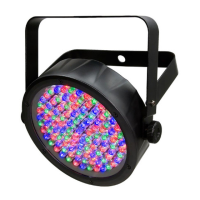
The SlimPAR PRO Q USB is a compact, quad-color RGBA (Red, Green, Blue, Amber) LED par fixture designed for various lighting applications. It features a robust design with a double-bracketed yoke for flexible mounting and includes a gel frame holder, making it suitable for both professional and amateur use. The device can be controlled via DMX, D-Fi USB, an IRC-6 infrared remote, or operate in standalone modes, offering versatility in setup and operation.
The SlimPAR PRO Q USB serves as a versatile lighting fixture capable of producing a wide range of colors and dynamic lighting effects. Its primary function is to provide illumination and atmospheric effects for events, stages, architectural lighting, and other venues. The quad-color RGBA LEDs allow for rich, vibrant color mixing, including warm amber tones, which can enhance the overall lighting design.
Control Panel Operation: The device is equipped with a user-friendly control panel featuring a display and four menu buttons (
DMX Control: The SlimPAR PRO Q USB is fully DMX-compatible, allowing for precise control over its functions when connected to a DMX controller. It supports multiple DMX channel personalities (4-CH, 5-CH, and 10-CH modes), enabling users to select the level of control desired. In DMX mode, users can adjust dimmer, individual RGBA color intensities, color macros, strobe speed, auto programs, sound sensitivity, and dimmer speed. The DMX Primer from Chauvet provides detailed information for users unfamiliar with the DMX protocol.
D-Fi USB Connectivity: A standout feature is its D-Fi USB compatibility. By simply plugging in a Chauvet DJ D-Fi USB transceiver, the SlimPAR PRO Q USB can transform into a wireless DMX receiver or transmitter. This eliminates the need for DMX cables, offering greater flexibility in rigging and setup. When a D-Fi USB is connected, it takes priority over wired DMX, manual control, and IRC-6 remote, ensuring seamless wireless operation. Users can configure the D-Fi USB for specific channels (1-16) for both transmitting and receiving, making it ideal for complex wireless setups.
Standalone Operation: For situations without a DMX controller, the SlimPAR PRO Q USB offers several standalone modes:
Master/Slave Mode (Wired): The device supports a wired Master/Slave configuration, where one SlimPAR PRO Q USB (the "master") controls the actions of multiple other units (the "slaves"). The master can operate in standalone mode or with an IRC-6 remote, and the slaves will mimic its behavior. This is achieved by daisy-chaining DMX cables between the units, with the master being the first in the chain. All slave products must be configured with a DMX address of d 1.
Master/Slave Mode (D-Fi USB): Leveraging its D-Fi USB capability, the SlimPAR PRO Q USB can also operate in a wireless Master/Slave setup. One unit acts as a D-Fi transmitter (master), controlling multiple D-Fi receiver units (slaves). This eliminates the need for DMX cables between units, simplifying setup. All products in this configuration must be set to the same DMX personality, DMX address (d 1 for slaves), and D-Fi channel.
IRC-6 Infrared Remote Control: The SlimPAR PRO Q USB is compatible with the optional IRC-6 infrared remote control, providing convenient wireless control over various functions. The remote allows users to:
Mounting and Rigging: The fixture comes with a double-bracketed yoke, allowing it to be mounted in any position, including overhead. When mounting overhead, a safety cable must always be used. The bracket adjustment knobs facilitate directional aiming. The product also includes a gel frame holder that can accommodate a gel frame or 7.5-inch barn doors, offering additional light shaping capabilities.
Power Linking: The SlimPAR PRO Q USB supports power linking, enabling multiple units to be powered from a single electrical outlet. This reduces the number of power cables needed, simplifying setup and cable management.
Fuse Replacement: The device features a replaceable fuse, which can be easily accessed and replaced by the user if it blows. Clear instructions are provided for safe fuse replacement.
Cleaning: Regular cleaning is crucial for maintaining optimal light output performance and extending the product's lifespan. The manual recommends cleaning the lighting products at least twice a month, with increased frequency depending on usage and environmental conditions. The cleaning process involves unplugging the product, allowing it to cool, removing dust from external surfaces and vents with a vacuum or soft brush, and cleaning transparent surfaces with a mild soap solution, ammonia-free glass cleaner, or isopropyl alcohol. It emphasizes carefully drying transparent surfaces after cleaning to prevent haze and lint.
General Care: To ensure longevity, it is recommended to completely disconnect the product from power during periods of non-use. The product is designed for indoor use (IP20) and should not be exposed to rain or moisture. Adequate ventilation is necessary, with at least 20 inches (50 cm) of clearance from adjacent surfaces, and ventilation slots should not be blocked. The product should never be connected to a dimmer circuit. In case of serious operating problems, users are advised to stop using the product immediately and contact an authorized technical assistance center rather than attempting repairs themselves.
 General
| Connector | 3-pin XLR |
|---|---|
| Life Expectancy | 50, 000 hours |
| Type | Par Can |
| LED Type | RGBW |
| Weight | 2.7 kg |
| Input Voltage | 100-240 VAC, 50/60 Hz |
| Control Modes | DMX, Standalone, Master/Slave |



 To Next Page
