140 Infotainment system
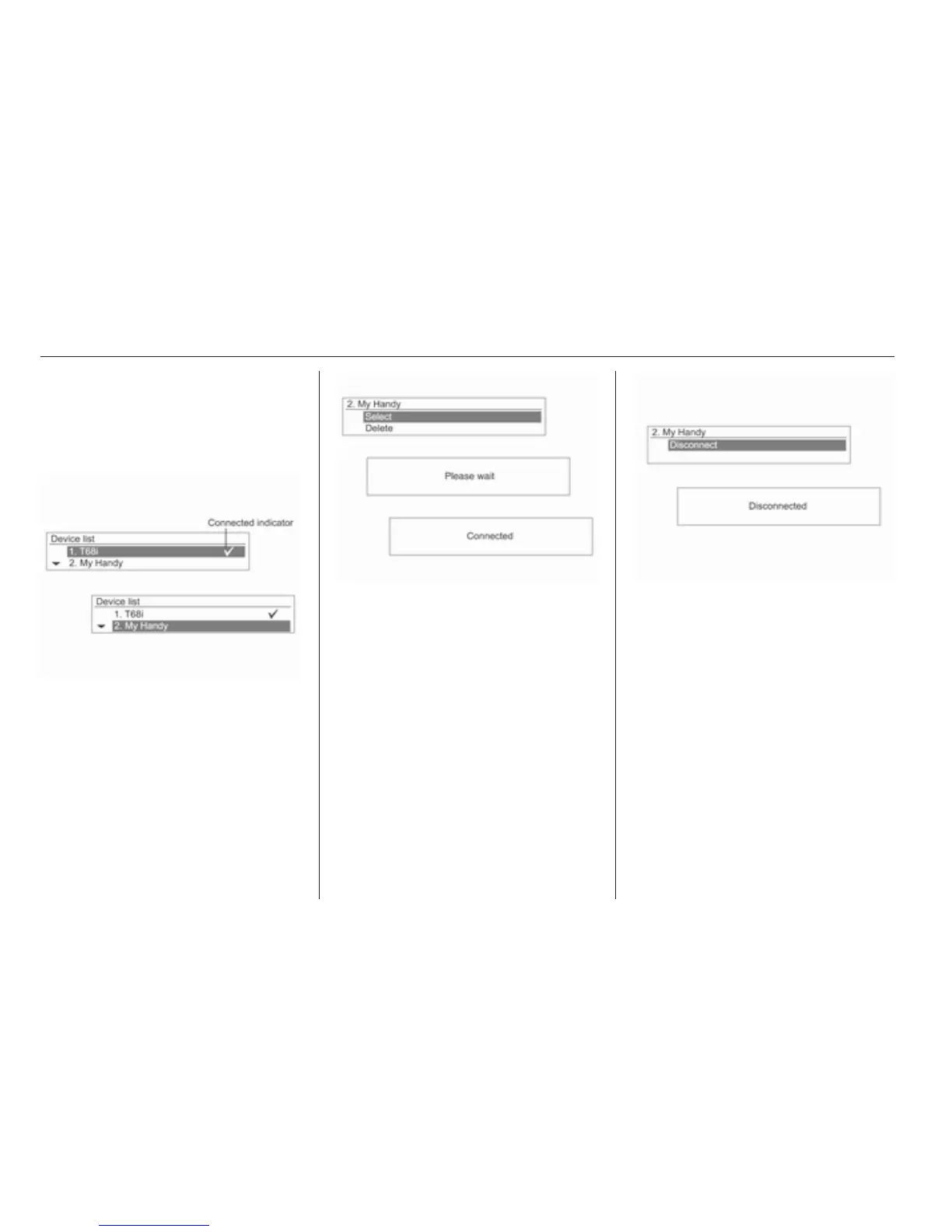
Press the CONFIG button, and use
the MENU button with TUNE dial, to
move to Settings → Bluetooth settings
→ Bluetooth → Device list and then
press the MENU button.
Use the MENU button with TUNE dial
to move from the registered Bluetooth
device to the device to be connected,
and then press the MENU button.
You can register by using the MENU
button with TUNE dial, moving to
select the item, moving to delete the
item to delete, and then pressing the
MENU button.
To disconnect the currently
connected Bluetooth device, from the
device list screen, select the
connected device, which will display
Disconnect, and then press the
MENU button.
Cautions for registering/connecting
Bluetooth
■ When it is not possible to connect
to Bluetooth, delete the entire
device list from the Bluetooth
device to be connected, and try
again. If deleting the entire device
list does not work, then reinstall the
battery and reconnect.




 To Next Page