Chevrolet Bolt EV Owner Manual (GMNA-Localizing-U.S./Canada-
14637856) - 2021 - CRC - 10/2/20
10 Keys, Doors, and Windows
Remote No Longer In Vehicle Alert
If the vehicle is on with a door open, and
then all doors are closed, the vehicle will
check for RKE transmitters inside. If an RKE
transmitter is not detected, the Driver
Information Center (DIC) will display NO
REMOTE DETECTED and the horn will chirp
three times.
This occurs only once each time the vehicle
is driven.
See Vehicle Personalization 0 101.
Keyless Liftgate Opening
Press the touch pad on the underside of the
liftgate glass and lift up to open if the RKE
transmitter is within 1 m (3 ft) and the doors
are locked. If the doors are unlocked, the
transmitter is not required to open the
liftgate. See Liftgate 0 18.
Key Access
To access a vehicle with a weak transmitter
battery, see Door Locks 0 14.
Programming Transmitters to the Vehicle
Only RKE transmitters programmed to the
vehicle will work. If a transmitter is lost or
stolen, a replacement can be purchased and
programmed through your dealer. The
vehicle can be reprogrammed so that lost or
stolen transmitters no longer work. Any
remaining transmitters will need to be
reprogrammed. Each vehicle can have up to
eight transmitters matched to it.
Programming with Two Recognized
Transmitters
A new transmitter can be programmed to
the vehicle when there are two recognized
transmitters. To program, the vehicle must
be off and all of the transmitters, both
currently recognized and new, must be
with you.
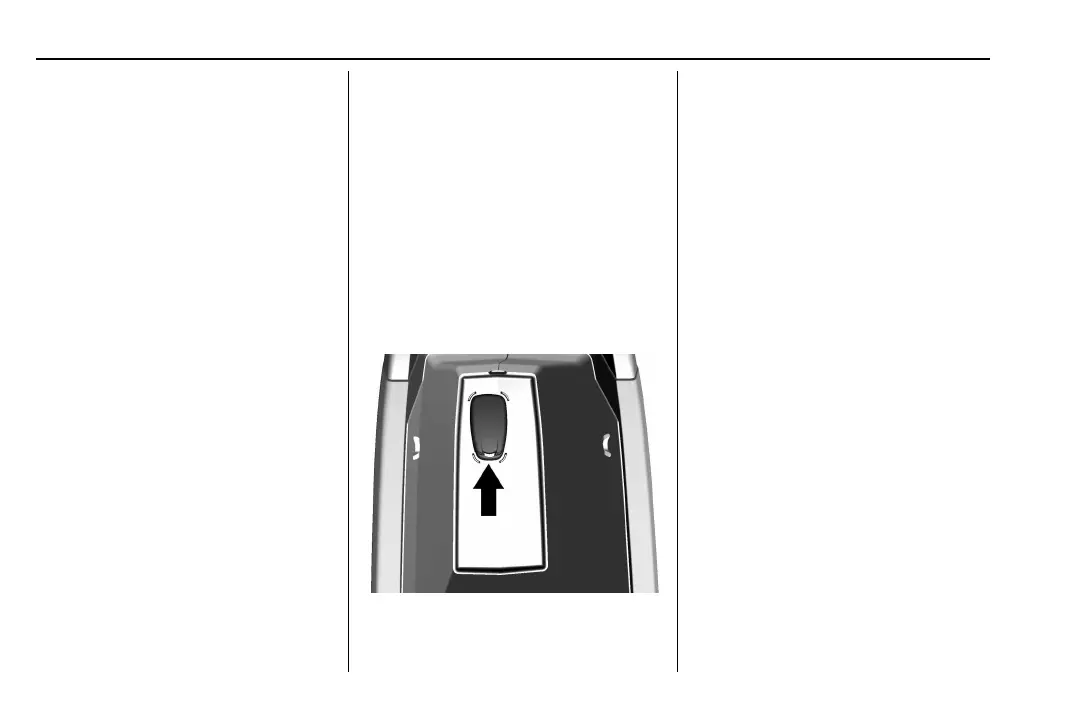
1. Open the center console and take out
the small tray, if equipped. Place the two
recognized transmitters in the backup
location with the buttons facing down.
2. Remove the key lock cylinder cover on
the driver door handle. See Door Locks
0 14. Insert the vehicle key of the new
transmitter into the key lock cylinder on
the driver door handle and turn the key
to the unlock position five times within
10 seconds.
The DIC displays READY FOR REMOTE # 3,
4, 5, 6, 7, or 8.
3. Place the transmitter to be programmed
in the backup location with the buttons
facing down.
4. Press POWER
O to start the vehicle.
When the transmitter is learned, the DIC
will show that it is ready to program the
next transmitter.
5. Remove the transmitter from the backup
location and press
K or Q .
To program additional transmitters,
repeat Steps 3–5.
When all additional transmitters are
programmed, press and hold POWER
O
for 12 seconds to exit
programming mode.









 To Next Page