Chevrolet Bolt EV Owner Manual (GMNA-Localizing-U.S./Canada-
14637856) - 2021 - CRC - 10/2/20
72 Instruments and Controls
Controls
Steering Wheel Adjustment
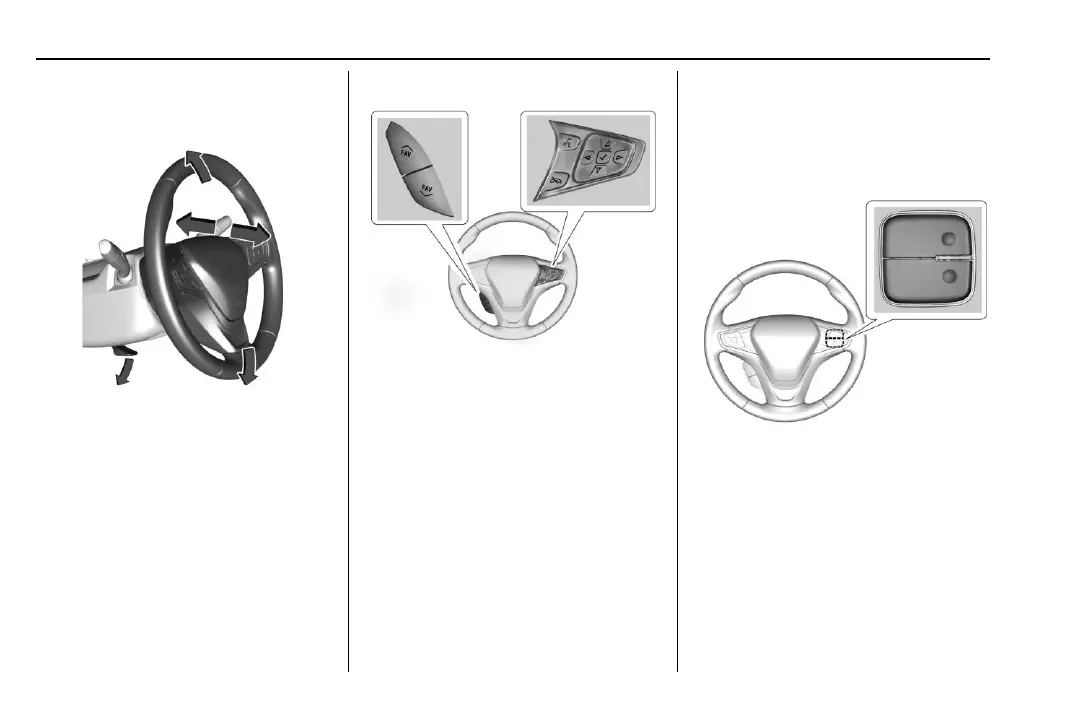
To adjust the steering wheel:
1. Pull the lever down.
2. Move the steering wheel up or down.
3. Pull or push the steering wheel closer or
away from you.
4. Pull the lever up to lock the steering
wheel in place.
Do not adjust the steering wheel while
driving.
Steering Wheel Controls
If equipped, some audio controls can be
adjusted at the steering wheel.
g : If equipped with OnStar or a Bluetooth
system, press to interact with those
systems. See OnStar Overview 0 274 or
Bluetooth 0 127.
c : Press to decline an incoming call or
end a current call. Press to mute or unmute
the infotainment system when not on a call.
w or x : Press to go to the previous or
next selection.
o or p : Press to move between the
interactive display zones in the cluster.
@ : Press to select a highlighted menu
option.
yFAV or FAV z : Press to display a list of
favorites and select the next or previous
favorite when listening to the radio.
The volume switches are on the right rear
side of the steering wheel. Press to increase
or decrease the volume.












 To Next Page