Chevrolet Bolt EV Owner Manual (GMNA-Localizing-U.S./Canada-
14637856) - 2021 - CRC - 10/2/20
172 Driving and Operating
the infotainment display. The front camera
is in the grille or near the front emblem, the
side cameras are on the bottom of the
outside mirrors, and the rear camera is
above the license plate.
The Surround Vision system can be accessed
by selecting CAMERA in the infotainment
display or when the vehicle is shifted into
R (Reverse). To return to the previous screen
sooner, press any button on the
infotainment system, shift into P (Park),
or reach a vehicle speed of approximately
12 km/h (8 mph).
{
Warning
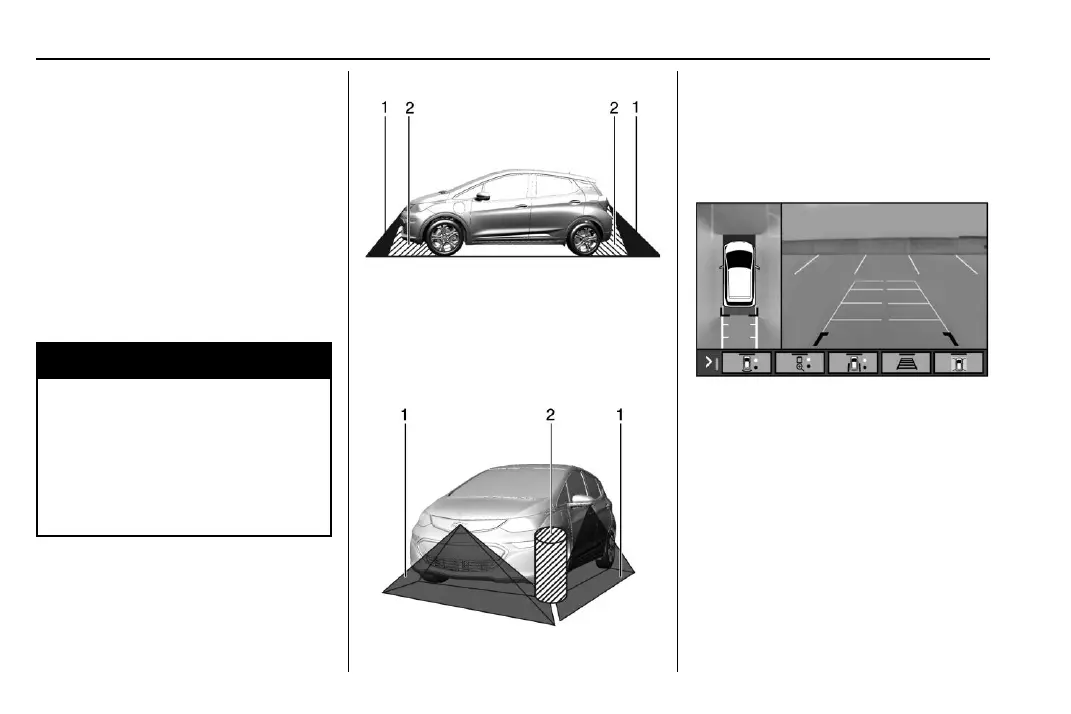
The Surround Vision Cameras have blind
spots and will not display all objects near
the corners of the vehicle. Folding side
mirrors that are out of position will not
display surround view correctly. Always
check around the vehicle when parking or
backing.
1. Views Displayed by the Surround
Vision Cameras
2. Area Not Shown
1. Views Displayed by the Surround
Vision Cameras
2. Area Not Shown
Camera Views
Touch the camera view buttons along the
bottom of the infotainment display.
Front/Rear Standard View : Displays an
image of the area in front or behind the
vehicle. Touch Front/Rear Standard View on
the infotainment display when a camera
view is active. Touching the button multiple
times will toggle between front and rear
camera views.
If equipped, the front view camera also
displays when the Park Assist system
detects an object within 30 cm (12 in).






 To Next Page