Chevrolet Bolt EV Owner Manual (GMNA-Localizing-U.S./Canada-
14637856) - 2021 - CRC - 10/2/20
94 Instruments and Controls
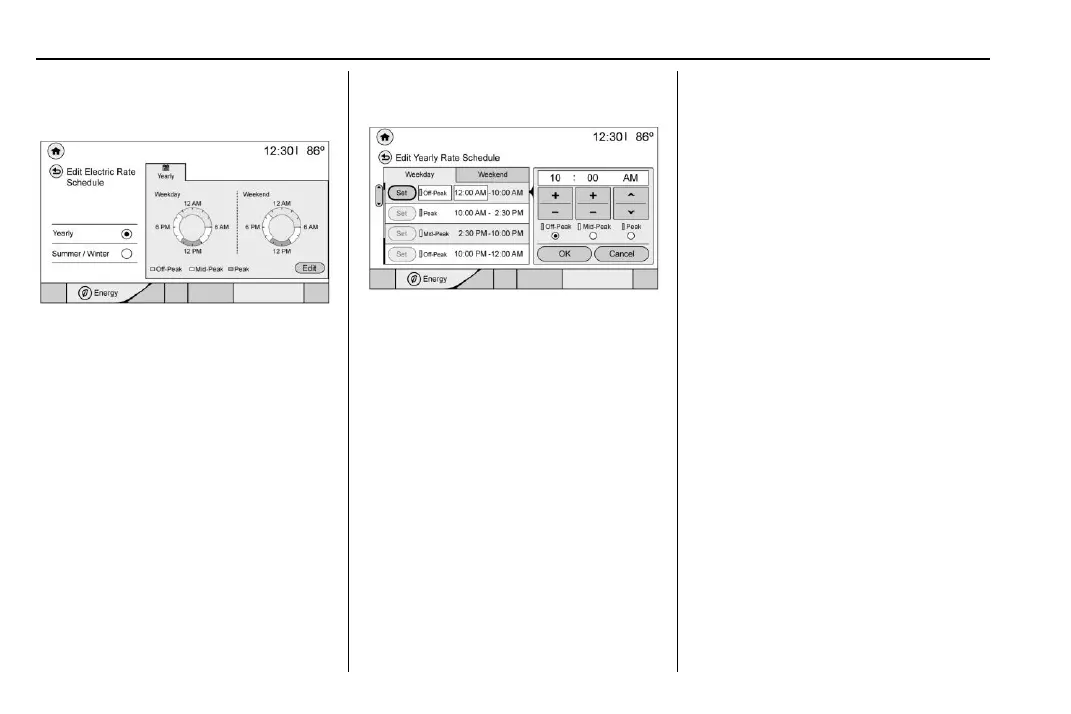
1. Touch Edit Electric Rate Schedule from
the Electric Rate Schedule screen and
select the desired schedule.
Yearly Shown, Summer/Winter Similar
2. Touch Edit in the lower right corner of
the screen to edit the electric rate
schedule.
.
Weekdays are Monday through
Friday and use the same rate
schedule.
.
Weekends are Saturday and Sunday
and use the same rate schedule.
Both weekday and weekend
schedules must be set. The rate
schedule only applies for a 24-hour
period, starting at 12 AM and ending
at 12 AM. There can be five rate
changes for each day; not all must
be used.
Select Weekday or Weekend.
3. Touch Set next to the row to be edited.
Yearly Shown, Summer/Winter Similar
4. Select Peak, Mid-Peak, or Off-Peak. Use +
or - to enter the time, and
y or z to
change AM or PM.
The finish times must be consecutive.
If a finish time does not follow a start
time, an error message displays.
5. Touch OK.
Priority Charging
The priority charging feature will work when
the Departure charge mode is selected. This
feature is designed to ensure that the high
voltage battery has a minimal amount of
energy prior to delaying a charge. Upon
completion of priority charging, the vehicle
will return to normal Programmable
Charging operation.
The feature can be enabled/disabled by
selecting On/Off from the Charge Mode tab
on the Charging screen when the Departure
charge mode is selected. When enabled,
Priority Charging will only prevent
Programmable Charging while the high
voltage battery is recharged from a depleted
state to a 40% state of charge.
Temporary Charge Mode Override and
Cancel
Programmed delayed charge modes can be
temporarily overridden to an immediate
charge mode for one charge cycle. Also, the
next planned departure time can be
temporarily overridden for one charge cycle.
In addition to the in-vehicle overrides via the
programmable charging screens, there are
other ways to temporarily override a
delayed charge mode. See Plug-In Charging
0 181.
Temporary Override of a Delayed
Charge Mode
The Temporary Override provides the ability
to set temporary charge items for the next
charge cycle.













 To Next Page