12 In Brief
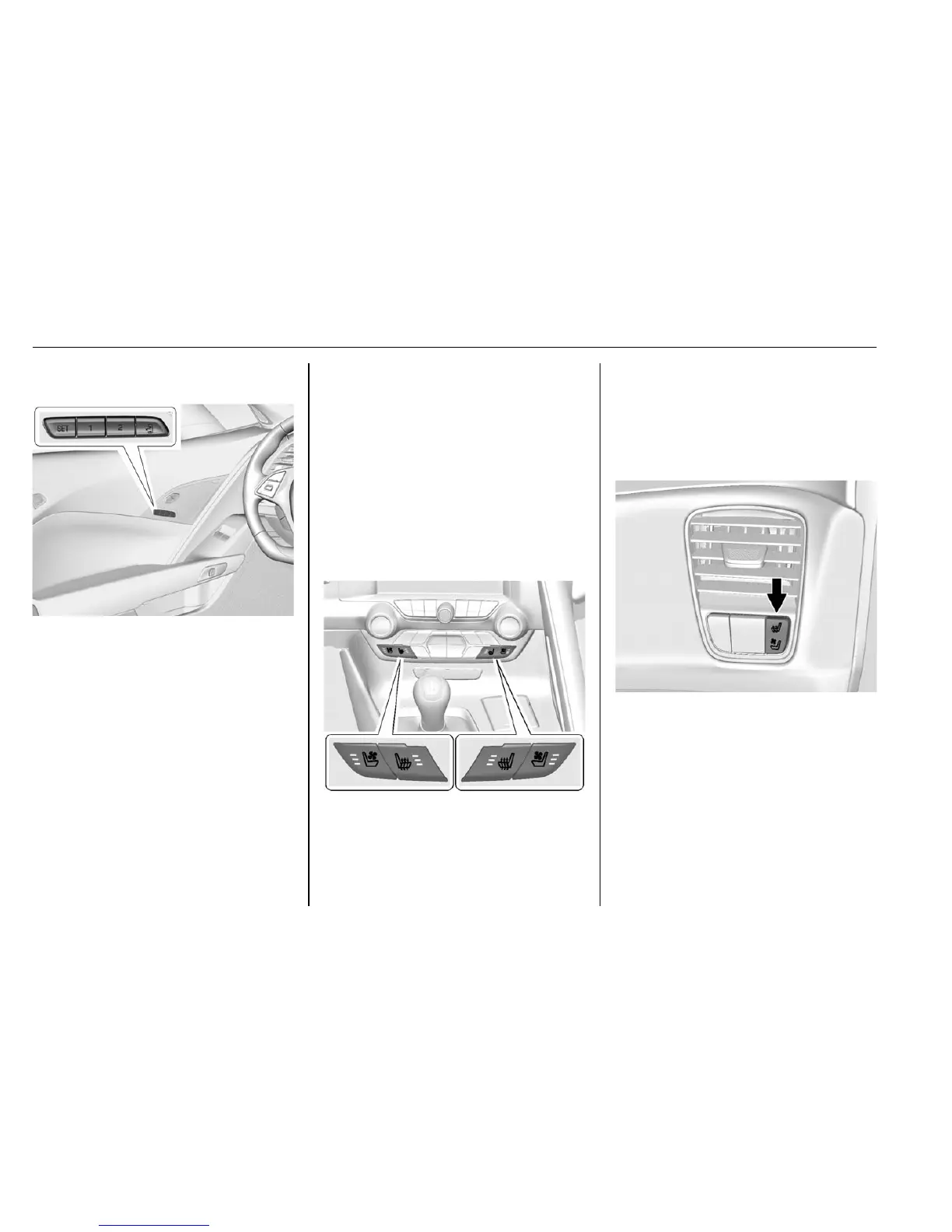
Memory Features
If equipped, the 1, 2, SET, and S
(Exit) buttons on the driver door are
used to manually store and recall
memory settings for the driver seat,
outside mirrors, and power tilt and
telescoping steering column.
When Auto Memory Recall is
enabled in the personalization
menu, positions previously stored to
memory buttons 1 and 2 are
recalled when the ignition is
changed from OFF to ON/RUN or
ACC/ACCESSORY.
When Easy Exit Options is enabled
in the personalization menu, the
seats will move rearward when the
ignition is changed to OFF and
driver door is opened within a
short time.
See Memory Seats 0 57 and
Vehicle Personalization 0 130.
Heated and Ventilated
Seats
Driver and Passenger Controls
If equipped, the driver buttons are
on the center stack. To operate, the
ignition must be on.
Press
C or M on the left side of the
climate control panel to ventilate or
heat the driver seat. A ventilated
seat has a fan that pulls or pushes
air through the seat. The air is not
cooled.
Passenger Controls
The passenger buttons are also on
the right side of the instrument
panel under the air vent. Press
L or
{ to heat or ventilate the passenger
seat. The driver can also turn on or
off the passenger heated and
ventilated seats using the buttons
on the right side of the climate
control panel.










 To Next Page