Infotainment System 149
.
Track
.
Performance Timing
No Overlay:
No vehicle data displays on top of
the recorded video. Vehicle data is
still available with the video when
accessed in the toolbox software.
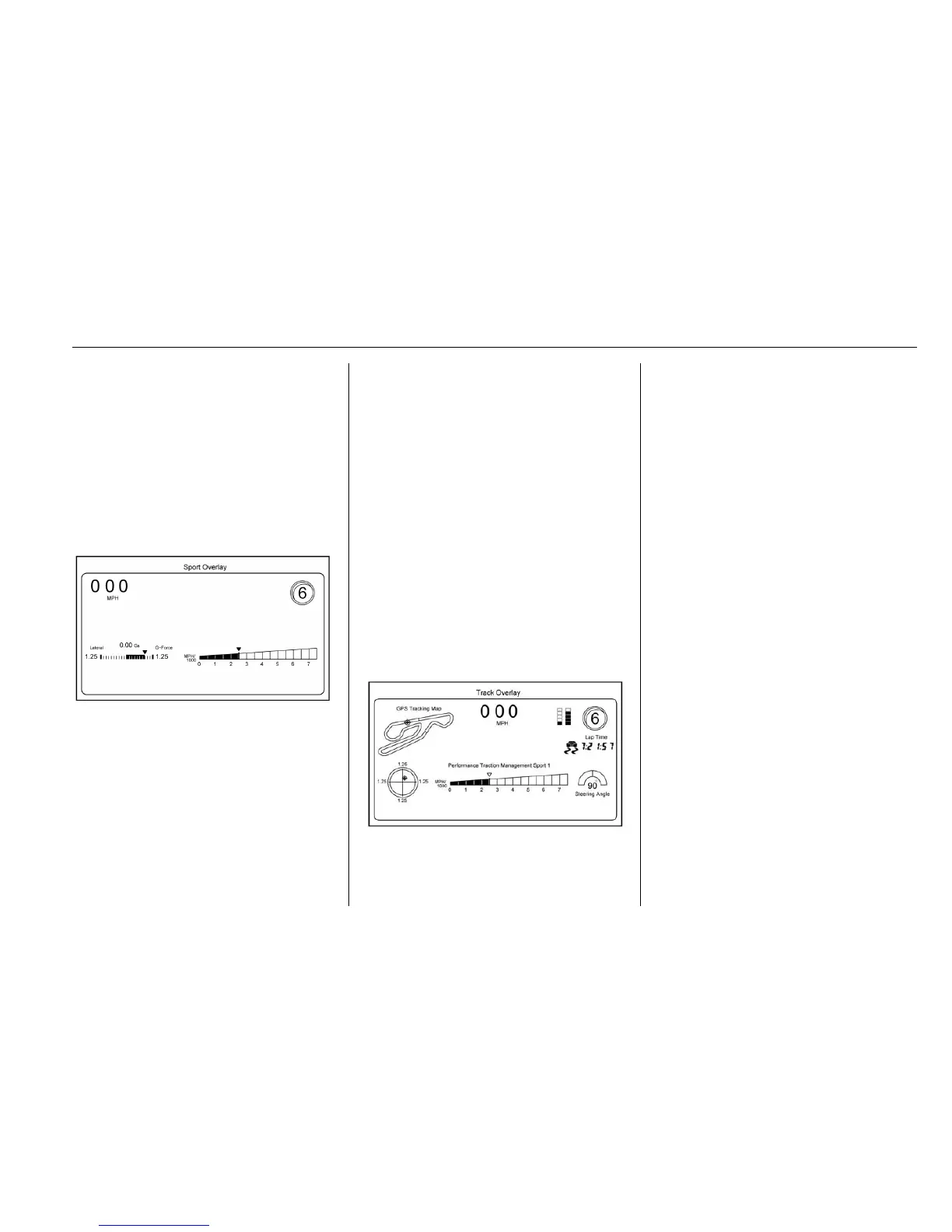
Sport:
Displays these vehicle metrics:
.
Vehicle Speed: Up to three digits
are displayed in km/h or MPH
depending on vehicle settings.
.
Engine Rotations Per Minute
(RPMs): The vertical line and
triangle show current RPMs. As
the RPMs increase, the orange
backfill follows.
.
Transmission State (Current
Gear): Automatic transmissions
display PRDN. D can change to
D1, D2, etc. When an automatic
transmission is in manual shift
mode, the display will change to
M1, M2, etc. Manual
transmissions display 1, 2, etc.
.
Lateral G-Force Graphic: Left
and Right G-Forces are
displayed. The graphic fills to the
left or the right depending on the
measure value. The measured
G-Force displays as a number at
the top of the graphic.
Track:
Displays these vehicle metrics:
.
Vehicle Speed: Same as Sport.
.
GPS Tracking Map: Shows the
vehicle’s current position relative
to a known route.
.
Engine Rotations Per Minute
(RPMs): The vertical line and
triangle indicate current RPMs.
As the RPMs increase, the
orange backfill follows.
.
Transmission State (Current
Gear): Same as Sport.
.
Friction Bubble Graphic: Lateral
and longitudinal G-Forces are
displayed as a dot within a
bubble. A red dot displays when
the vehicle starts braking and
turns green when the vehicle
accelerates. The dot is white
when the vehicle is not moving.
A white dot is the default.
.
Brake and Throttle Graphic:
Displays the percentage value of
brake and throttle pedal position
from 0–100%.
.
Steering Angle: The graphic fills
from the center to the left or right
depending on the direction of










 To Next Page