Navigation/Radio System
Your vehicle may have a navigation radio system.
The navigation system has built-in features
intended to minimize driver distraction. Technology
alone, no matter how advanced, can never
replace your own judgment. See the Navigation
System manual for some tips to help you
reduce distractions while driving.
Theft-Deterrent Feature
THEFTLOCK
®
is designed to discourage theft of
your vehicle’s radio. The feature works
automatically by learning a portion of the Vehicle
Identification Number (VIN). If the radio is
moved to a different vehicle, it will not operate and
LOCKED will appear on the display.
With THEFTLOCK
®
activated, the radio will not
operate if stolen.
Your radio has a blinking indicator light located on
the upper left side of the radio. The indicator
light is used to show that the theft-deterrent feature
mode is set. The blinking indicator light will only
flash when the ignition is in the off position.
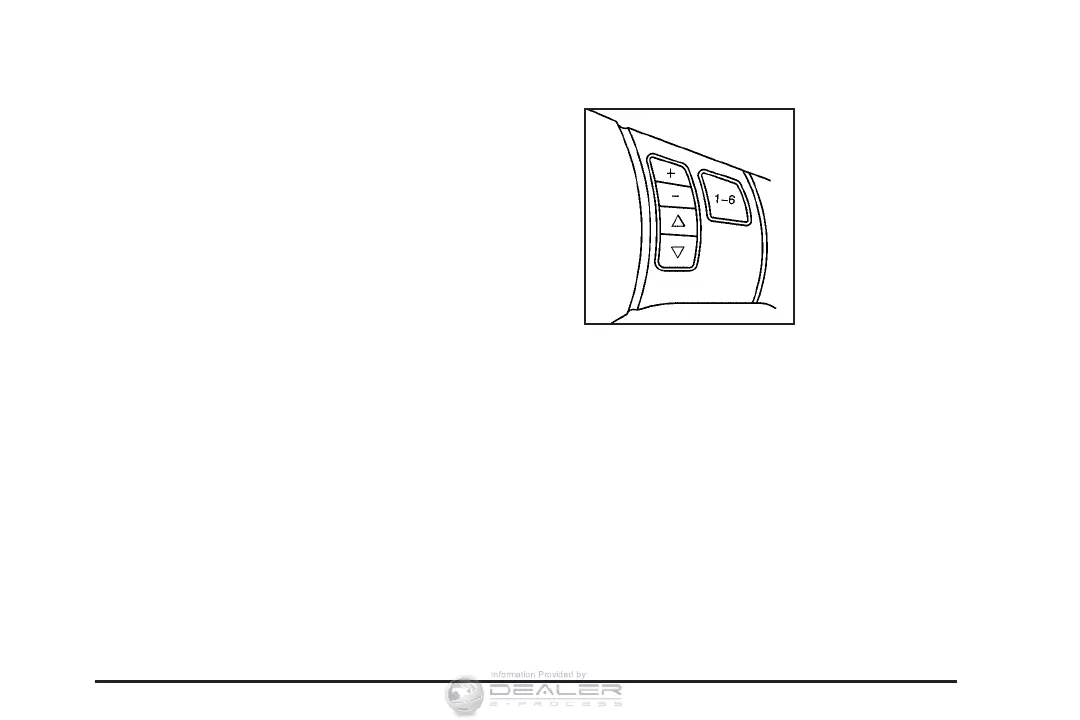
Audio Steering Wheel Controls
If your vehicle has this
feature, some audio
controls can be adjusted
at the steering wheel.
They include the
following:
xw: Press the up or the down arrow to go to
the next or to the previous radio station and
stay there. The radio will only seek stations with a
strong signal that are in the selected band.
To scan stations, press and hold either arrow for
two seconds until SCAN appears on the display
and you hear a beep. The radio will go to a station,
play for a few seconds, then go on to the next
station. Press either arrow again to stop scanning.
267











 To Next Page