3. Use instructions
7
Attention: If the remote controller fails, please replace with new batteries and try again, but if it fails
again, please contact the seller or our authorized service center.
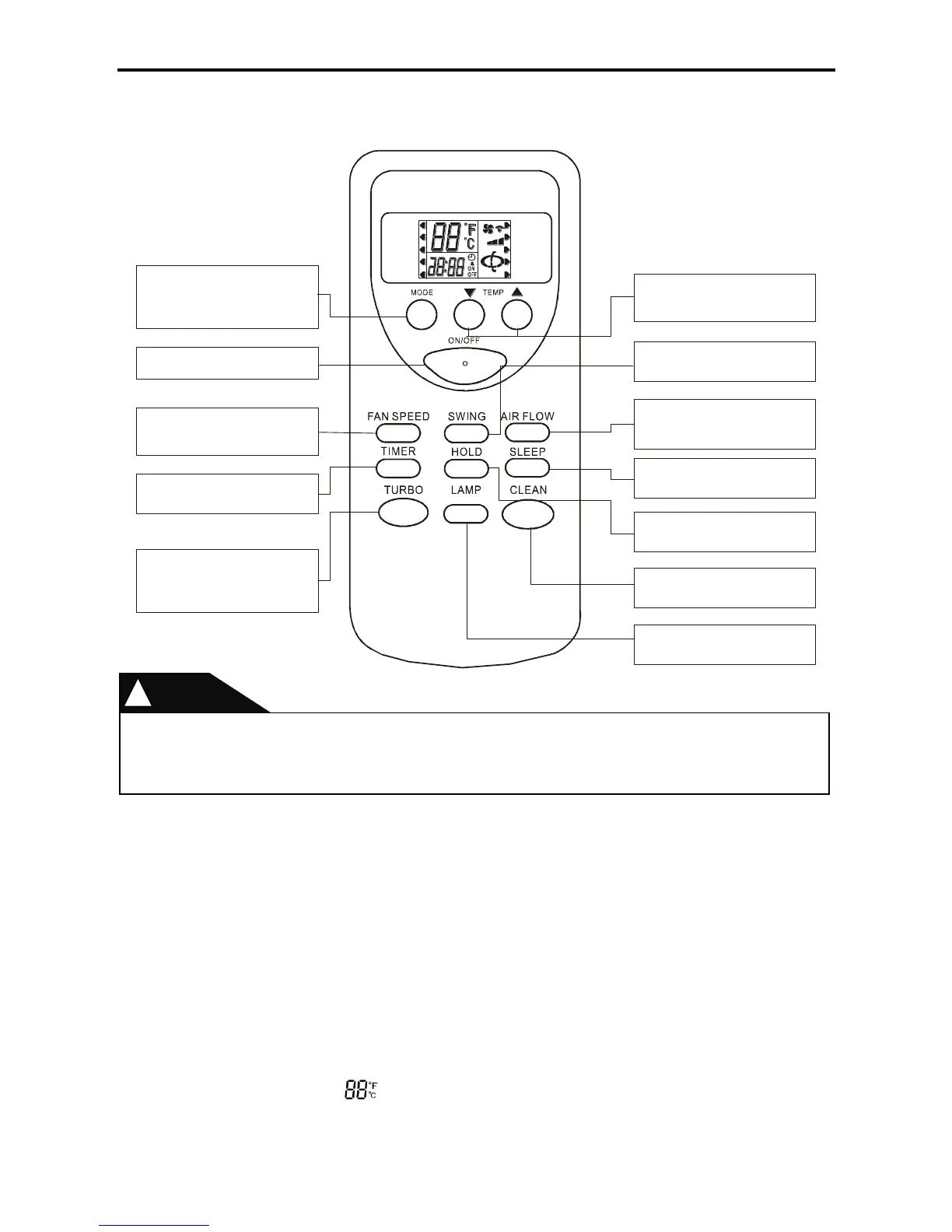
3-1-1 Meanings of remote controller symbols
1) This controller is applicable to: ordinary air conditioners except for high-end ones.
2) This controller has its appearance following ELF remote controllers equipped with 13 buttons, and
its LCD screen adopts that of the original ELF LCD screen, with the mask screen printing changed
from the original economic screen printing to the lamp button screen printing (The mask needs
changing due to elimination of the economic function).
3) The LCD displays and masks are introduced as follows: The “Function Options” button
corresponds to the masks below: “auto, refrigeration, dehumidification, heating and ventilation”; The
“Sleep, Lamp, High wind, Purification and Lock” buttons correspond to the masks below: “Sleep,
Lamp, High wind, Purification and Lock”; such functions as temperature regulation, speed regulation,
wind swing, wind direction and timing are displayed with the icons on the LCD screen, specifically as
shown below:
•Temperature display: displays the temperature, with the temperature range of 16-32˚C.
Let the remote controller directing at the air conditioner, press the buttons on the remote
controller and the command signal will be sent to the air conditioner.
If the signal is correctly received, the air conditioner will “beep”.
COOL
DRY
HEAT
FAN
SLEEP
LAMP
CLEAN
HOLD
AUTO
MODE key
It is used for selecting different
modes, such as automatic, cooling,
dehumidifying, heating and
ventilating.
ON/OFF key
It is used for starting or stopping AC.
FAN SPEED key
It is used for selecting wind speeds
(natural wind, high wind, middle
wind and low wind)
TIMER key
It is used for setting timing ON/
OFF and regards hour as its union.
TURBO key
The key doesn t indicate wind
speed and setting sleep mode or
changing modes will cancel TURBO
operation.
’
Set TEMP key
Press will decrease or increase
the set temperature and the rang is :
16 ~32
▼▲
℃℃
SWING key
It is used for selecting swing and
stopping switching circularly.
AIR FLOW key
It is used for selecting swing , stable
wind, natural wind and circulating
wind.
SLEEP key
It is used for selecting sleep mode
and canceling sleep mode.
HOLD key
It is used for selecting hold mode and
canceling hold mode.
CLEAN key
It is used for selecting purification or
canceling purification.
LAMP key
It is used for selecting
lamp being on or being off.



 To Next Page