3. Use instructions
8
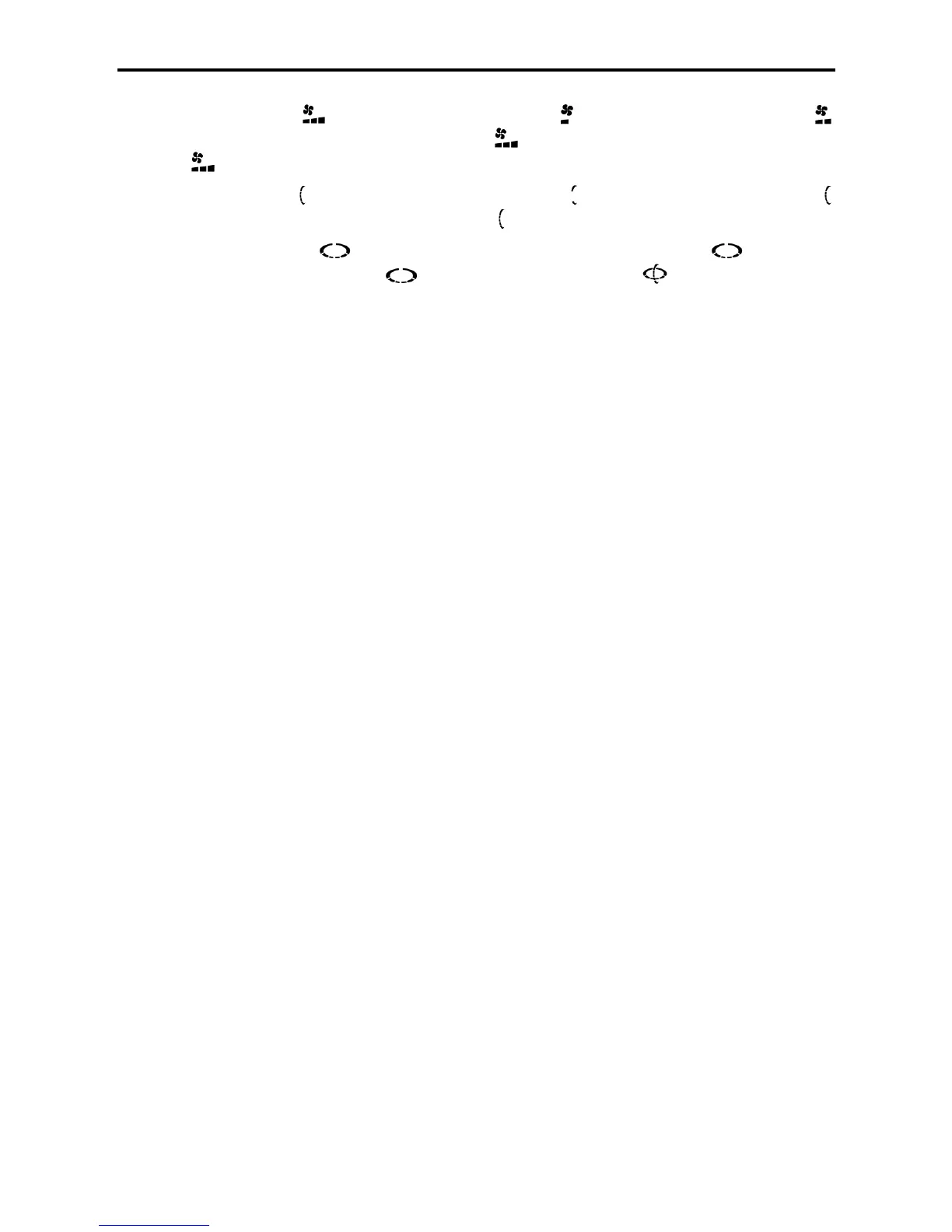
•Speed display: displays the fan speed, the static indicates low fan speed, the static
indicates the moderate fan speed, the static indicates the high fan speed and the dynamic
indicates the automatic fan speed.
•Swing display: displays the outward swing, the static indicates the fixed swing, the static
indicates the natural swing, and the dynamic indicates the automatic swing.
•Damper display: Indicates the status of outward wind swing, the static indicates the
swing stop and the dynamic indicates the wind swing. When is dynamically displayed
vertically and horizontally, it indicates the three-dimensional wind.
3-1-2 Remote controller functions
In time of initial power-on, the remote controller is in its idle state. Press the “On/Off” button to have the
remote controller into its automatic mode. Press the “Mode” button, and the remote controller will switch
“Auto” → “Refrigeration” → “Dehumidification” → “Heating” → “Air Ventilation” → “Auto”. If the remote
controller is in its “Off” state, only such buttons as “On/Off”, “TIMER”, “Purification”, “Lamp” and “Lock” are
valid, but if other buttons are pressed, there is no display. In case of the “Off” state, press the “On/Off” and
“TIMER” buttons to set the setting state of other buttons (based on the setting requirements in different
modes).
1. Auto mode
1) “Running On/Off” button: Press this button to switch “On” → “Off” → “On”. In time of initial power-on
from “Off” → “On”, other button settings will follow the default settings. If not initial power-on from “Off”
→ “On”, such functions as lamp, purification, sleep, high wind and timer will be canceled after
shutdown. Other button settings will follow the settings before “Off”.
2) “-” button: Press “-”, and the display screen still shows 25˚C unchanged.
3) “+” button: Press “+”, and the display screen still shows 25˚C unchanged.
4) “Swing” button: (Outer damper) it shall be in its “Swing” state by default. Press this button to switch
“Swing Wind”, “Fixed Wind”, “Natural Wind” and “Swing Wind”.
5) “Wind Direction” button: (Inner damper) it shall be in its “Swing” state by default. Press this button
to switch “Swing Wind”, “Stop” and “Swing Wind”.
6) “Fan Speed” button: It shall be in its “Automatic Wind” state by default. Press this button to switch
“Automatic Wind”, “High Wind”, “Moderate Wind”, “Low Wind” and “Automatic Wind”.
7) “TIMER” button: It shall be in its “No Timing” state by default. Press this button to set the timer by 1
hour, respectively 1H, 2H, ..., 24H, Cancel and 1H. In the “Off” state, press the “TIMER” button to set
the “On” time, the remote controller displays the running state before “Off” (In case of initial power-on,
it will enter the default state of the auto mode), and the timer displays 1H. Press the “TIMER” button
again to repeat 2H ... 24H, Cancel, 1H, ... in order. In the “On” state, press the “TIMER” button to set
the “Off” time, and the timer displays 1H. Press the “Off” button again to repeat 2H ... 24H, Cancel,
1H, ... in order. After the timer function is set, decrease every 1 hour until the “On” or “Off” time, and
simultaneously disables the timer display. If the “Mode” button is pressed in time of “Timing”, the
“Timing” will not be cancelled. (Note: When the “TIMER” is actuated, press any other button, for
example, the “Swing Wind” button, and the timing signal will be sent out.)
8) “High Wind” button: It shall be in the state of “No High Wind” by default, and in the “Auto” mode, the
“High Wind” button has no effect. (Press the “High Wind” button, and there is no display or code
sending)
9) “Sleep” button: It shall be in the “No Sleep” state by default, press the “Sleep” button to switch
“Sleep”→ “Sleep Cancel” → “Sleep”. If it is in the state of “Sleep”, the “Sleep” will not be cancelled
after the mode is switched. (Note: If the air conditioner is running in its low fan speed and the speed
can be adjustable, press the “Sleep” button again to cancel sleep and come back to the running state


 To Next Page
 Loading...